10
OWNER’S MANUAL
SD200 DRUM MODULE OPERATION
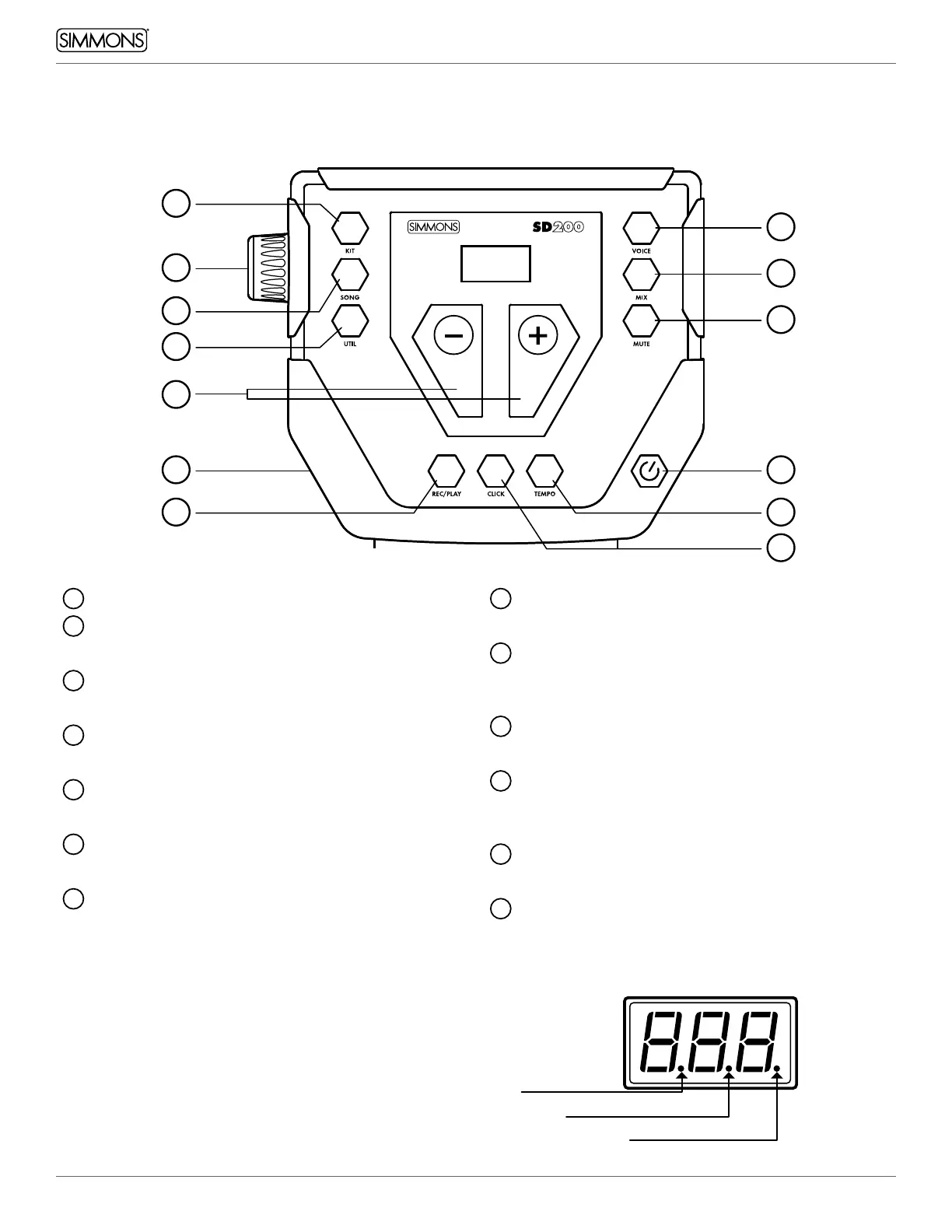
TOP PANEL
1
Volume Knob
2
Kit Button
Switches the module to Kit Mode
3
Song Button
Switches the module to Song Mode
4
Util Button
Access Utility Functions
5
Voice Button
Press to assign a new drum sound to the pad
6
Mix Button
Press to change the volume of the selected pad
7
Mute Button
Mutes the drum track in the currently-playing song
8
+/- Buttons
Adjusts the current parameter on the screen
9
Rec/Play Button
Plays the currently selected song, or records a
user song
10
Click Button
Activates the metronome click
11
Tempo Button
Press to change the tempo of the metronome
or song using the +/- buttons
12
Power Button
Press and release to power ON or OFF
13
Headphone Output
3
4
1
2
7
12
6
5
13
119
10
8
Kit mode
Edit mode
Song mode
LED DISPLAY
The LED indicates the SONG, EDIT or KIT status.
When SONG is selected, the song number appears
in the display. When VOICE or MIX is selected, the
pad name such as Snare, Crash, and Tom, etc. will
appear. Press the KIT button and the drum kit
number will be displayed on the LED.


 To Next Page