12
OWNER’S MANUAL
GETTING STARTED
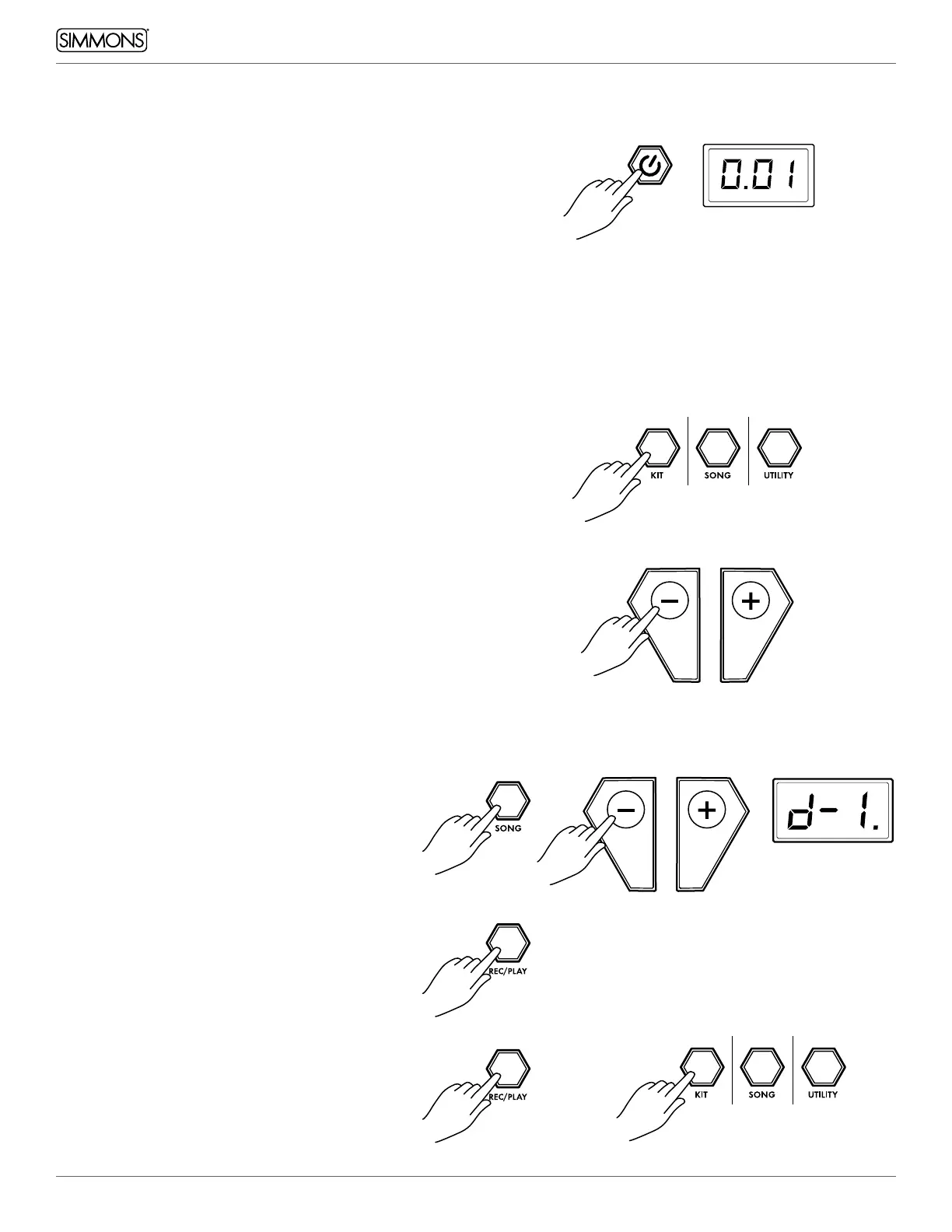
SWITCHING THE POWER ON
1. Connect the AC Adapter to the drum module.
2. Press the power switch on the front panel to turn on
the module.
NOTE: There is an automatic power off function that
turns off the module when the kit is not being used for
a certain period of time. The default setting is Always
ON. You can change this setting by holding down the
[KIT] button for two seconds. This will disable the auto
power off function. Press and hold the [KIT] button
again to switch it back on.
BASIC OPERATION AND NAVIGATION
There are 3 main modes for the module KIT, SONG and
UTILITY. To enter these modes press the corresponding
buttons on the top left panel of the module.
1. Select the parameter to be adjusted.
2. Adjust the value using [ - ] / [+] buttons.
LISTENING TO THE DEMO SONG
The demo song helps to show you the capabilities
and sounds of the SD200KIT module. There is one
demo in the module. The demo song is a medley
that has several patterns combined to show the
different genres of music that the module can play.
1. Press the [SONG] button to enter Song Mode.
Use the [ - ] / [ + ] buttons to select song d-1.
2. Press the [REC/PLAY] button to start or stop
the demo.
3. After stopping the demo, press any of the Mode
Mode.


 To Next Page