108
ENG
5.9 Creation of sequences
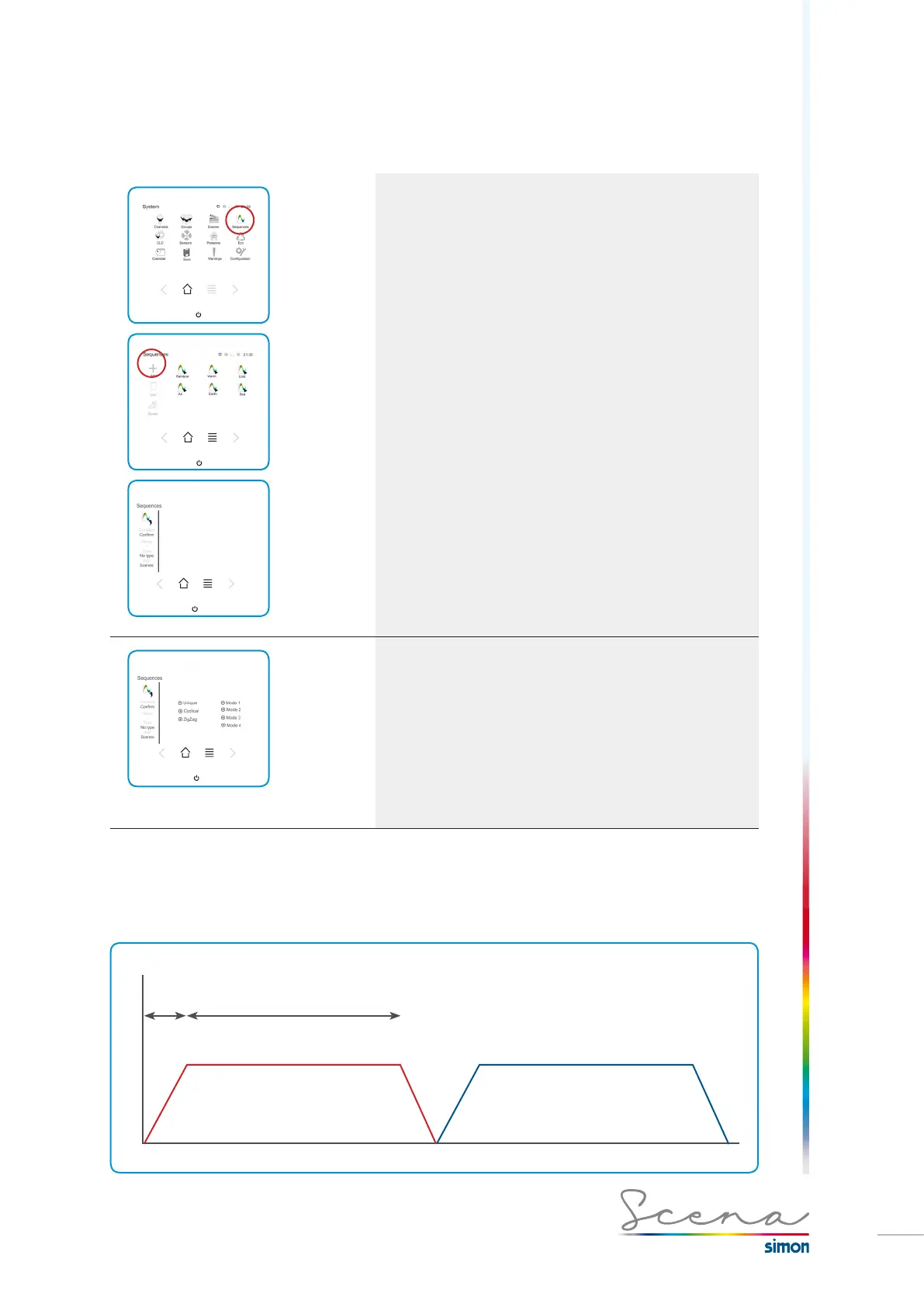
A sequence is a succession of different scenarios. This enables us to add vitality to the lighting. To enter the
sequences menu, press on “Sequences” in the “System” screen.
On accessing the sequences menu, we will access the
screen on which the predefined sequences and those
previously created appear.
If we want to add a sequence, we press add, if we want to
modify, we long press on the one we want to modify.
Within a sequence, we can modify:
· Type of sequence
· Name of the sequence
· Selection of channels that form it.
Type of Sequence
· Single: The linear sequence, a sequence of scenarios with
a start and an end will be obtained: S1 is the first sequence,
S2 the second and S3 the third (S1, S2, S3)
· Cyclical: The sequence of scenarios will be infinite and will
repeat until we turn the said sequence off: (S1, S2, S3, S1,
S2, S3…)
· Zig-Zag: The sequence will be out and back, i.e. (S1, S2,
S3, S3, S2, S1…).
Mode 1
Each scenario will be activated for a certain time without overlapping. Each scenario will have an up time and a
down time, so that it turns on and off progressively.
TIME
% SCENARIO
SET
TIME TRANSIT TIME
SCENARIO 1 SCENARIO 2



 To Next Page