96
ENG
5.3 Creation of channels
A channel is the basic unit of a lighting control system. It may be made up of one or several luminaires that
share the same line and do not exceed the power (i.e. those connected to a regulator power module, circuit
breaker...).
Creation of channels
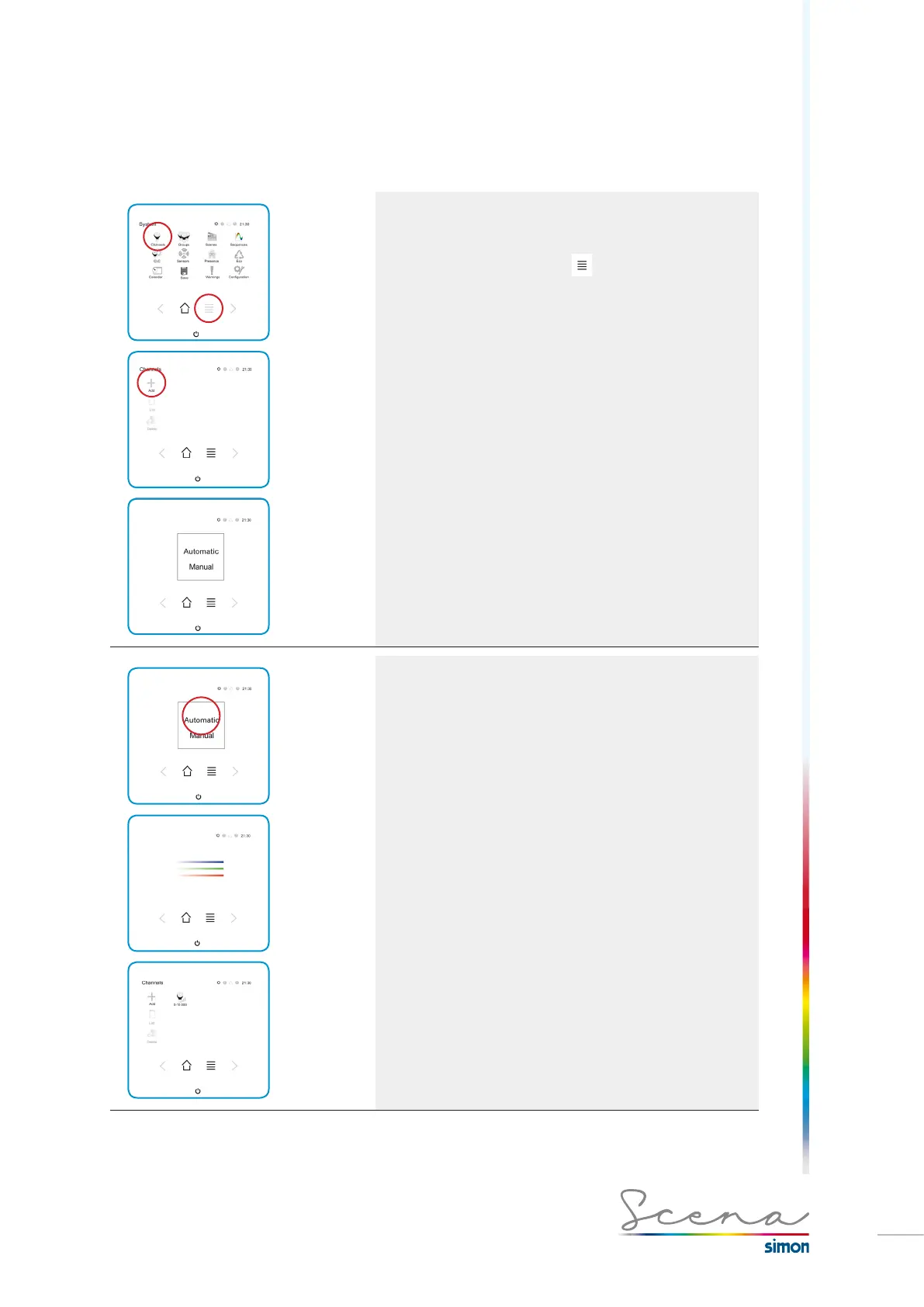
With Scena we can create channels automatically or
manually, but we must be in installer mode:
If on the Start screen we select we will move to the
System screen and next we will select Channels > Add.
We will then go to the screen for introducing channels
automatically (valid for Scena modules except DMX/PWM or
DMX/DALI converters) or manually.
Create channels automatically
To create channels automatically we must manually
configure the name of the channel since the type of
regulation and address will be assigned to us by the console
(see section “3.2 Switch operation” for more information).
If we select automatic mode, we proceed to a loading
screen and next the list of channels found will appear.
* if any of the channels installed are not found the installation
must be checked over.



 To Next Page