
EasyManua.ls Logo

Simon TUNE MAESTRO I - User Manual

Simon TUNE MAESTRO I
26 pages
Print Icon
To Next Page IconTo Next Page
Loading...
1
User Manual
English
TUNE MAESTRO
I
SIMON LABORATORIES
©

Questions and Answers

Simon TUNE MAESTRO I Specifications

General IconGeneral
BrandSimon
ModelTUNE MAESTRO I
CategoryRecording Equipment
LanguageEnglish

Summary

Device Overview and Connections

Top Panel and Button Description

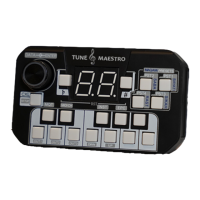
Details the functions and layout of buttons on the Tune Maestro's top panel.

Rear Panel and Side Panel Connections

Describes the available ports on the rear and side panels of the device.

Second Functions of Buttons

Explains secondary functions accessible via buttons under the main menu.

Setting Up The Tune Maestro I

Setting Up The Main Quarter Tune

Configures the main quarter tune for the device, affecting all scale keys.

Setting Up MIDI Channel

Configures MIDI channels for communication with external instruments via MIDI ports.

Setting Up the Instrument(s)

Selects the specific instrument brand connected to each MIDI Out port for proper control.

Setting Up and Calibrating the Expression Pedal

Guides the user through calibrating the expression pedal for accurate performance control.

Saving and Initialization

Saving the Entire Setup

Guides the user on how to save the configured settings on the device.

Initializing to Factory Settings

Details the procedure to reset the Tune Maestro I to its original factory default settings.

Features of the Tune Maestro I

Local Quarter Tune Application

Explains the capability to tune any key in desired micro-tuning.

Using the Pre-Defined Maqams Buttons

Describes how to use the four pre-defined Middle Eastern maqams.

Tuning and Preset Saving

Saving and Recalling User Tuning

Instructions on how to save and recall user-defined tuning settings using preset buttons.

Instrument Connectivity

Tune Maestro I Connection to Special Instrument

Explains how to connect the Tune Maestro I to special instruments like Korg Trinity.

Setting up Instruments to Operate with Tune Maestro I

Outlines necessary settings on instruments like Korg Products for compatibility with Tune Maestro I.

Issues and Troubleshooting

Power and Sound Issues

Addresses problems related to device power, micro-tuning accuracy, and maqam implementation.

Connectivity and Responsiveness Problems

Solves issues with keyboard/device response, MIDI channels, and OEM code usage.

Preset and Pedal Malfunctions

Provides solutions for Tune Maestro I not saving presets or the expression pedal not functioning.