EasyManua.ls Logo

Simplicity 560 - Traction Drive Tension; Auger Drive Tension

Simplicity 560
28 pages
Print Icon
To Next Page IconTo Next Page
To Previous Page IconTo Previous Page
Loading...
Service
TRACTION
DRIVE
TENSION
With
the
drive
lever
engaged,
the
bottom
end
of
the
lower
rod
(D,
figure
13)
should
be
flush
with
the
bottom
of
the
spring
(E).
To
adjust,
loosen
the
two
huts.
Hold
the
lower
rod
to
keep
from
turning
and
turn
the
turnbuckle
toward
the
right
to
lower
the
rod
or
toward
the
left
to
raise
the
rod.
Engage
the
drive
lever
to
check
the
adjustment.
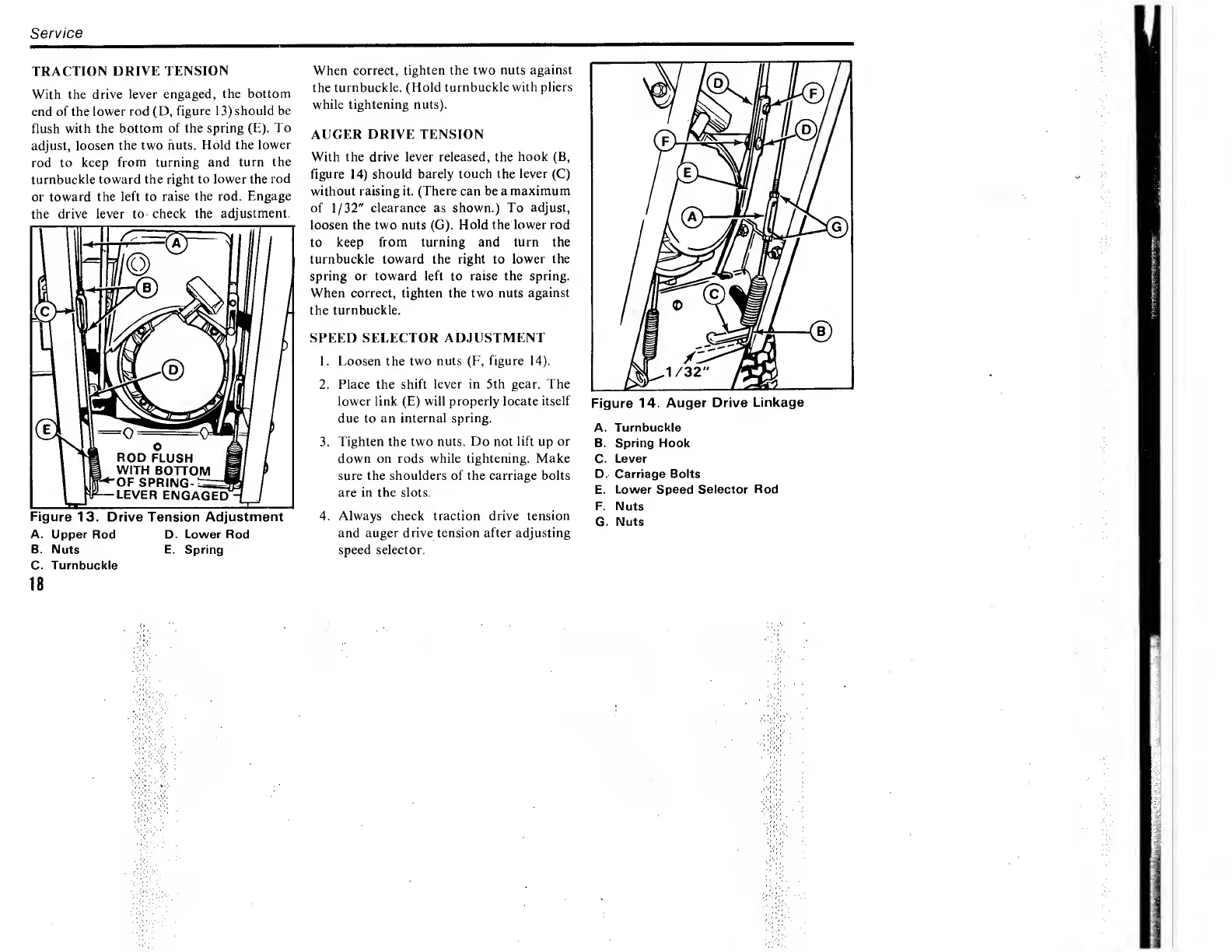
Figure
13.
Drive
Tension
Adjustment
A.
Upper
Rod
D.
Lower
Rod
B.
Nuts
E.
Spring
C.
Turnbuckle
18
When
correct,
tighten
the
two
nuts
against
the
turnbuckle.
(Hold
turnbuckle
with
pliers
while
tightening
nuts).
AUGER
DRIVE
TENSION
With
the
drive
lever
released,
the
hook
(B,
figure
14)
should
barely
touch
the
lever
(C)
without
raising
it.
(There
can
be
a
maximum
of
1/32"
clearance
as
shown.)
To
adjust,
loosen
the
two
nuts
(G).
Hold
the
lower
rod
to
keep
from
turning
and
turn
the
turnbuckle
toward
the
right
to
lower
the
spring
or
toward
left
to
raise
the
spring.
When
correct,
tighten
the
two
nuts
against
the
turnbuckle.
SPEED
SELECTOR
ADJUSTMENT
1.
Loosen
the
two
nuts
(F,
figure
14).
2.
Place
the
shift
lever
in
5th
gear.
The
lower
link
(E)
will
properly
locate
itself
due
to
an
internal
spring.
3.
Tighten
the
two
nuts.
Do
not
lift
up
or
down
on
rods
while
tightening.
Make
sure
the
shoulders
of
the
carriage
bolts
are
in
the
slots.
4.
Always
check
traction
drive
tension
and
auger
drive
tension
after
adjusting
speed
selector.
Figure
14.
Auger
Drive
Linkage
A.
Turnbuckle
B.
Spring
Hook
C.
Lever
D.
Carriage
Bolts
E.
Lower
Speed
Selector
Rod
F.
Nuts
G.
Nuts

Related product manuals