Choose the water level
Water level
Different models of washing machines have different control
panels. Check the control panel layouts in the first section of this
booklet.
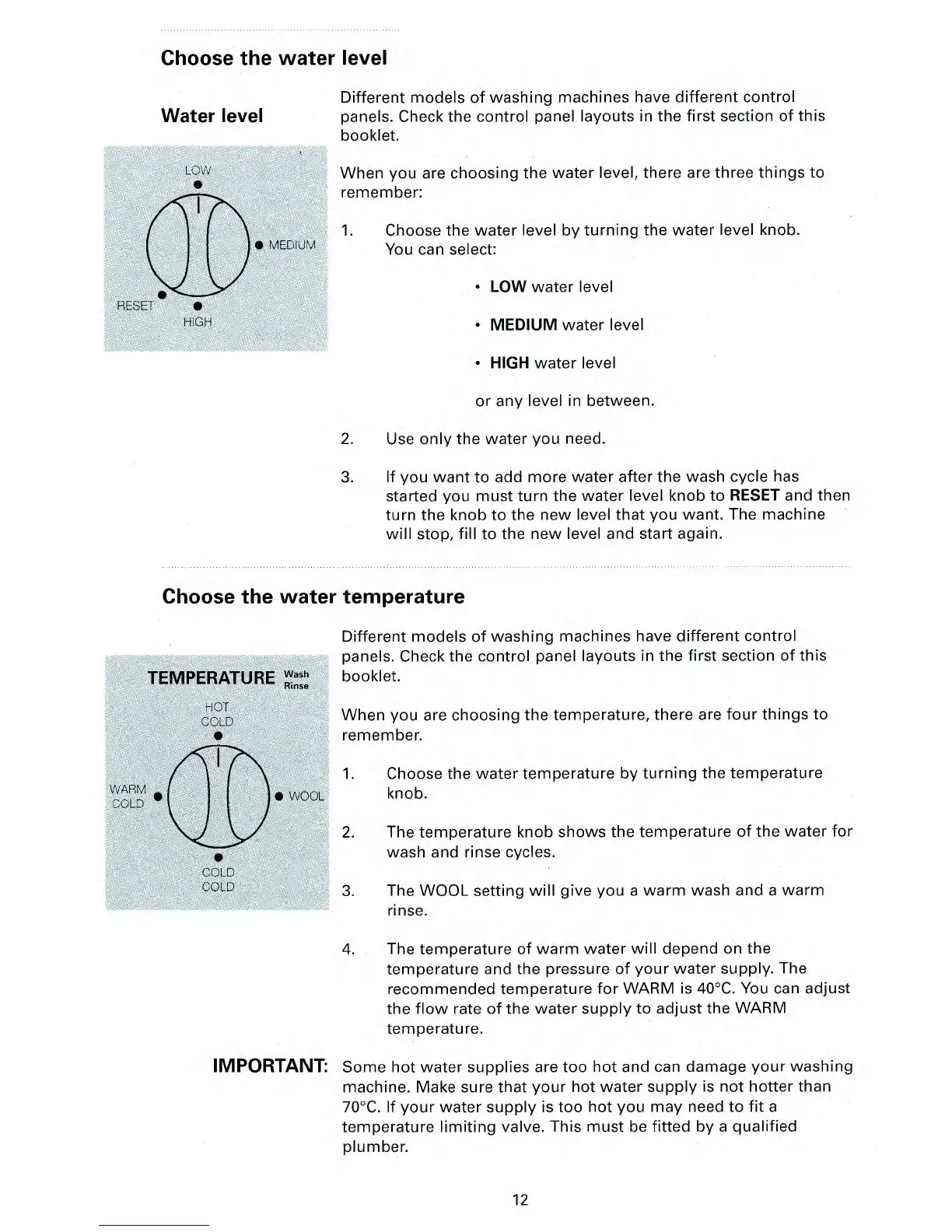
When you are choosing the water level, there are three things to
remember:
1.
Choose the water level by turning the water level knob.
You can select:
•
LOW
water level
•
MEDIUM
water level
•
HIGH
water level
or any level in between.
2.
Use only the water you need.
3.
If you want to add more water after the wash cycle has
started you must turn the water level knob to
RESET
and then
turn the knob to the new level that you want. The machine
will stop, fill to the new level and start again.
Choose the water temperature
Different models of washing machines have different control
panels. Check the control panel layouts in the first section of this
booklet.
When you are choosing the temperature, there are four things to
remember.
1.
Choose the water temperature by turning the temperature
knob.
2.
The temperature knob shows the temperature of the water for
wash and rinse cycles.
3.
The WOOL setting will give you a warm wash and a warm
rinse.
4.
The temperature of warm water will depend on the
temperature and the pressure of your water supply. The
recommended temperature for WARM is 40°C. You can adjust
the flow rate of the water supply to adjust the WARM
temperature.
IMPORTANT:
Some hot water supplies are too hot and can damage your washing
machine. Make sure that your hot water supply is not hotter than
70°C. If your water supply is too hot you may need to fit a
temperature limiting valve. This must be fitted by a qualified
plumber.
12



 To Next Page