EasyManua.ls Logo

Singer 14U 34B - 6 How to Adjust Thread Tension

Singer 14U 34B
31 pages
Print Icon
To Next Page IconTo Next Page
To Previous Page IconTo Previous Page
Loading...
6.
How
to
adjust
thread
tension
Adjust
thread
tension
to
suit
the
type
of
material
and
size
of
the
thread
used.
The
thread
tension
dials
on
this
machine
are
a
one-turn
system
and
as
the
number
on
the
thread
tension
dials
increases,
the
thread
tension
becomes
tighter.
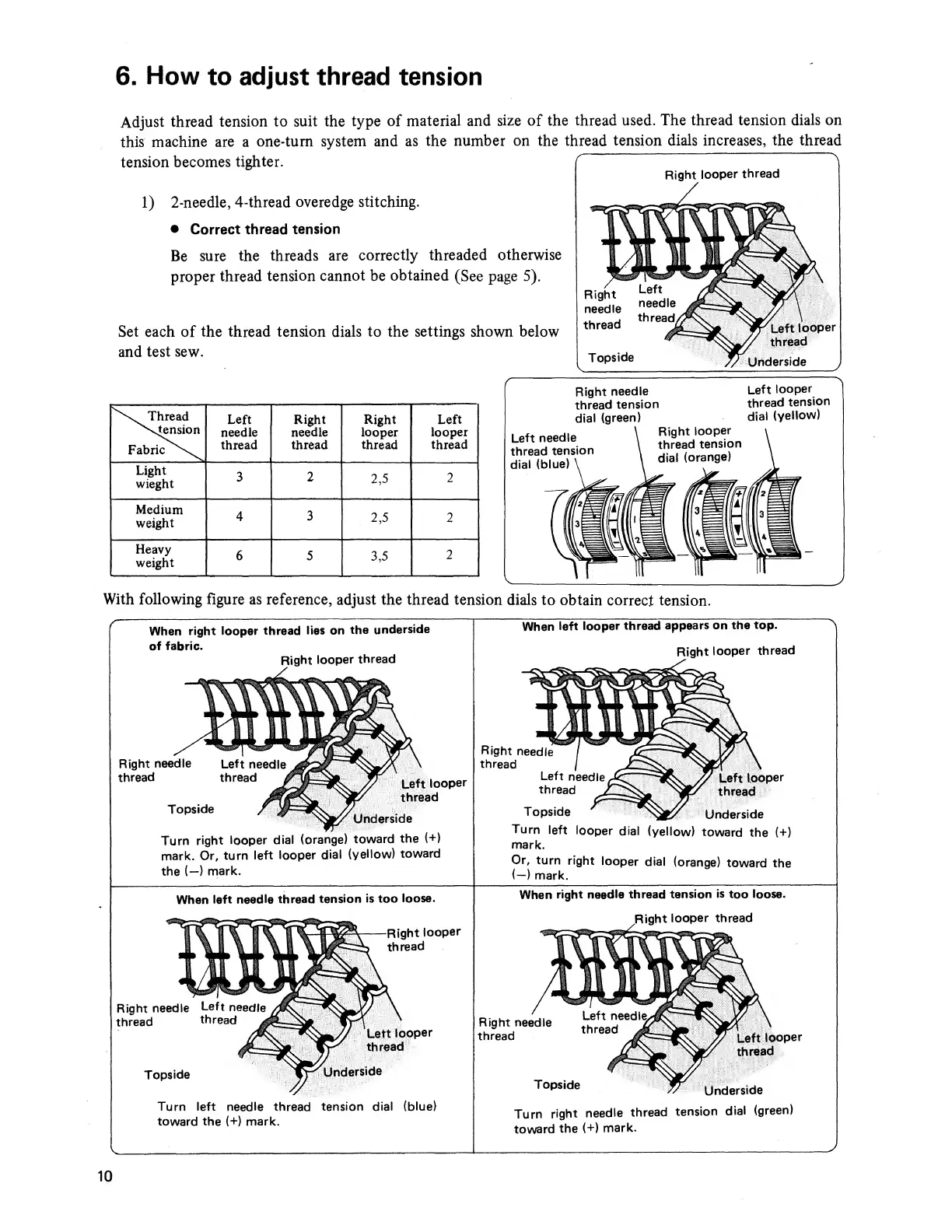
1)
2-needle,
4-thread
overedge
stitching.
Correct
thread
tension
Be
sure
the
threads
are
correctly
threaded
otherwise
proper
thread
tension
cannot
be
obtained
(See
page
5).
Set
each
of
the
thread
tension
dials
to
the
settings
shown
below
and
test
sew.
Thread
Left
Right
Right
Left
^vtension
needle
needle
looper
looper
Fabric^\^
thread
thread
thread
thread
Light
wieght
3
2
2,5
2
Medium
weight
4
3
2,5
2
Heavy
weight
6
5
3,5
2
Right
needle
Left
looper
thread
tension
thread
tension
dial
(green)
dial
(yellow)
With
following
figure
as
reference,
adjust
the
thread
tension
dials
to
obtain
correct
tension.
When
right
looper
thread
lies
on
the
underside
of
fabric.
Right
looper
thread
Turn
right
looper
dial
(orange)
toward
the
(+)
mark.
Or,
turn
left
looper
dial
(yellow)
toward
the
(—)
mark.
When
left
looper
thread
appears
on
the
top.
Right
looper
thread
Turn
left
looper
dial
(yellow)
toward
the
(+)
mark.
Or,
turn
right
looper
dial
(orange)
toward
the
(—)
mark.
When
left
needle
thread
tension
is
too
loose.
When
right
needle
thread
tension
is
too
loose.
Turn
left
needle
thread
tension
dial
(blue)
toward
the
(+)
mark.
Turn
right
needle
thread
tension
dial
(green)
toward
the
(+)
mark.
10

Related product manuals