EasyManua.ls Logo

Singer 14U 34B - 7 How to Adjust Stitch Length.12; 8 How to Adjust Overedge Seam Width

Singer 14U 34B
31 pages
Print Icon
To Next Page IconTo Next Page
To Previous Page IconTo Previous Page
Loading...
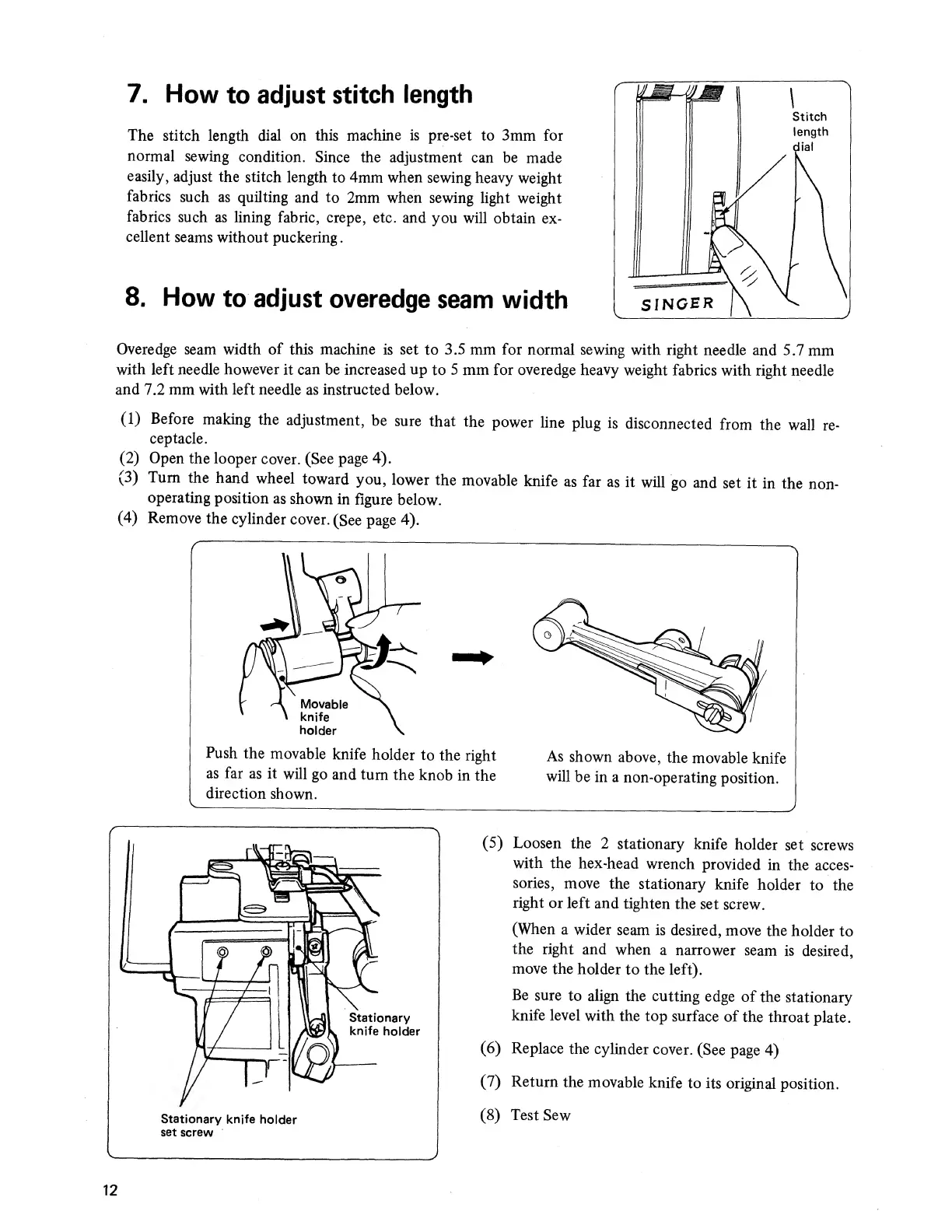
7.
How
to
adjust
stitch
length
The
stitch
length
dial
on
this
machine
is
pre-set
to
3mm
for
normal
sewing
condition.
Since
the
adjustment
can
be
made
easily,
adjust
the
stitch
length
to
4mm
when
sewing
heavy
weight
fabrics
such
as
quilting
and
to
2mm
when
sewing
light
weight
fabrics
such
as
lining
fabric,
crepe,
etc.
and
you
will
obtain
ex¬
cellent
seams
without
puckering.
8.
How
to
adjust
overedge
seam
width
Overedge
seam
width
of
this
machine
is
set
to
3.5
mm
for
normal
sewing
with
right
needle
and
5.7
mm
with
left
needle
however
it
can
be
increased
up
to
5
mm
for
overedge
heavy
weight
fabrics
with
right
needle
and
7.2
mm
with
left
needle
as
instructed
below.
(1)
Before
making
the
adjustment,
be
sure
that
the
power
line
plug
is
disconnected
from
the
wall
re¬
ceptacle.
(2)
Open
the
looper
cover.
(See
page
4).
(3)
Turn
the
hand
wheel
toward
you,
lower
the
movable
knife
as
far
as
it
will
go
and
set
it
in
the
non¬
operating
position
as
shown
in
figure
below.
(4)
Remove
the
cylinder
cover.
(See
page
4).
(5)
Loosen
the
2
stationary
knife
holder
set
screws
with
the
hex-head
wrench
provided
in
the
acces¬
sories,
move
the
stationary
knife
holder
to
the
right
or
left
and
tighten
the
set
screw.
(When
a
wider
seam
is
desired,
move
the
holder
to
the
right
and
when
a
narrower
seam
is
desired,
move
the
holder
to
the
left).
Be
sure
to
align
the
cutting
edge
of
the
stationary
knife
level
with
the
top
surface
of
the
throat
plate.
(6)
Replace
the
cylinder
cover.
(See
page
4)
(7)
Return
the
movable
knife
to
its
original
position.
(8)
Test
Sew
12

Related product manuals