EasyManua.ls Logo

Singer 201P - Stitch Regulation; Adjusting Stitch Length

Singer 201P
68 pages
Print Icon
To Next Page IconTo Next Page
To Previous Page IconTo Previous Page
Loading...
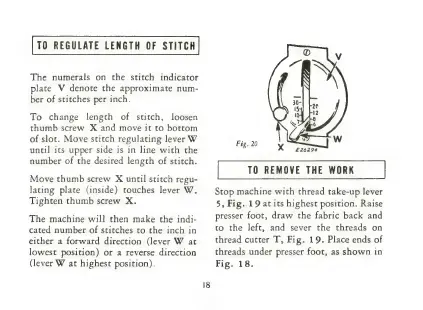
TO
REGULATE
LENGTH
OF
STITCH
The
numerals
on
the
stitch
indicator
plate
V
denote
the
approximate
num-
ber
of
stitches
per
inch.
To
change
length
of
stitch,
loosen
thumb
screw
X
and
move
it
to
bottom
of
slot.
Move
stitch
regulating
lever
W
until
its
upper
side
is
in
line
with
the
number
of
the
desired
length
of
stitch.
Move
thumb
screw
X
until
stitch
regu-
lating
plate
(inside)
touches
lever
W.
Tighten
thumb
screw
X.
The
machine
will
then
make
the
indi-
cated
number
of
stitches
to
the
inch
in
either
a
forward
direction
(lever
W
at
lowest
position)
or
a
reverse
direction
(lever
W
at
highest
position).
TO
REMOVE
THE
WORK
Stop
machine
with
thread
take-up
lever
5,
Fig..19
at
its
highest
position.
Raise
presser
foot,
draw
the
fabric
back
and
to
the
left,
and
sever
the
threads
on
thread
cutter
T,
Fig.
19.
Place
ends
of
threads
under
presser
foot,
as
shown
in
Fig.
18.

Related product manuals