EasyManua.ls Logo

Singer 201P - Bulb Replacement; Removing and Inserting Bulb

Singer 201P
68 pages
Print Icon
To Next Page IconTo Next Page
To Previous Page IconTo Previous Page
Loading...
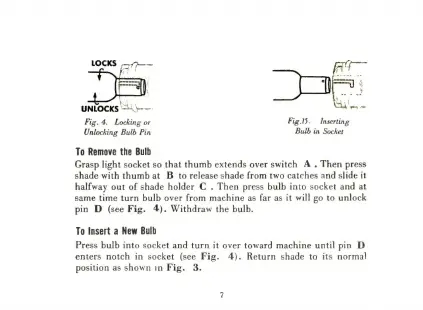
LOCKS
~~~
hoe,
UNLOCKS
=~:
Fig.
4.
Locking
or
Fig.15.
Inserting
Unlocking
Bulb
Pin
Bulb
in
Socket
To
Remove
the
Bulb
Grasp
light
socket
so
that
thumb
extends
over
switch
A
.
Then
press
shade
with
thumb
at
B
to
release
shade
from
two
catches
and
slide
it
halfway
out
of
shade
holder
C
.
Then
press
bulb
into
socket
and
at
same
time
turn
bulb
over
from
machine
as
far
as
it
will
go
to
unlock
pin
D
(see
Fig.
4).
Withdraw
the
bulb.
To
Insert
a
New
Bulb
Press
bulb
into
socket
and
turn
it
over
toward
machine
until
pin
D
enters
notch
in
socket
(see
Fig.
4).
Return
shade
to
its
normal
position
as
shown
in
Fig.
3.

Related product manuals