EasyManua.ls Logo

Singer 4671 - Selecting a Sewing Pattern; Pattern Display and Selection Dial; Straight Stitching; Recommended Settings for Straight Stitch

Singer 4671
39 pages
Print Icon
To Next Page IconTo Next Page
To Previous Page IconTo Previous Page
Loading...
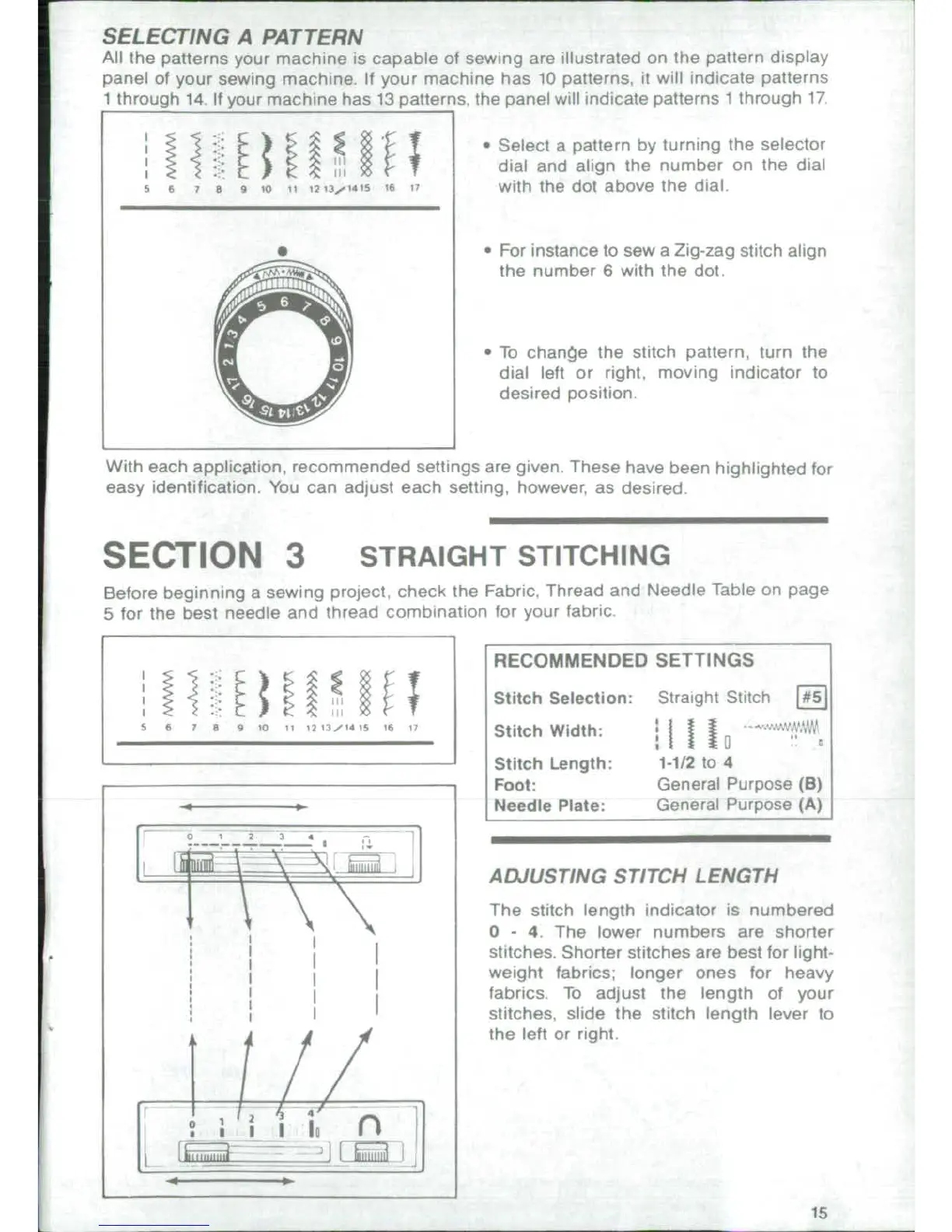
SELECTING
A
PATTERN
All
the
patterns
your
machine
is
capable
of
sewing
are
illustrated
on
the
pattern
display
panel
of
your
sewing
machine,
If
your
machine
has
10
patterns,
it
will
indicate
patterns
1
through
14
If
your
machine
has
13
patterns
the
panel
will
indicate
patterns
1
througth
17
*
Select
a
pattern
by
turning
the
selector
i
dial
and
align
the
number
on
the
dial
with
the dot
above
the dial
* *
For
instance
to
sew
a
Zig-zag
stitch
align
the
number
6
with
the
dot.
*
To
chanoe
the
stitch pattern,
turn the
c
i jdial
left
or
right,
moving
indicator
to
desired
position
With each
application,
recommended
settings
are
given. These
have
been
highlighted
for
easy
identification.
You
can
adjust
each
setting,
however,
as
desired
SECTION
3
STRAIGHT
STITCHING
Before
beginning
a
sewing project,
check
the
Fabric.
Thread
and
Needle
Table
on
page
5
for
the
best
needle and
thread
combination
for
your
fabric,
RECOMMENDED
SETTINGS
i
)!
4
i-
t
jS
0 g
(;iStitch
Selection:
Straight
Stitch
#5
sr 4r.o
1
l,f
a
./
4t
Stitch
Width:
Ilf
tt
Stitch
Length:
1-1/2
to
4
Foot:
General Purpose
(B)
Needle
Plate:
General
Purpose
(A)
I
012
4
____________________
t L _
,
_9j5>hbl l
ADJUSTING
STITCH
LENGTH
The
stitch
length
indicator
is
numbered
0
-
4.
The
lower
numbers
are
shorter
.
N i
[
~~~~~~stitches.
Shorter
stitches
are
best
for
light-
,
I I I
weight
fabrics;
longer
ones
for
heavy
I I j
labrics
To
adjust
the
length
of
your
stitches,
slide
the stitch
length
lever
to
the left
or
right.
I
/ /n
:, .'16i,
n i~~~~~~~~~~~~~~~~1

Related product manuals