EasyManua.ls Logo

Singer 4671 - Special Stitches Overview; Understanding Special Stitch Settings; Adjusting Stitch Width for Special Stitches; Adjusting Stitch Length for Special Stitches

Singer 4671
39 pages
Print Icon
To Next Page IconTo Next Page
To Previous Page IconTo Previous Page
Loading...
SECTION
4
SPECIAL
STITCHES
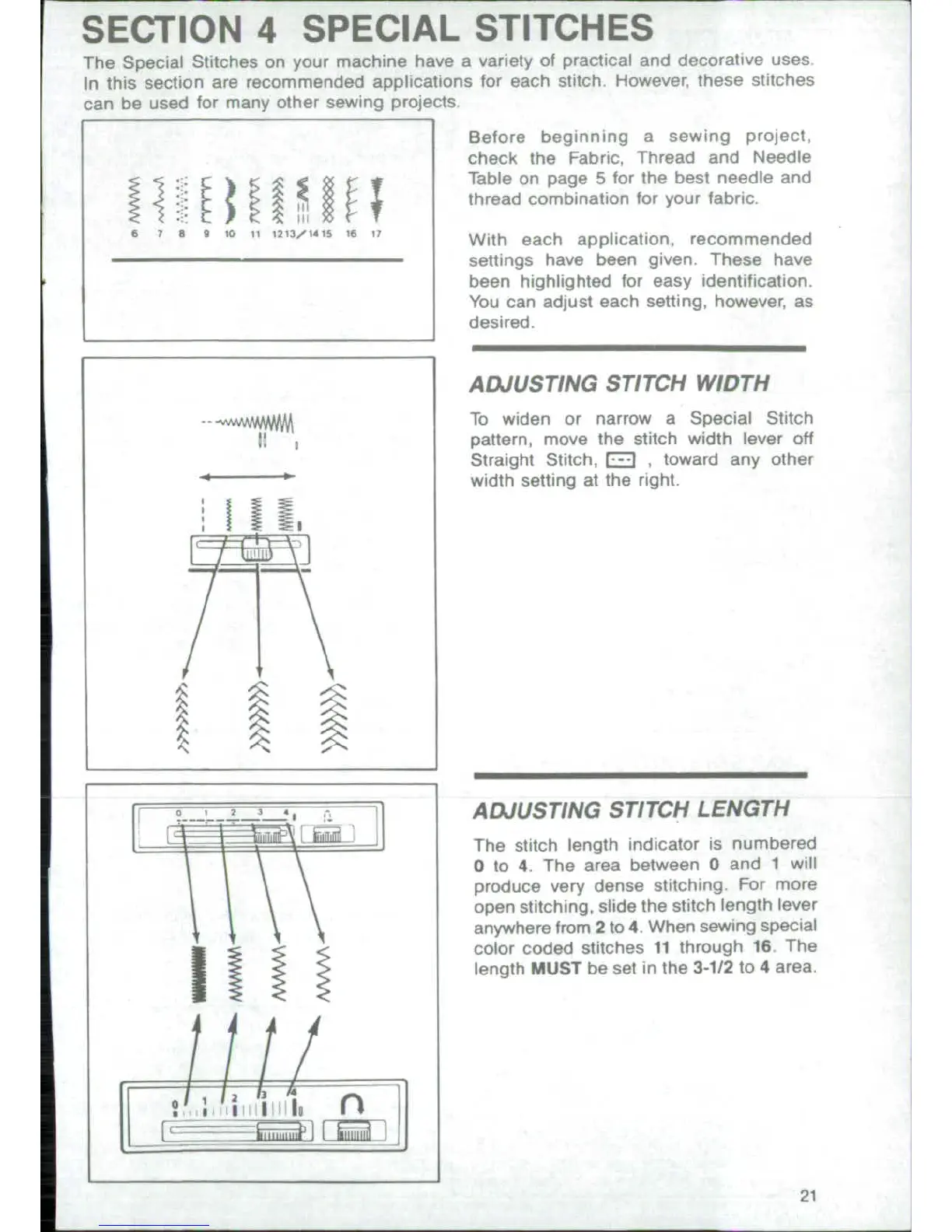
The
Special
Stitches
on
your
machine
have
a
variety
of
practical
and
decorative
uses
In
this
section
are
recommended
applications
for
each
stitch.
However,
these
stitches
can
be
used
for many
other
sewing
projects.
Before
beginning
a
sewing
project.
check
the
Fabric,
Thread
and
Needle
Table
on
page
5
for
the
best
needle
and
thread
combination
for
your
fabric.
.
7
S
QIOCst213..4t.S
.6 1TWith
each
application,
recommended
settings
have
been
given.
These
have
been
highlighted
for
easy
identification,
You
can
adjust
each
setting,
however,
as
desired.
ADJUSTING
STITCH
WIDTH
To
widen
or
narrow
a
Special
Stitch
pattern,
move
the
stitch
width
lever
off
Straight
Stitch,
E
,
toward
any
other
width
setting
at
the
right
1
----
o
I
ADJUSTING
STITCH
LENGTH
|
__
kiIflIA~
--.
The
stitch length
indicator
is
numbered
O
to
4.
The
area
between
O
and
1
will
produce
very
dense
stitching.
For
more
open
stitching,
slide
the
stitch
length
lever
anywhere
from
2
to
4.
When
sewing
special
color
coded
stitches
11
through
16
The
length
MUST
be
set
in
the
3-112
to
4
area.
t
_..
6
1
.
a,
|

Related product manuals