EasyManua.ls Logo

Singer 4671 - Connecting and Running the Machine; Connecting the Speed Controller and Power; Operating the Power Switch; Using the Speed Controller

Singer 4671
39 pages
Print Icon
To Next Page IconTo Next Page
To Previous Page IconTo Previous Page
Loading...
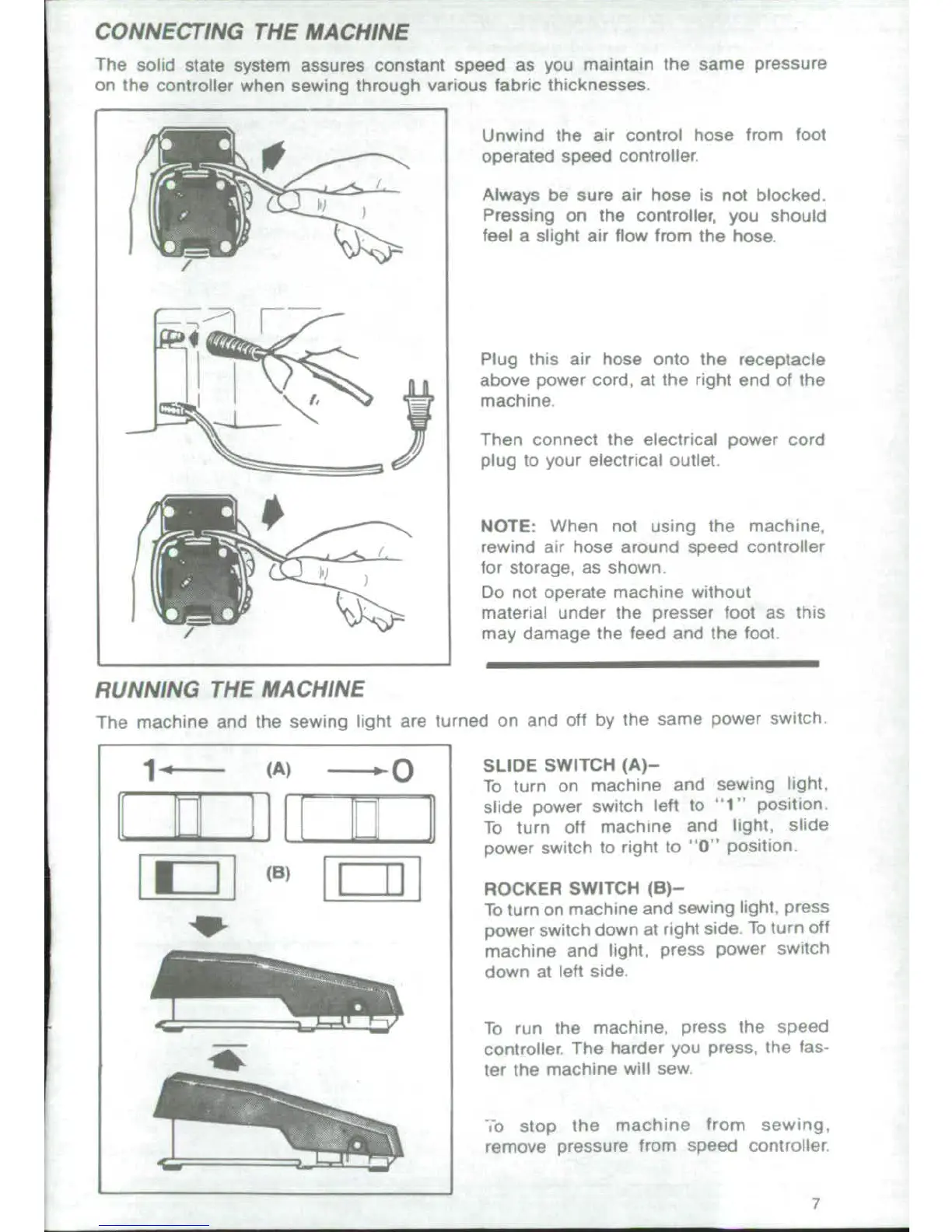
CONNECTING
THE
MACHINE
The
solid
state
system
assures
constant
speed
as
you
maintain the
same
pressure
on
the
controller
when
sewing
through
various
fabric
thicknesses
Unwind
the
air
control hose
from
foot
operated speed
controller
Always
be
sure
air
hose
is
not
blocked
Pressing
on
the
controller,
you
should
feel
a
slight air flow from
the hose.
Plug
this
air
hose
onto
the
receptacle
above
power
cord,
at
the
right
end of
the
Ja \'
machine.
Then
connect
the
electrical
power
cord
67
fplug
to
your
electrical
outlet.
NOTE: When
not
using the
machine,
rewind
air
hose
around speed
controller
for
storage,
as
shown
Do not
operate
machine
without
material
under
the
presser
foot
as
this
may
damage
the
feed
and
the
foot
RUNNING
THE
MACHINE
The
machine
and
the
sewing
light
are
turned
on
and
off
by
the
same
power
switch
1-
'----
(A)
r
SLIDE
SWITCH
(A)-
To
turn
on
machine
and
sewing
light,
m
l ii |
_-
r-q
slide
power
switch
left
to
t1
position
To
turn
off
machine
and
light,
slide
power
switch
to
right
to
0
position
rri
I
I I4
l
ROCKER
SWITCH
(B)-
To
turn
on
machine
and
sewing
light,
press
power
switch
down
at
right
side
To
turn
off
machine
and
light,
press
power
switch
down
at
left
side,
_a
To
run
the
machine,
press
the
speed
controller
The
harder
you
press,
the
fas-
ter
the
machine
will
sew
o
stop
the
machine
fromTi
sewing.
remove
pressure
from
speed
controller
7

Related product manuals