Rough Terrain Scissors
December 2007 Page 31
Section 2 - Familiarization Function Tests
It is the responsibility of the operator to read, completely understand and follow all instructions and warnings
contained in this operating manual and on the aerial platform.
• Test Driving
1. Ensure path of intended motion is clear.
2. Activate and hold “ ”enable trigger
switch.
3. Slowly move controller fully ” forward,
and then return handle to center
position.
Result: Aerial platform should move in
forward direction, and then come to a
stop.
4. Slowly move controller fully “ ”
backward, and then return handle to center
position.
Result: Aerial platform should move in
reverse direction, and then come to a
stop.
• Test Brake
WARNING
Brake will engage instantly when
controller handle is released, causing
aerial platform to stop immediately.
1. Ensure path of intended motion is clear.
2. Activate and hold “ ” enable trigger
switch.
3. Drive aerial platform “ ” forward. Test
brake by releasing controller handle.
Result: Aerial platform should come to a
stop.
4. Drive aerial platform “ ” forward. Test
brake again by releasing “
” enable
trigger switch only.
Result: Aerial platform should come to an
instant and abrupt stop.
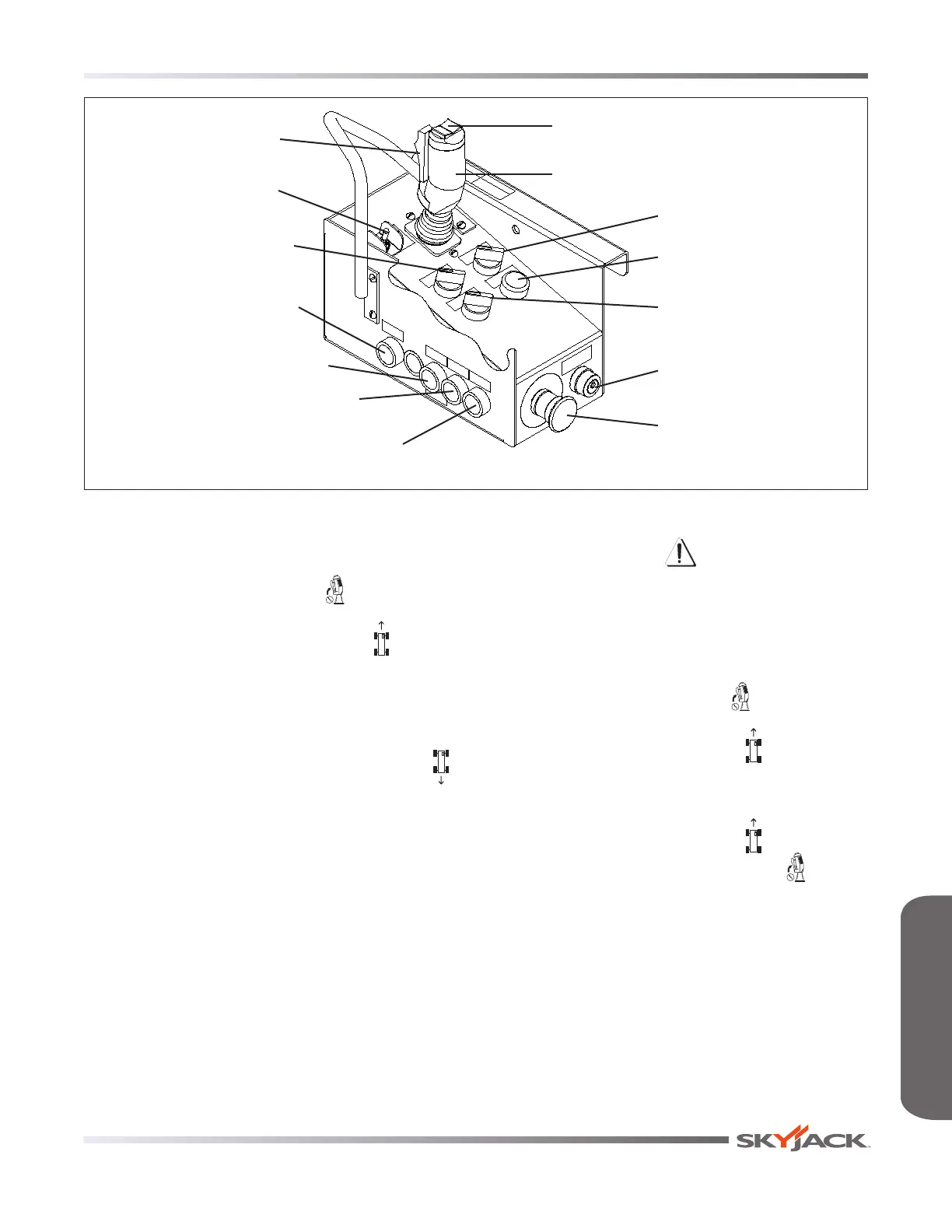
Torque Switch
Engine Start
Pushbutton
Horn
Pushbutton
Glow Plug/Choke
Pushbutton
Lift Enable
Pushbutton
Emergency Stop
Button
Low/High Throttle
Switch
Operation Light
Off/Lift/Drive Key
Switch
Low/High Speed Range
Switch
Drive/Steer
Controller
Raise/Off/Lower
Switch
Drive/Steer Enable
Trigger Switch
Rocker Switch
FAMILIARIZATIONFAMILIARIZATION






 To Next Page