3
Watching an on demand
programme
It’s easy to watch programmes on demand — just follow the simple
steps below. If you would rather see a sneak peek first, look for the
trailer icon
and press the red button.
In most cases you can expect programmes to be ready to watch
within minutes. The time it takes to download a programme depends
on the speed of your broadband connection and can be affected by
other internet usage in your home.
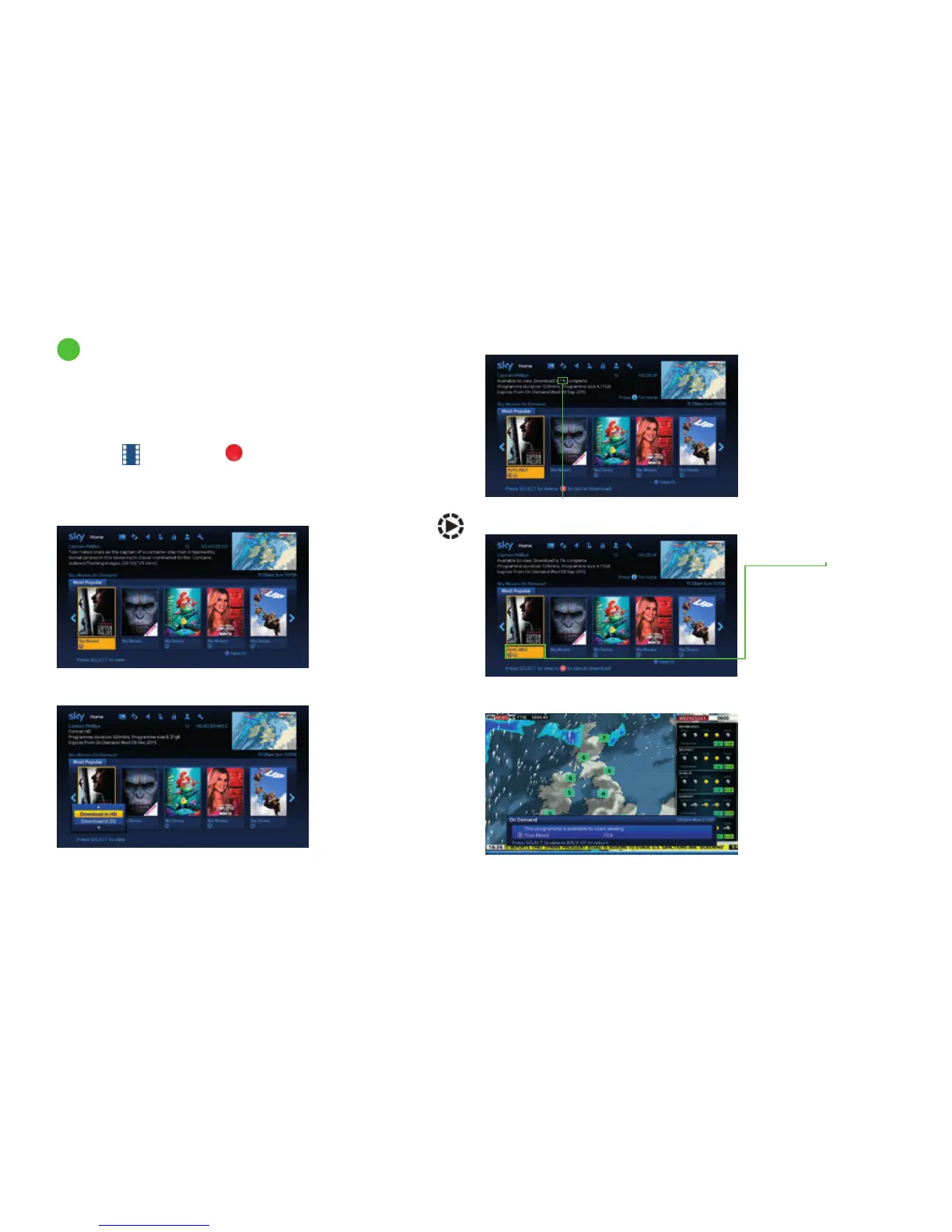
Step 1
If you can see the
symbol, you can start
watching straight away.
If not, press select to
start downloading the
programme.
Step 2
If the programme
you have chosen is
available in HD and
SD (subject to your
Sky subscription) you
will need to choose if
you want to download
the HD or SD version.
Use the up/down
arrow keys to choose
an option then
press Select.
Step 4
Your programme will
be marked AVAILABLE
when it’s ready to start
watching. Just press
select to get started.
Step 3
Amount downloaded
You can see how much
has been downloaded
so far in the programme
summary area.
Step 5
You can carry on
watching live TV whilst
you’re downloading
and a handy pop up
feature lets you know
when your programme
is ready to watch.
Discover a world of entertainment
37



 To Next Page