HDMI One-Touch-Play enables you to turn a compatible TV on and
switch to the correct HDMI input for your Sky±HD box. You can even
quickly switch from a DVD Player or games console. Find out more
information at sky.com/onetouch
This feature is not available on Samsung HD, Pace HD or DRX780
boxes.
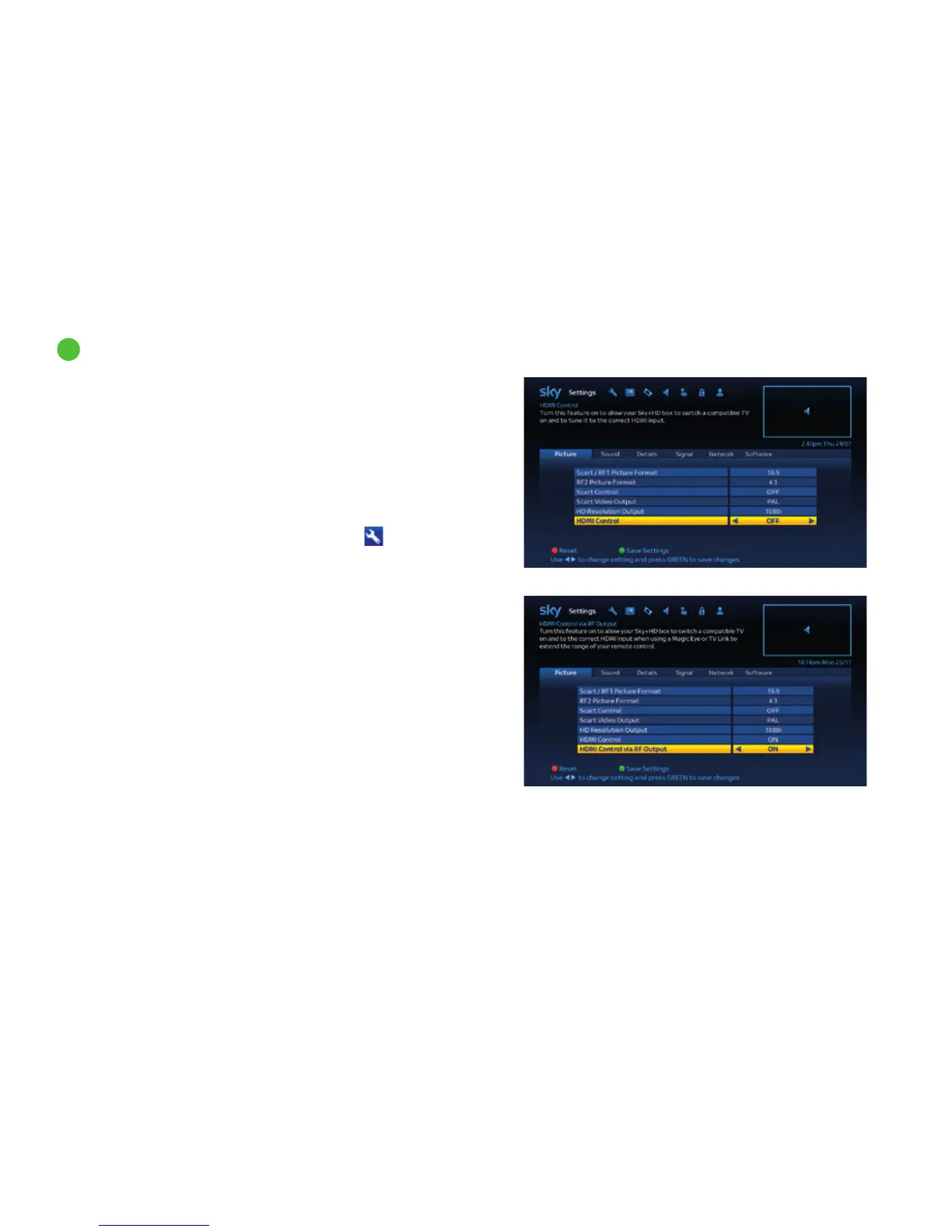
HDMI One-Touch-Play is switched on by default. To change this
setting follow these steps:
1 Press services, scroll right and select Settings
then select
the Picture tab.
2 Highlight HDMI Control and use the left/right arrows to turn the
setting ON/OFF.
3 If your Sky±HD box is controlled by a TV link / Magic eye or
Remote extender connected via RF2 output, when HDMI Control
is On then HDMI Control via RF Output setting will also be shown.
Use the left/right arrow keys to turn this setting ON/OFF.
HDMI One-Touch-Play
Get the most from Sky±HD
31
94



 To Next Page