CH. A CH. B
SCAN TO GO
PROGRAM
SYSTEM
HOME
NEXT
DISCHARGER
BAL.CHARGE
4
CHARGER
LiIon
LiFe
LiPo
15:53
Revo
Operation
Mode
Battery
Type
Battery
Cells
5
33 ·
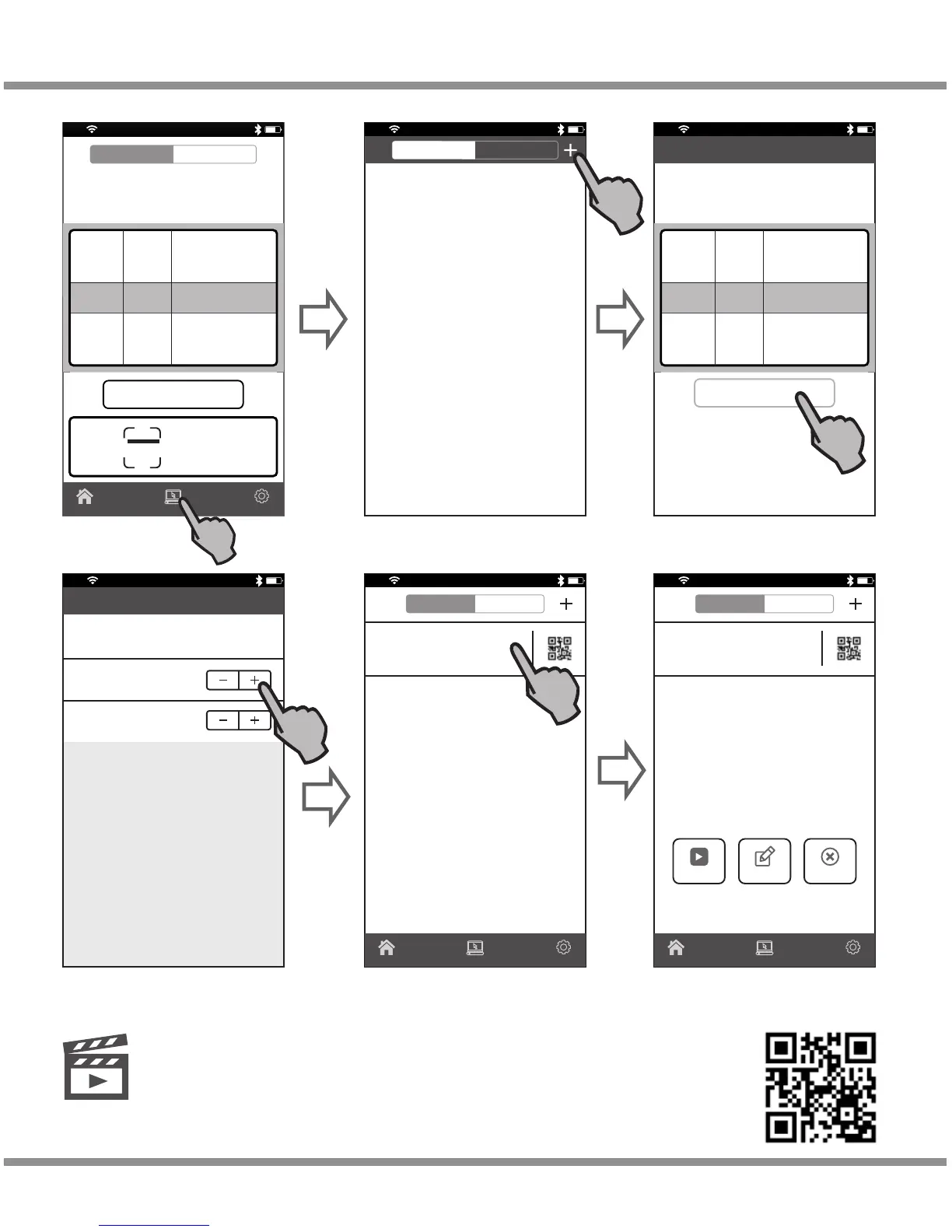
3). How to Use Memory Program
15:53
Revo
Save
Press
“PROGRAM”
button
Set battery type, cells
and working modes
DISCHARGER
BAL.CHARGE
5
6
CHARGER
4
LiIon
LiFe
LiPo
Operation
Mode
Battery
Type
Battery
Cells
EditBACK
15:53
Revo
5.0 A
4.20 V
Cancel Edit Save
LiPo 6Cell BAL.CHARGE >
Charge Current
Voltage Cut-Off
START EDIT CANCEL
15:53
Revo
CH. A CH. B
LiPo BAL.CHARGE
Cells: 6 Charge Curretn: 5.0A
Voltage:4.20V
PROGRAM
SYSTEM
HOME
Press to save the program after
set the charge current and
voltage cut-off
15:53
Revo
Enter into PROGRAM interface
15:53
Revo
CH. A CH. B
LiPo BAL.CHARGE
Cells: 6 Charge Curretn: 5.0A
Voltage:4.20V
PROGRAM
SYSTEM
HOME
Memory program setting finishes.
Press“START”button to start charge
Press“EDIT” button to change
the setting
D100v2
Please scan and watch the tutorial video above how to use
memory program.
Controlling the Charger Using the App
Video
Tutorial
6
CH. A CH. B


 To Next Page