If you have a question or a problem, please contact
1-844-SKY-WELL(759-9355) or email service@skywell.com for assistance.
8
WATER GENERATION SETTINGS
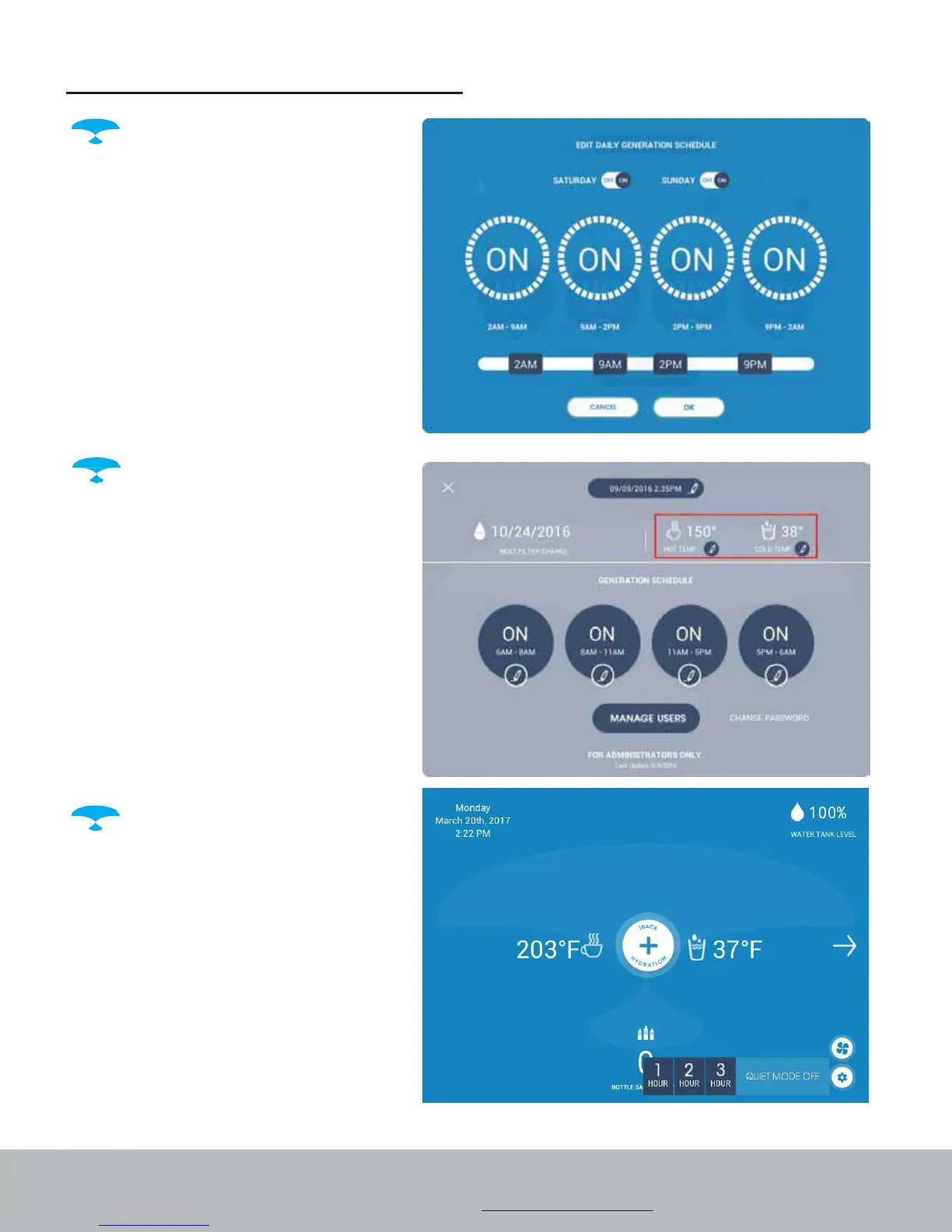
Daily Water Generation
Schedule – Tap the Settings icon
on the bottom right hand corner
of the home page. Enter the
Administrator PIN number (the
factory default PIN number is
1111). Tap the buttons to set
regular generation schedule. You
can set up to 4 different time
periods. Setting all 4 time periods
to "ON" will produce the most
water.
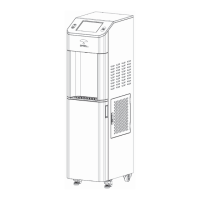
Hot and Cold Water
Temperature - Tap the Settings
icon on the bottom right hand
corner of the home page. Enter
the Administrator PIN number.
Tap the pencil icon next to Hot
Temp or Cold Temp and use the
scroll bar to change the water
temperature. Tap "Save and Set
Temperature" to save changes.
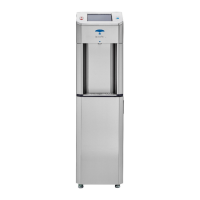
Quiet Mode - Tap the fan
icon on the bottom right hand
corner of the home page. Select
Quiet Mode for 1, 2, or 3 hours. To
schedule a recurring quiet
mode, you can use the Daily
Generation Schedule feature.


 To Next Page