10 / 17
Copyright (c) 2009-2017 RoboPeak Team
Copyright (c) 2013-2017 Shanghai Slamtec Co., Ltd.
Troubleshooting
When the scan core or the laser power works abnormally, the scan core will
enter protection mode. This state can be retrieved via SDK API. If such
scenario happened, please send restart command to reset the scan core.
Motor Speed Adjustment
During the running process, different motor rotating speed can be achieved
by pressing the button, which can fit in different working environments
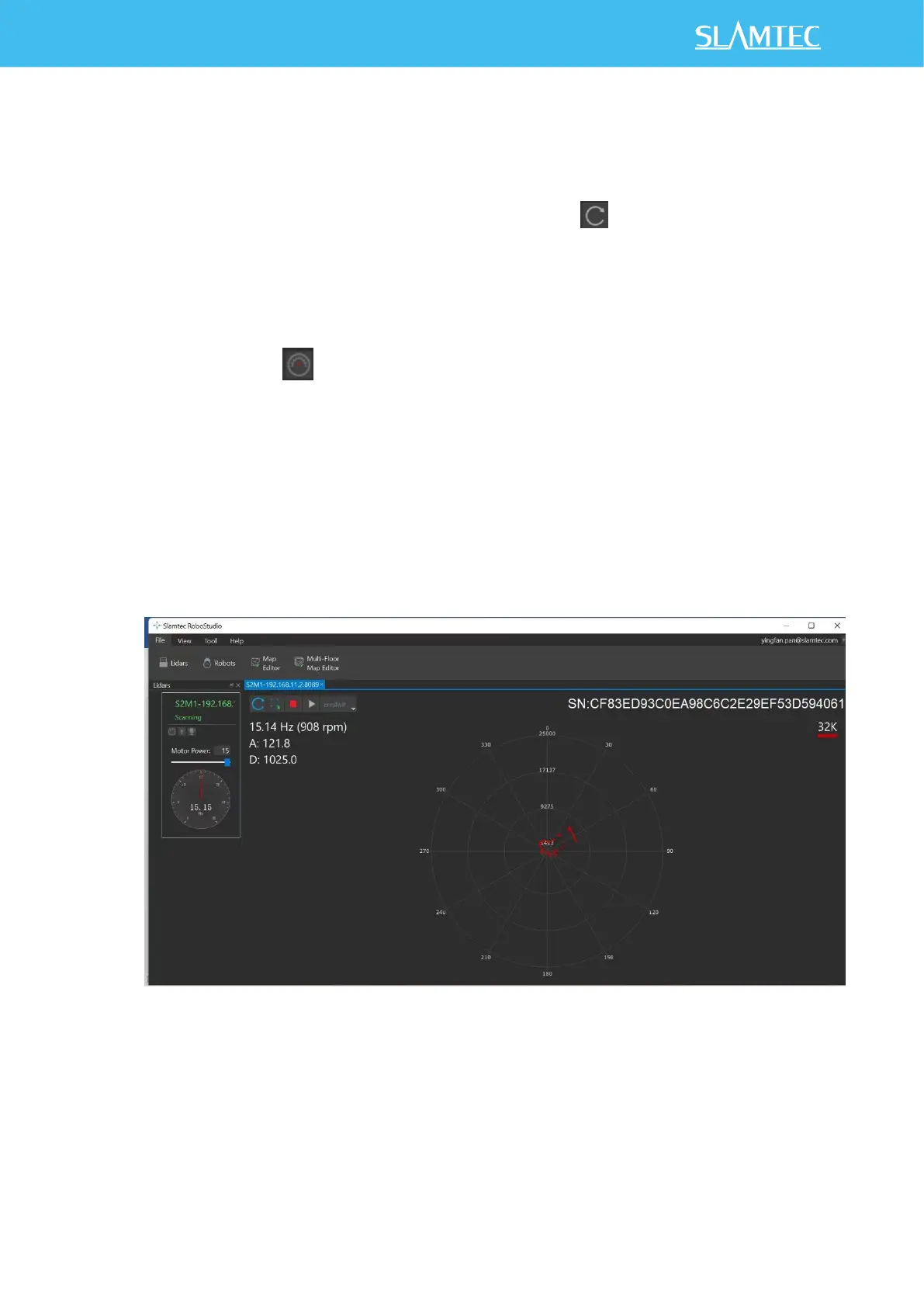
or meet specific requirements. There will be a speed adjustment dialog box
and dash board popped up for users to enter required speed. After entering
a value, the motor will work as the settled rotating speed automatically. User
can also drag the sliding handle to the required rotating speed.
The current actual rotating speed will show in the upper left corner of the
major work area. For instance, the actual rotating speed in the following
screenshot is 15.14Hz.
Figure 2-10 The Motor Speed Adjustment Dialogue of RPLIDAR in RoboStudio


 To Next Page