6 Decommissioning SMA Solar Technology AG
18 485i-Module-IA-en-19 Installation Manual
6 Decommissioning
6.1 Disassembling the 485 Data Module
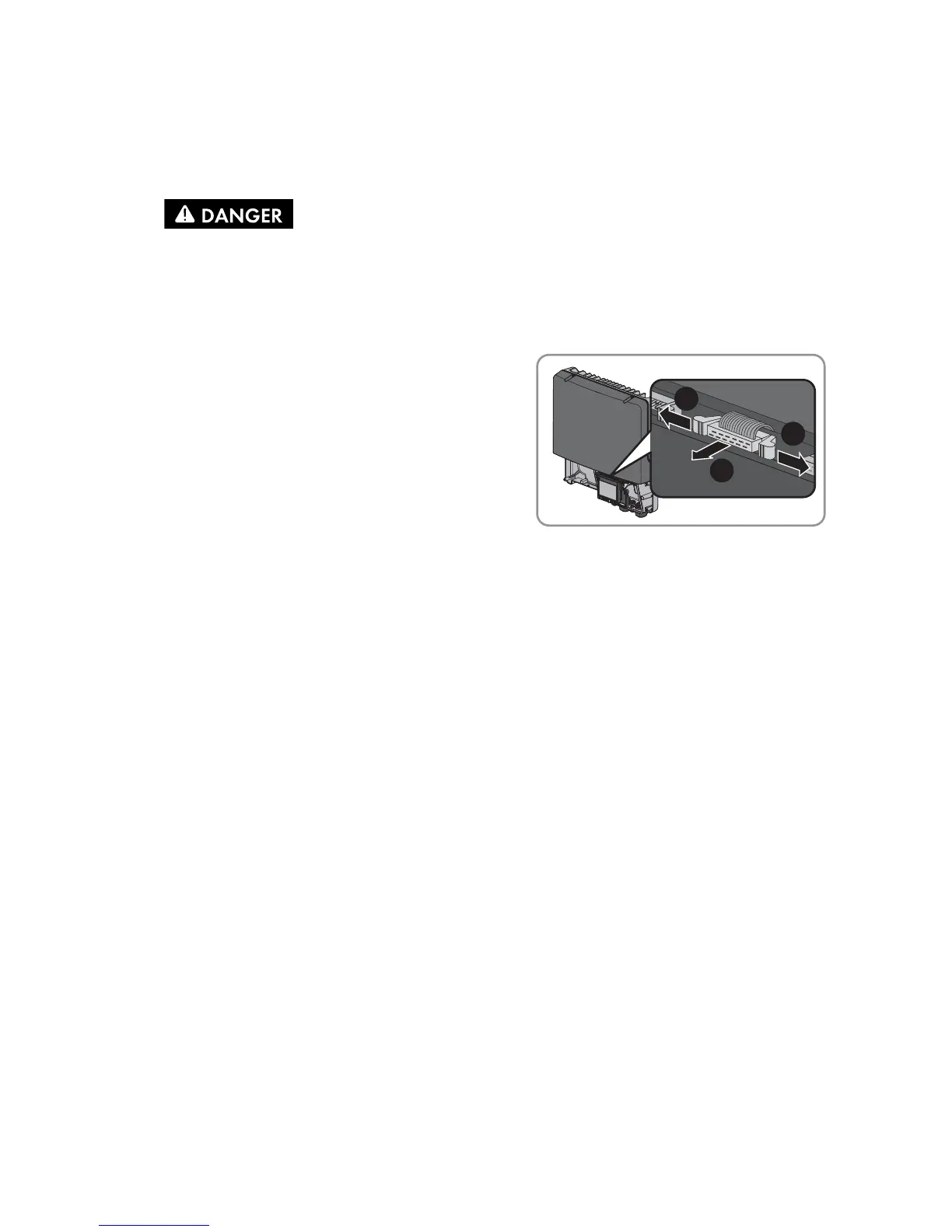
2. Press the left-hand and right-hand lock hooks
outwards and remove the ribbon cable plug from
the center connector strip of the inverter.
3. Release the screw of the display far enough to allow the display to be flipped up.
4. Flip the display up until it snaps into place.
5. Unscrew the swivel nut from the cable gland.
6. Open the spring clamp terminals of the plug on the 485 Data Module.
7. Remove the cables from the 485 Data Module.
8. Unscrew the counter nut of the cable gland.
9. Pull the cable gland and cables out of the inverter.
10. Release the screw of the 485 Data Module and remove the 485 Data Module.
11. Close the spring clamp terminals of the plugs on the 485 Data Module.
12. Flip the display down and fasten the display screw hand-tight.
13. Seal the opening in the inverter enclosure with the filler plug for enclosure openings.
14. Close the inverter (see inverter installation manual).
1.
Danger to life due to electric shock when opening the inverter
Death or serious injuries
• Disconnect the inverter from all voltage sources on the AC and DC sides and open it
(see the inverter installation manual).


 To Next Page