Section 4
4.1
PROGRAMMING USING LOCAL
ADJUSTMENT
Move Jumper “W1" to position “ON” to enable the local adjustment. This jumper is located on top of the
main electronic circuit board.
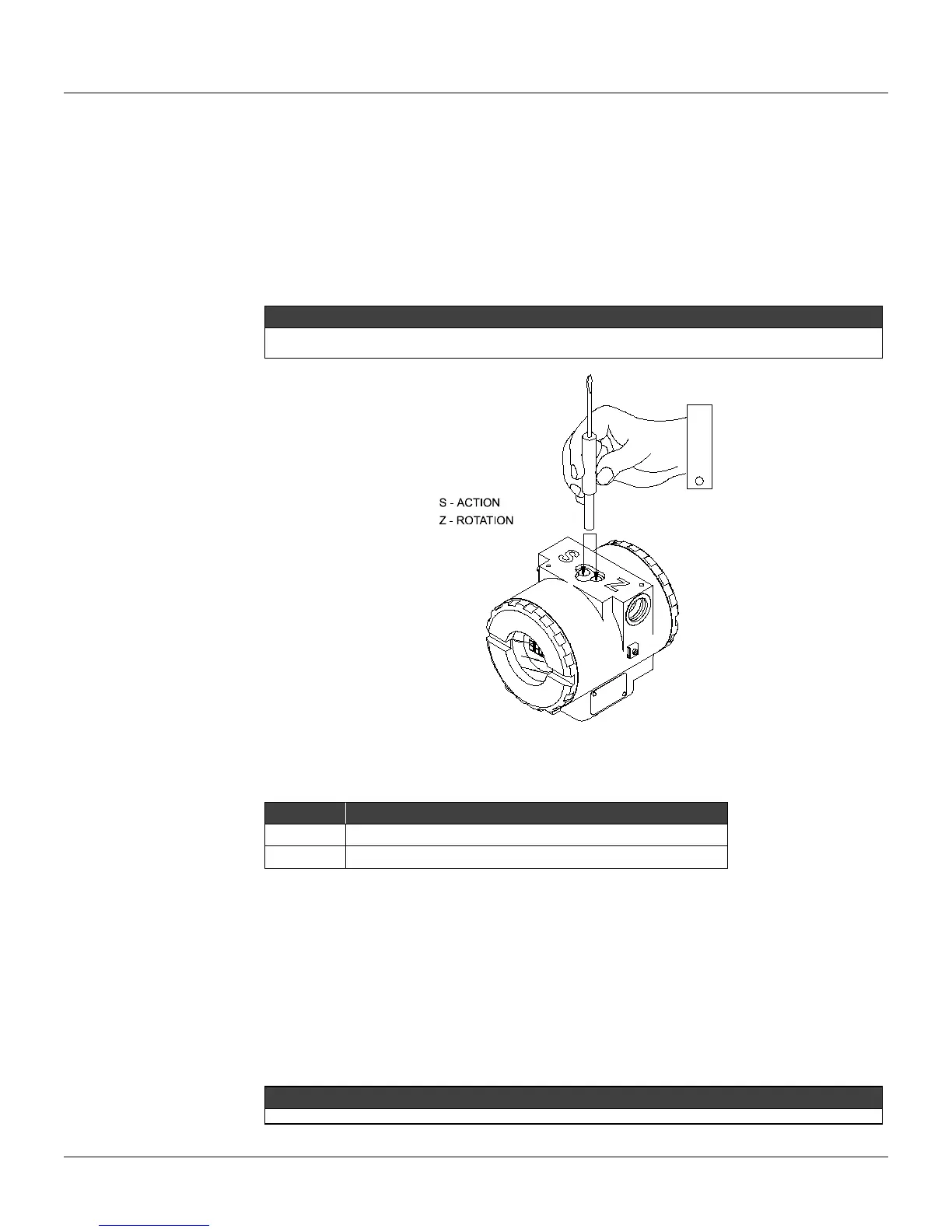
There are two orifices on the positioner, under the nameplate, identified by “S” and “Z” respectively,
which provide access to two magnetic switches actuated by means of a magnetic tool (Refer to Figure
4.1).
NOTE
In this section the “Magnetic Tool” will be referred to as “TOOL”, and the orifices identified by “S” and “Z” will be
“ORIFICE S” and “ORIFICE Z”, respectively.
Figure 4.1 - Local Adjustment Orifices
Table indicates the results for the actions on orifices “Z” and “S” in FY301.
ORIFICE ACTION
Z
Function browsing.
S
Selects the displayed function.
The digital display is required in order to show the programming performed via local adjustment.
W1 and W2 Jumpers Connection
W1 Jumper connected in ON
If W1 Jumper is connected in ON, adjustment local enabled, the parameters of the programming tree
can be modified.
W2 Jumper connected in DOWN
With W2 Jumper connected in this mode, write protected, the positioner protects the configuration
against improper modifications.
NOTE
Writing must be enabled during the configuration and after configuration must be disabled again.



 To Next Page