Installation Manual STR7202 TAG4 & SFM7704 TAG1
DBCI-0512-0052-V013
STR7202 2-Side Trimmer & SFM7704 Square Fold Module
5. Installation (continued)
Contents
5.2. Electrical Installation (continued)
5.2.4 Installing Start/Stop Interface in Canon Booklet Trimmer D1
IMPORTANT:
Make sure to have the latest software installed in the Canon Booklet Trimmer D1.
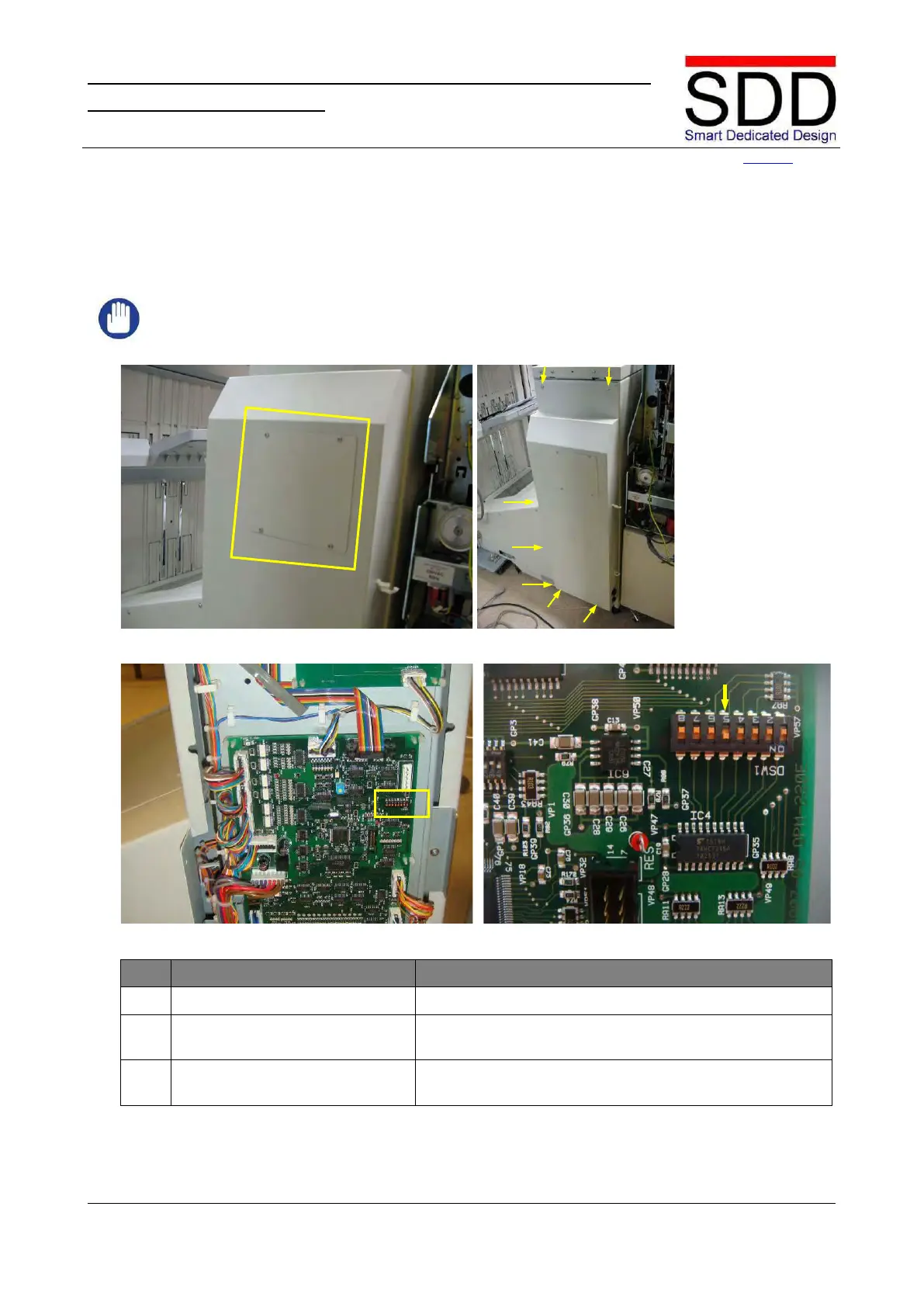
Fig. 5.2.4.1 Fig. 5.2.4.2
Fig. 5.2.4.3 Fig. 5.2.4.4
Remove Cover from Rear Cover.
2. Remove Rear Cover. Remove 7 bolts on top, left and bottom side (Fig. 5.2.4.2)
Locate DIP switch DSW1 (Fig. 5.2.4.3) and set #5 of
DSW1 to ‘ON’ (Fig. 5.2.4.4).



 To Next Page