Installation Manual STR7202 TAG4 & SFM7704 TAG1
DBCI-0512-0052-V013
STR7202 2-Side Trimmer & SFM7704 Square Fold Module
6. System Setup (continued)
Contents
6.3 Thickness Detection Setup
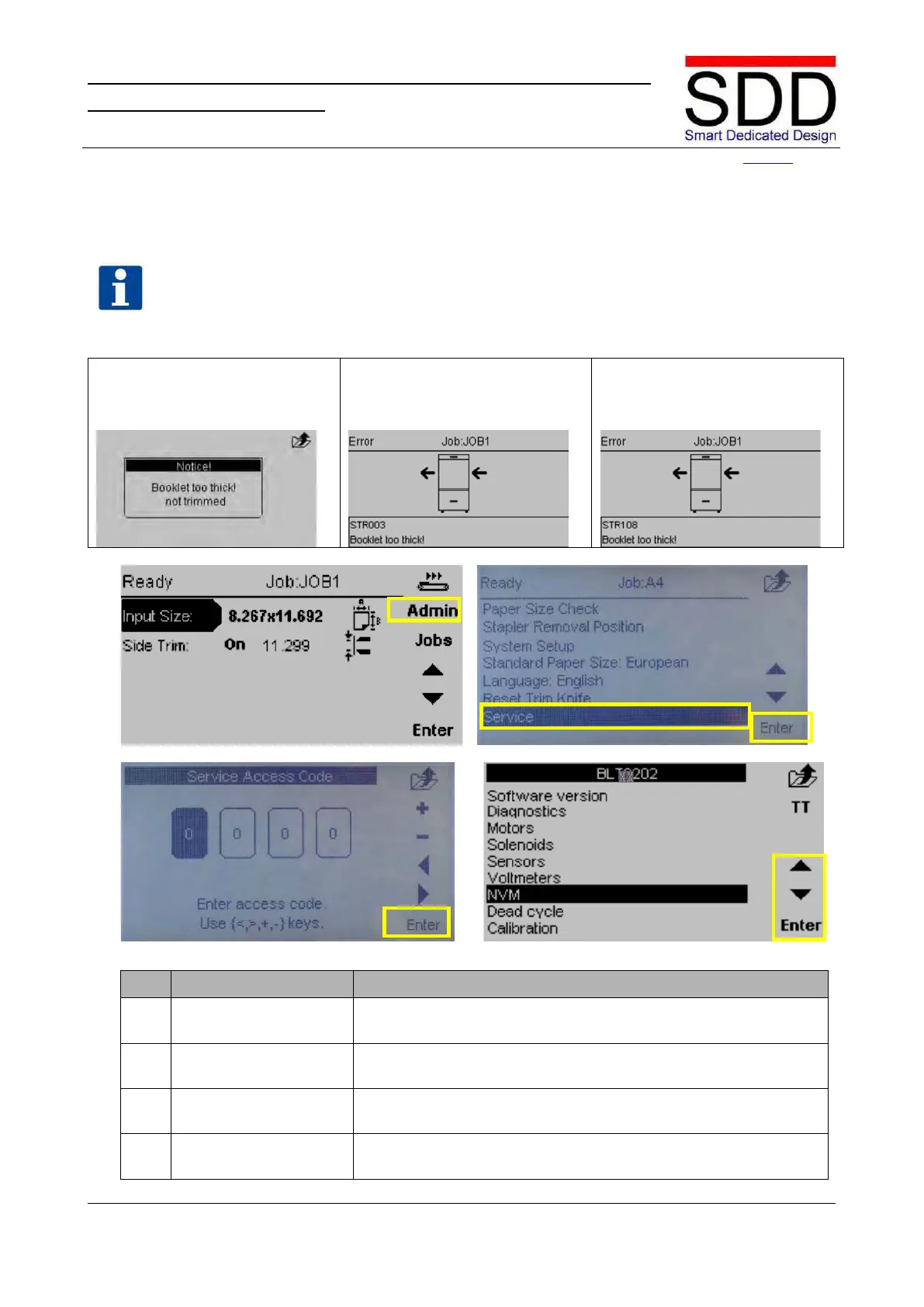
There are 3 different warning settings as follows:
Booklet too thick! not trimmed
(NO STOP: only message in UI
Booklet too thick (STR003)
SOFT STOP: booklet transported
Booklet too thick (STR108)
(HARD STOP: booklet still inside
Fig.6.3.1 Fig.6.3.2
Fig. 6.3.3 Fig. 6.3.4
Press the [Admin] button when [Ready] is displayed in the top left
corner (Fig. 6.3.1).
Use the ‘▲ / ▼ buttons’ to select [Service] and press [Enter] (Fig.
6.3.2.).
Follow 0n-screen instructions to enter [Service Access Code] (Fig.
6.3.3). Press [Enter] to enter Service Menu.
Use the ‘▲ / ▼ buttons’ to select [NVM] and press [Enter] (Fig.
6.3.4).
NVM ‘Stop if booklet too thick’ is a value set to warn the Operator that a booklet is too thick to
trim.



 To Next Page