-12-
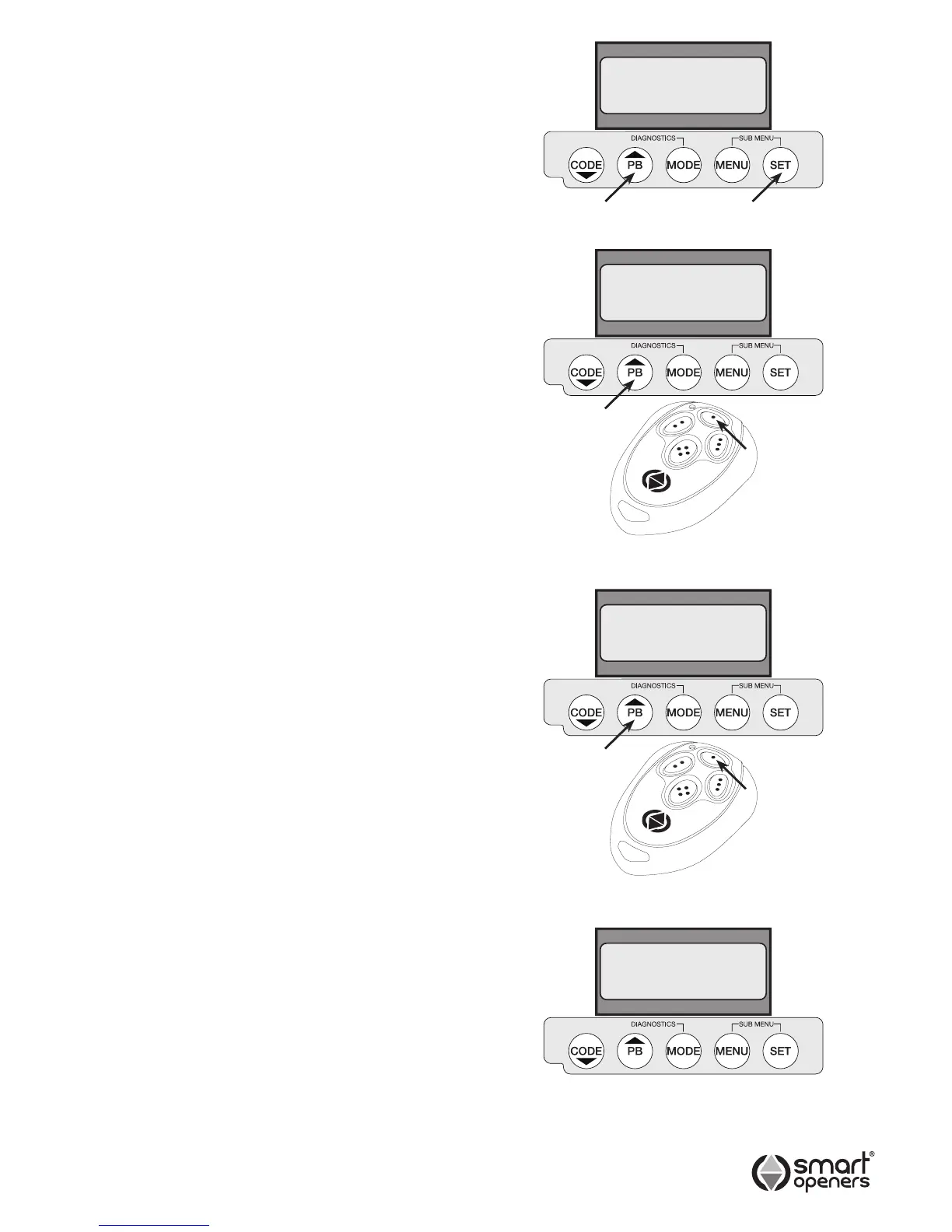
1. Press SET for 3 secs to enter Limits Set Up. The
display will show Motor Extend Press PB.
2. Press PB. The motors should already be full wound
out and the gate fully closed from the initial set up as
per Pg 7 - if the motors are not already wound out as
done previously they will wind out to the fully closed
position. If they are fully wound out the display will
now show MODE = EXIT SET = SETUP.
3. Press SET to enter setup. The display will show Dual
Motor (default). If this is correct press SET to save
and continue to Limits Set Up (Fig. 14).
4. The display will show Motor 1 Set Up (Fig. 15). Press
PB (or TX Button 1) to drive the gate to the desired
open position - release button when this position is
reached.
Note: Adjust if required by pressing CODE (or TX Button
4) to move in close direction.
5. Pause for 5 secs (do not press anything) to conrm
open position set. The controller will beep to conrm.
6. The display will show Motor 2 Set Up. Repeat as per
steps 2 and 3.
7. The display will show Set Up Complete (Fig. 17) for 2
secs and is ready for normal use.
Note: Gate leaf delay is factory preset and is
automatically calculated during the limits set up
procedure.
If you would like to alter the gate delay time after
installation is complete. Please go to Close Delay
section on Pg 17.
Aborting Limits Set Up
To abort limits set up press MENU to exit. To return to set
up mode press SET for 3 secs and repeat as per above.
Setting Limits – Dual Leaf Gate
© November 2011 Smart Openers Pty Ltd
Fig. 15
Fig. 16
Dual Motor
Set Up
Complete
Motor 1
Set Up
Motor 2
Set Up
Fig. 14
Fig. 17


 To Next Page