EasyManua.ls Logo

SMART radio five - Overview; Basic Functions

SMART radio five
15 pages
Print Icon
To Next Page IconTo Next Page
To Previous Page IconTo Previous Page
Loading...
3)
4)
3)
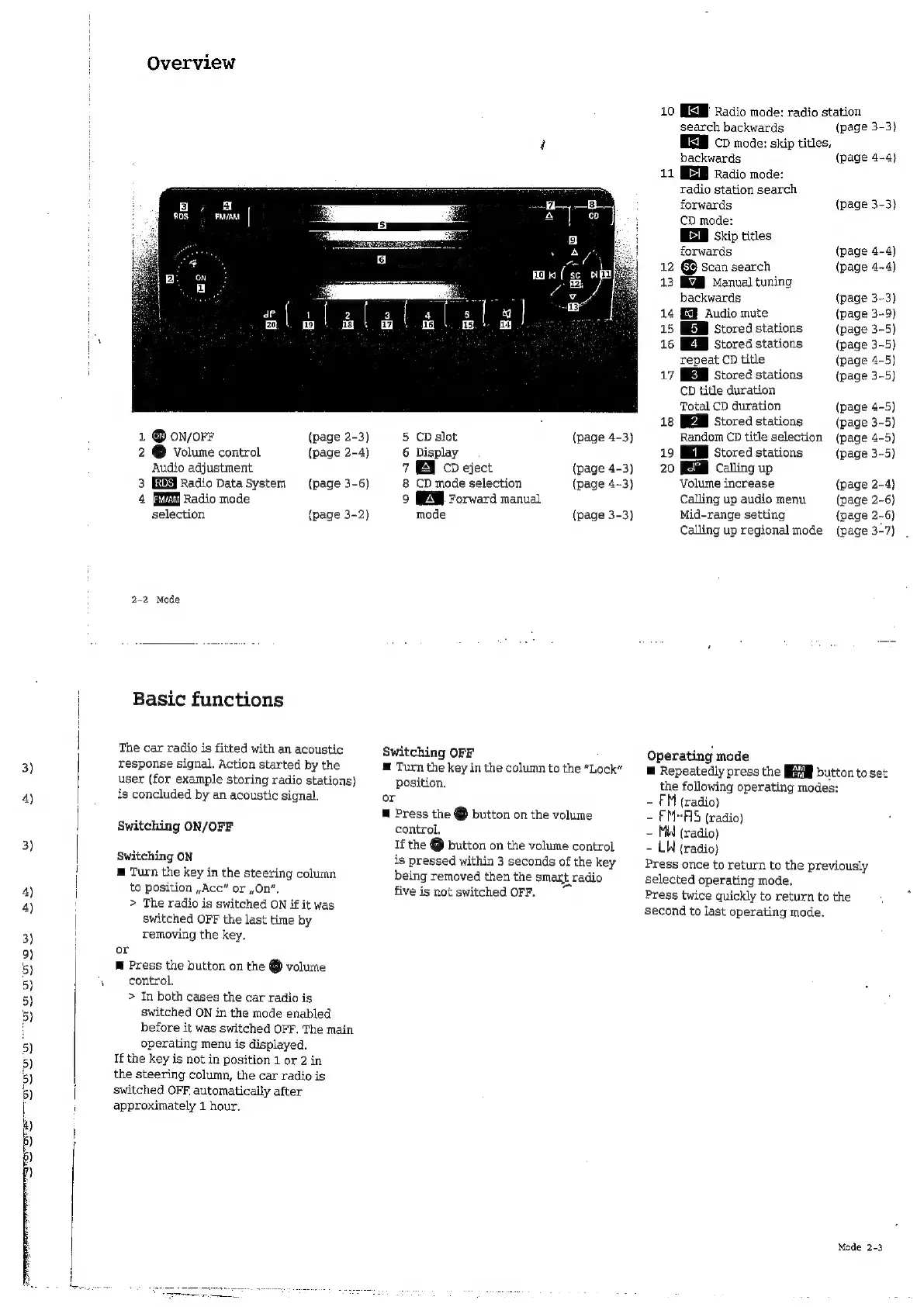
Overview
1
®
on/orr
2
É
volume
control
Audio
adjustment
3
Radio
Data
System
4
Radio
mode
selection
(page
2-3)
(page
2-4)
(page
3-6)
(page
3-2)
2-2
Mode
Basic
functions
The
car
radio
is
fitted
with
an
acoustic
response
signal.
Action
started
by
the
user
(for
example
storing
radio
stations)
is
concluded
by
an
acoustic
signal.
Switching
ON/OFF
Switching
ON
E
Turn
the
key
in
the
steering
column
to
position
,
Acc”
or
On”,
>
The
radio
is
switched
ON
if it
was
switched
OFF
the
last
time
by
removing
the
key,
or
m
Press
the
button
on
the
@
volume
control.
>
In
both
cases
the
car
radio
is
switched
ON
in
the
mode
enabled
before
it
was
switched
OFF.
The
main
operating
menu
is
displayed.
If
the
key
is
not
in
position
1
or
2
in
the
steering
column,
the
car
radio
is
switched
OFF.
automaticaly
after
approximately
1
hour.
5
CD
slot
(page
4-3)
6
Display
7
ES
CD
eject
(page
4-3)
8
CD
mode
selection
(page
4--3)
9
Forward
manual
mode
(page
3-3)
Switching
OFF
E
Turn
the
key
in
the
column
to
the
“Lock”
position.
or
E
Press
the
É
button
on
the
volume
control,
If
the
O
button
on
the
volume
control
is
pressed
within
3
seconds
of
the
key
being
removed
then
the
smart
radio
five
is
not
switched
OFF.
10
MEM
Radio
mode:
radio
station
search
backwards
(page
3-3)
MM
cp
mode:
skip
titles,
backwards
(page
4-4)
11
EZ
Radio
mode:
radio
station
search
forwards
(page
3-3)
CD
mode:
E
Skip
titles
forwards
(page
4-4)
12
[sc]
Scan
search
(page
4-4)
13
KA
Manval
tuning
backwards
(page
3-3)
14
ES
Audio
mute
(page
3-9)
15
Stored
stations
(page
3-5)
16
Stored
stations
(page
3-5)
repeat
CD
title
(page
4-5)
17
Stored
stations
(page
3-5)
CD
title
duration
Total
CD
duration
(page
4-5)
18
Stored
stations
(page
3-5)
Random
CD
title
selection
(page
4-5)
19
Stored
stations
(page
3-5)
20
Calling
up
Volume
increase
(page
2-4)
Calling
up
audio
menu
(page
2-6)
Mid-range
setting
(page
2-6)
Calling
up
regional
mode
(page
3-7)
Operating
mode
E
Repeatedly
press
the
button
to
set
the
following
operating
modes:
-
FM
(radio)
-
EM-FIS
(radio)
-
MH
(radio)
-
LW
(radio)
Press
once
to
return
to
the
previously
selected
operating
mode.
Press
twice
quickly
to
return
to
the
second
to
last
operating
mode.
Mode
2-3

Related product manuals