SMARTRG INC. PROPRIETARY AND CONFIDENTIAL. ALL RIGHTS RESERVED. COPYRIGHT © 2016
15
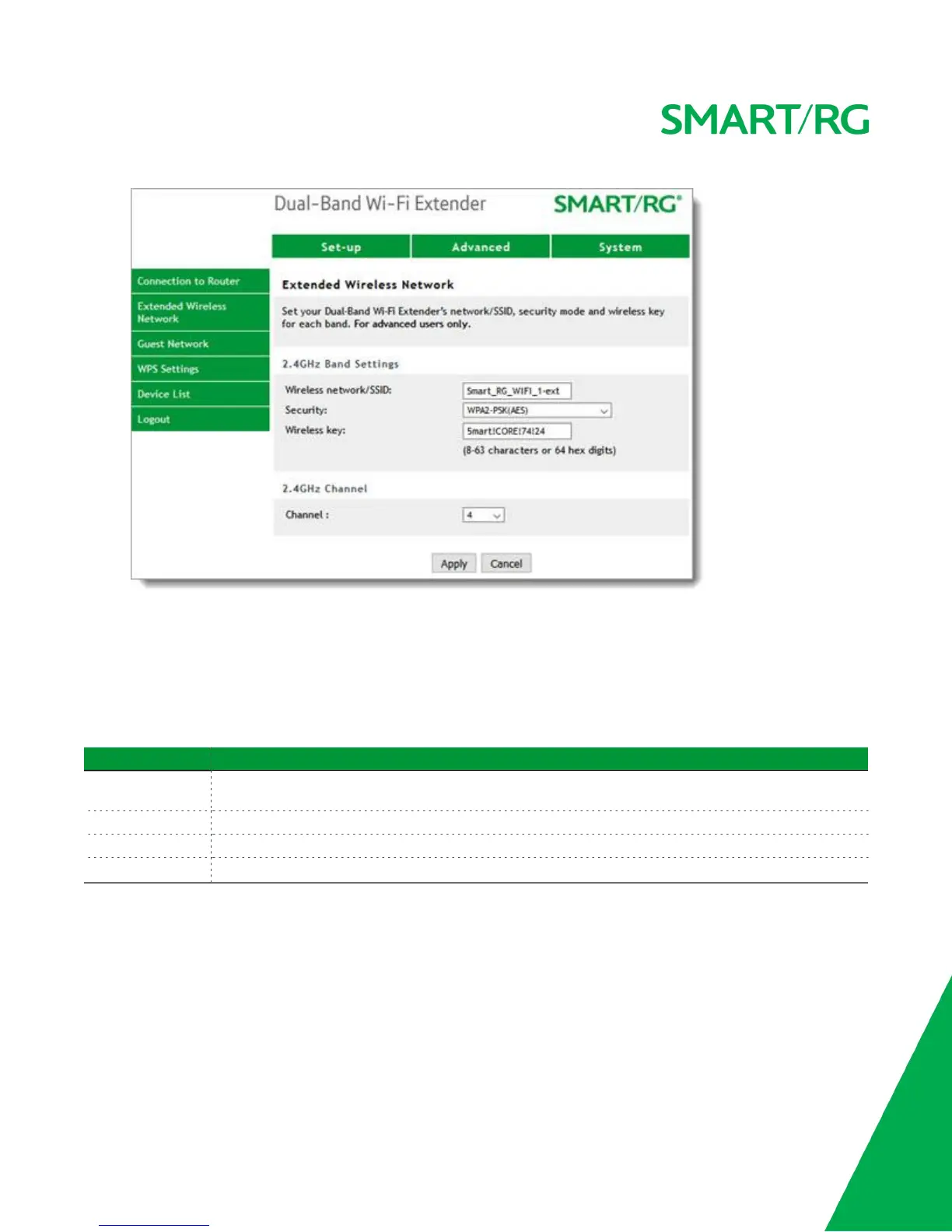
2. If you want to use the same settings for both channels, click the Use the same... checkbox at the top of
the page.
3. To enable the 5GHZ channel, click the Enable 5GHZ wireless checkbox in the 5GHz Band Settings sec-
tion.
4. Complete the remaining fields, using the information in the following table.
5. When your changes are completed, click Apply.
Field Description
Wireless net-
work/SSID
The SSID of the wireless network.
Security Select the authentication method for your extender. The default is
Wireless key Enter the wireless key for the extender (found on the back of the extender & in the Quick Start Guide).
Channel (
5GHz channel only
) Select a specific channel number or accept the default of
Auto
.
Guest Network
On this page, you can set up two networks, each with its own SSID and key, for guests to use.
1. In the top navigation bar, click Advanced and then click Guest Network in the left menu. The Advanced
> Guest Network page appears.


 To Next Page