SMARTRG INC. PROPRIETARY AND CONFIDENTIAL. ALL RIGHTS RESERVED. COPYRIGHT © 2016
21
2. In the Old password field, enter the current Admin password.
3. In the New password and Confirm password fields, enter the new password.
4. Click Apply. The password is changed immediately.
There is no need to log out or restart the gateway; you can proceed with other tasks.
Config Upgrade
On this page, you can backup and restore configuration files for your extender.
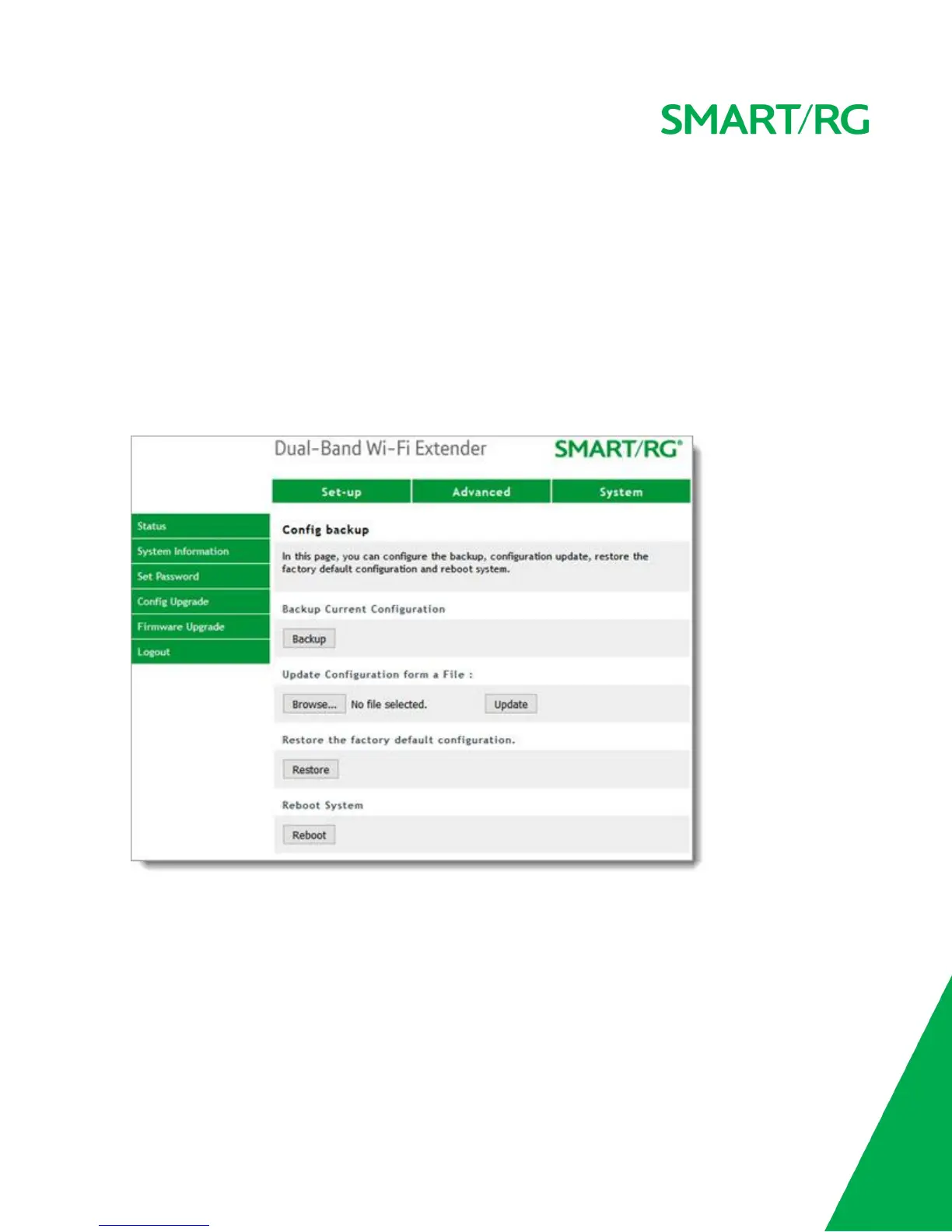
1. In the top navigation bar, click System and then click Config Upgrade in the left menu. The following
page appears.
2. To backup the current configuration settings, click Backup. A backup file named config.xml is created
and downloaded to your defined download folder.
3. To upload a saved configuration file, click Browse to select the file and then click Update. The extender
reboots and a progress message appears, counting down from 40 seconds. When the browser is ready, the
login window opens.
4. To clear the current configuration settings and return to the factory default configuration, click Restore.
The extender reboots and a progress message appears, counting down from 40 seconds. When the browser
is ready, the login window opens.
5. To restart the extender, click Reboot. When the extender is ready to use, the login window opens.


 To Next Page