EasyManua.ls Logo

SMC Networks 6624FMSC - annexe 1 - User Manual

SMC Networks 6624FMSC - annexe 1
80 pages
Print Icon
To Next Page IconTo Next Page
Loading...
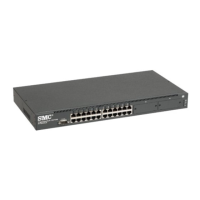
Stackable Fast Ethernet Switch
24 10BASE-T/100BASE-TX RJ-45 ports
Auto MDI/MDI-X support on all ports
Optional 100BASE-FX or 1000BASE-X modules
Optional stack module for linking up to 16 units
8.8 Gbps of aggregate switch bandwidth
LACP port trunking support
Port mirroring for non-intrusive analysis
Port security
Full support for IEEE 802.1Q VLANs with GVRP
IP Multicasting with IGMP Snooping
Manageable via console, Web, SNMP/RMON
TigerSwitch 10/100
Installation Guide
SMC6624M

Table of Contents

Questions and Answers

  • L
    Lisa McconnellAug 12, 2025
    Why is my SMC Networks 6624FMSC - annexe 1 network connection not working properly?
    • L
      Laurie WhiteAug 12, 2025
      If your SMC Networks Switch network connection isn't working, verify that both ends of the cabling are properly connected at both the switch and the connected device. Ensure both the connected device and the switch are powered on and operating correctly. Use the correct cable type for the connection, depending on whether the port is configured to Auto or has a fixed configuration. For 1000Base-T connections, make sure the network cabling complies with the IEEE 802.3ab standard. Use the console to determine if the port has been disabled through a switch configuration change. If these steps don't resolve the problem, try using a different port or a different cable.
  • S
    Shelia BarnettAug 16, 2025
    What to do if the SMC Networks 6624FMSC - annexe 1 is not plugged into an active AC power source?
    • A
      Amber BeckAug 16, 2025
      First, verify that the power cord is plugged securely into both an active power source and the SMC Networks Switch. Try power cycling the switch by unplugging it and plugging it back in. If the Power LED is still not on, verify that the AC power source is working by plugging another device into the outlet.
  • A
    Alexander HallAug 20, 2025
    How to fix improper network topologies on SMC Networks 6624FMSC - annexe 1 Switch?
    • D
      donnasmithAug 20, 2025
      To fix improper network topologies on your SMC Networks Switch, ensure you have a valid network topology. If network problems occur after recent changes, revert to the previous topology. You can also enable Spanning Tree Protocol support on the switch to avoid data path loops and check your topology to ensure no data path loops exist.
  • E
    Eddie HessAug 25, 2025
    What to do if SMC Networks 6624FMSC - annexe 1 has experienced a software failure during self test?
    • V
      vincentmatthewAug 25, 2025
      If your SMC Networks Switch has experienced a software failure during self-test, try resetting it by pressing the Reset button on the front, or by power cycling the switch.
  • T
    Tami JosephAug 27, 2025
    What to do if a module was installed and the SMC Networks Switch has not yet been reset?
    • B
      Blake ReidAug 27, 2025
      If you've installed a module and the SMC Networks Switch hasn't been reset, you must reset or reboot the switch. This allows the switch processor to properly initialize and configure the module.
  • N
    Nathaniel MooreAug 31, 2025
    How to check the port configuration on SMC Networks 6624FMSC - annexe 1?
    • J
      jeffrey14Aug 31, 2025
      Use the switch console to determine the port’s configuration on your SMC Networks Switch and verify that there is not an improper or undesired configuration.
  • J
    Jessica ThompsonSep 3, 2025
    How to resolve faulty or loose cables in SMC Networks 6624FMSC - annexe 1?
    • G
      garciabenjaminSep 3, 2025
      To resolve issues with faulty or loose cables on your SMC Networks Switch, first look for loose or obviously faulty connections. If they appear to be OK, make sure the connections are snug. If that does not correct the problem, try a different cable.
  • M
    Ms. Laurie Russell DDSSep 7, 2025
    How to fix non-standard cables on SMC Networks 6624FMSC - annexe 1?
    • L
      lmedinaSep 7, 2025
      Use a new correctly-wired cable or compare your cable to the cable in appendix B, “Cables and Connectors” for pinouts and correct cable wiring.

Summary

Introducing the TigerSwitch 10;100 SMC6624 M

Front of the Switch

Overview of the front panel components, including ports, LEDs, and buttons.

LEDS

Detailed explanation of the function and status indication of each switch LED.

Console Port and Buttons

Description of the console port for terminal connection and the function of the Reset and Clear buttons.

Back of the Switch

Description of the back panel, including the power connector.

Switch Features

Key features and capabilities of the SMC6624M switch.

Switch Operation Overview

Explanation of how the switch handles network traffic, including address learning and forwarding.

Effect of VLANs

Explanation of Virtual LAN functionality and its impact on switch operation.

Installing the SMC6624 M Switch

Included Parts

List of all items included in the SMC6624M switch package.

Installation Procedures

Step-by-step guide for installing the switch, covering preparation, mounting, and connections.

Troubleshooting

Basic Troubleshooting Tips

Common issues and initial checks to resolve network problems.

Diagnosing with the LEDs

Guide to interpreting LED patterns for troubleshooting switch problems.

Hardware Diagnostic Tests

Methods for testing switch hardware, including resetting and checking LEDs.

Restoring the Factory Default Configuration

Procedure to reset the switch to its original factory settings.

Specifications

Physical, Electrical, and Environmental Specifications

Details on switch dimensions, weight, power requirements, and operating conditions.

Connectors and Safety

Information regarding port types, connector standards, and safety compliance.

Switch Ports and Network Cables

Switch Ports Overview

Information about Twisted-Pair and Fiber-Optic ports on the switch and modules.

Network Cable Specifications and Pin-Outs

Specifications and pin-outs for various network cables, including twisted-pair and fiber-optic types.

SMC Networks 6624FMSC - annexe 1 Specifications

General IconGeneral
Product NameSMC Networks 6624FMSC - annexe 1
CategorySwitch
ManageableYes
Rack MountableYes
ManagementWeb-based, SNMP
MAC Address Table Size8K
VLAN SupportYes
Quality of Service (QoS)Yes
Featuresport mirroring, broadcast storm control
Power SupplyInternal
Form FactorRack-mountable

Related product manuals