EasyManua.ls Logo

SMC Networks TigerSwitch SMC6128PL2 - User Manual

SMC Networks TigerSwitch SMC6128PL2
658 pages
Print Icon
To Next Page IconTo Next Page
Loading...
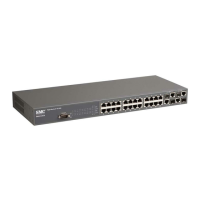
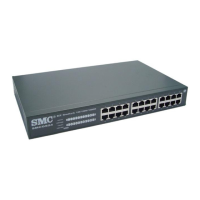
TigerSwitch 10/100
24-Port Fast Ethernet Switch
24 auto-MDI/MDI-X 10/100BASE-TX ports
10BASE-T/100BASE-TX ports support PoE capabilities
Two 10/100/1000BASE-T RJ-45 ports
Two Gigabit RJ-45/SFP combination ports
12.8 Gbps of aggregate bandwidth
Supports IP Clustering
Non-blocking switching architecture
Spanning Tree Protocol, and RSTP
Up to eight LACP or static 8-port trunks
RADIUS and TACACS+ authentication
Rate limiting for bandwidth management
CoS support for four-level priority
Full support for VLANs with GVRP
IP Multicasting with IGMP Snooping
Manageable via console, Web, SNMP/RMON
Management Guide
SMC6128PL2

Table of Contents

Other manuals for SMC Networks TigerSwitch SMC6128PL2

Questions and Answers

  • B
    Brittany MooreAug 6, 2025
    What to do if I cannot connect to SMC Networks TigerSwitch SMC6128PL2 Switch using Secure Shell?
    • E
      Elizabeth BrownAug 6, 2025
      If you're having trouble connecting to your SMC Networks Switch using Secure Shell, consider the following: * You may have exceeded the maximum number of concurrent Telnet/SSH sessions permitted; try connecting again later. * Ensure the control parameters for the SSH server are properly configured on the switch and that the SSH client software is correctly configured on the management station. * Verify that you've generated a public key on the switch and exported it to the SSH client. * Confirm you've set up an account on the switch for each SSH user, including user name, authentication level, and password. * If using public key authentication, ensure you've imported the client's public key to the switch.
  • C
    Catherine FrederickAug 12, 2025
    How to access the on-board configuration program via a serial port connection on SMC Networks TigerSwitch SMC6128PL2 Switch?
    • A
      Allison WhiteAug 12, 2025
      To access the on-board configuration program on your SMC Networks Switch via a serial port connection: * Ensure your terminal emulator program is set to VT100 compatible, with 8 data bits, 1 stop bit, no parity, and the baud rate set to 9600, 19200, 38400, 57600, or 115200 bps. * Check that the null-modem serial cable conforms to the pin-out connections provided in the Installation Guide.
  • M
    Mike CaseyAug 17, 2025
    What to do if SMC Networks Switch unit powers off after running for a while?
    • S
      sherryschmidtAug 18, 2025
      If your SMC Networks Switch powers off unexpectedly, the issue might stem from loose power connections, power losses or surges at the power outlet, or a defective internal power supply. First, check for any loose power connections. Also, ensure that there are no power losses or surges at the outlet. Before the unit shuts down, make sure the fans are unobstructed and running.
  • E
    Ellen FrankAug 23, 2025
    What to do if power indicator does not turn on when the power cord is plugged in SMC Networks Switch?
    • J
      Jose MillerAug 23, 2025
      If the power indicator on your SMC Networks Switch doesn't light up when you plug in the power cord, you may have a problem with the power outlet, the power cord itself, or the internal power supply of the switch.
  • S
    Sarah SandersOct 30, 2025
    Why can't I connect to my SMC Networks TigerSwitch SMC6128PL2 using Telnet, web browser, or SNMP software?
    • T
      Todd SmithOct 30, 2025
      There might be several reasons why you cannot connect to your SMC Networks Switch: * Ensure the switch is powered on. * Verify the network cabling between your management station and the switch. * Confirm you have a valid network connection and that the port you're using hasn't been disabled. * Check that the VLAN interface, through which the management station connects, is configured with a valid IP address, subnet mask, and default gateway. * Make sure the management station's IP address is in the same subnet as the switch's IP interface. * If connecting via a tagged VLAN group's IP address, ensure your management station and intermediate switches are configured with the appropriate tag. * You may have exceeded the maximum number of concurrent Telnet/SSH sessions permitte...

Summary

Introduction

Key Features

Lists key features and capabilities of the switch, including port specifications and management options.

Description of Software Features

Details advanced performance features like flow control, broadcast storm suppression, and VLAN support.

Authentication

Explains management access authentication via console, Telnet, web, RADIUS, TACACS+, and 802.1X.

Initial Configuration

Connecting to the Switch

Details steps for connecting to the switch via console port or Telnet for configuration.

Setting an IP Address

Configures manual or dynamic IP address settings for management access over the network.

Configuring the Switch

Using the Web Interface

Describes configuring the switch and viewing statistics via a web browser.

Simple Network Management Protocol (SNMP)

Explains the SNMP protocol for network device management, including versions 1, 2c, and 3.

User Authentication

Restricts management access using local or remote authentication methods.

Configuring the Secure Shell

Details SSH server configuration for secure remote management access.

Configuring Port Security

Allows configuring MAC addresses authorized to access switch ports.

Configuring 802.1 X Port Authentication

Implements port-based access control preventing unauthorized network access.

Access Control Lists

Provides packet filtering for IP frames or any frames based on addresses or protocols.

Power Over Ethernet Settings

Configures DC power supply to connected devices via Ethernet, including power budget and priority.

Spanning Tree Algorithm Configuration

Configures Spanning Tree protocols (STP, RSTP, MSTP) globally and for interfaces.

VLAN Configuration

Describes creating VLAN groups, adding members, and configuring VLAN behavior.

Switch Clustering

Groups switches for centralized management through a Commander/Member unit structure.

Quality of Service Commands

Configures QoS classification criteria and service policies using DiffServ.

Multicast Filtering Commands

Supports real-time applications like videoconferencing or streaming audio using IGMP.

DHCP Snooping Commands

Protects the network from rogue DHCP servers by filtering DHCP messages.

Command Line Interface

Using the Command Line Interface

Guides on using the CLI for switch management via keywords and parameters.

Class of Service Configuration

Specifies data packet precedence based on congestion and priority queues.

IP Source Guard Commands

Filters IP traffic based on configured entries in the IP Source Guard table.

Appendix B Troubleshooting

SMC Networks TigerSwitch SMC6128PL2 Specifications

General IconGeneral
PoEYes
PoE Ports24
Switching Capacity12.8 Gbps
Forwarding Rate9.5 Mpps
LayerLayer 2
MAC Address Table Size8K
Jumbo Frame Support9 KB
Power SupplyInternal
Weight3.6 kg
Operating Temperature0°C to 40°C
Storage Temperature-40°C to 70°C
Humidity10% to 90% non-condensing
FeaturesVLAN, QoS, IGMP Snooping, Link Aggregation, Port Mirroring
Ports24 x 10/100 Mbps + 4 x Gigabit Combo (RJ45/SFP)

Related product manuals