Twisted-Pair Cable and Pin Assignments
B-3
B
any RJ-45 port on the switch, you can use either straight-through or crossover cable
to connect to any device type.)
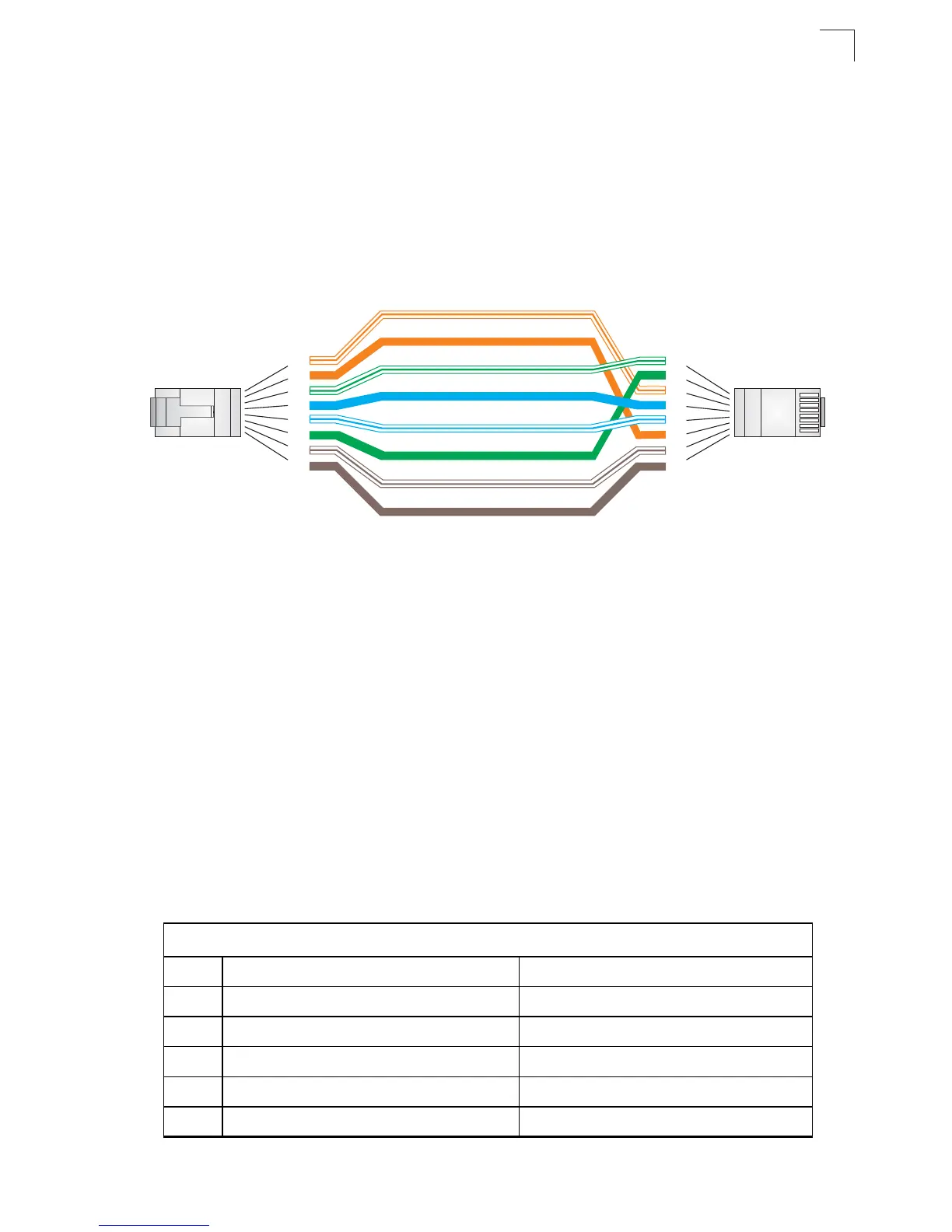
You must connect all four wire pairs as shown in the following diagram to support
Gigabit Ethernet connections.
Figure B-3 Crossover Wiring
1000BASE-T Pin Assignments
All 1000BASE-T ports support automatic MDI/MDI-X operation, so you can use
straight-through cables for all network connections to PCs or servers, or to other
switches or hubs.
The table below shows the 1000BASE-T MDI and MDI-X port pinouts. These ports
require that all four pairs of wires be connected. Note that for 1000BASE-T
operation, all four pairs of wires are used for both transmit and receive.
Use 100-ohm Category 5, 5e or 6 unshielded twisted-pair (UTP) or shielded
twisted-pair (STP) cable for 1000BASE-T connections. Also be sure that the length
of any twisted-pair connection does not exceed 100 meters (328 feet).
Table B-2 1000BASE-T MDI-X and MDI Port Pinouts
1000BASE-T MDI-X and MDI Port Pinouts
Pin MDI-X Signal Name MDI Signal Name
1 Bi-directional Data Two Plus (BI_D2+) Bi-directional Data One Plus (BI_D1+)
2 Bi-directional Data Two Minus (BI_D2-) Bi-directional Data One Minus (BI_D1-)
3 Bi-directional Data One Plus (BI_D1+) Bi-directional Data Two Plus (BI_D2+)
4 Bi-directional Data Four Plus (BI_D4+) Bi-directional Data Three Plus (BI_D3+)
5 Bi-directional Data Four Minus (BI_D4-) Bi-directional Data Three Minus (BI_D3-)
White/Orange Stripe
Orange
White/Green Stripe
1
2
3
4
5
6
7
8
1
2
3
4
5
6
7
8
EIA
TIA 568B RJ-45 Wiring
tandard
10/100BASE-TX Crossover Cable
End A
End B
Green
Blue
White/Blue Stripe
Brown
White/Brown Stripe


 To Next Page
 Loading...