EasyManua.ls Logo

Smeg GW0260 - User Manual

Smeg GW0260
86 pages
Print Icon
To Next Page IconTo Next Page
Loading...
User Manual
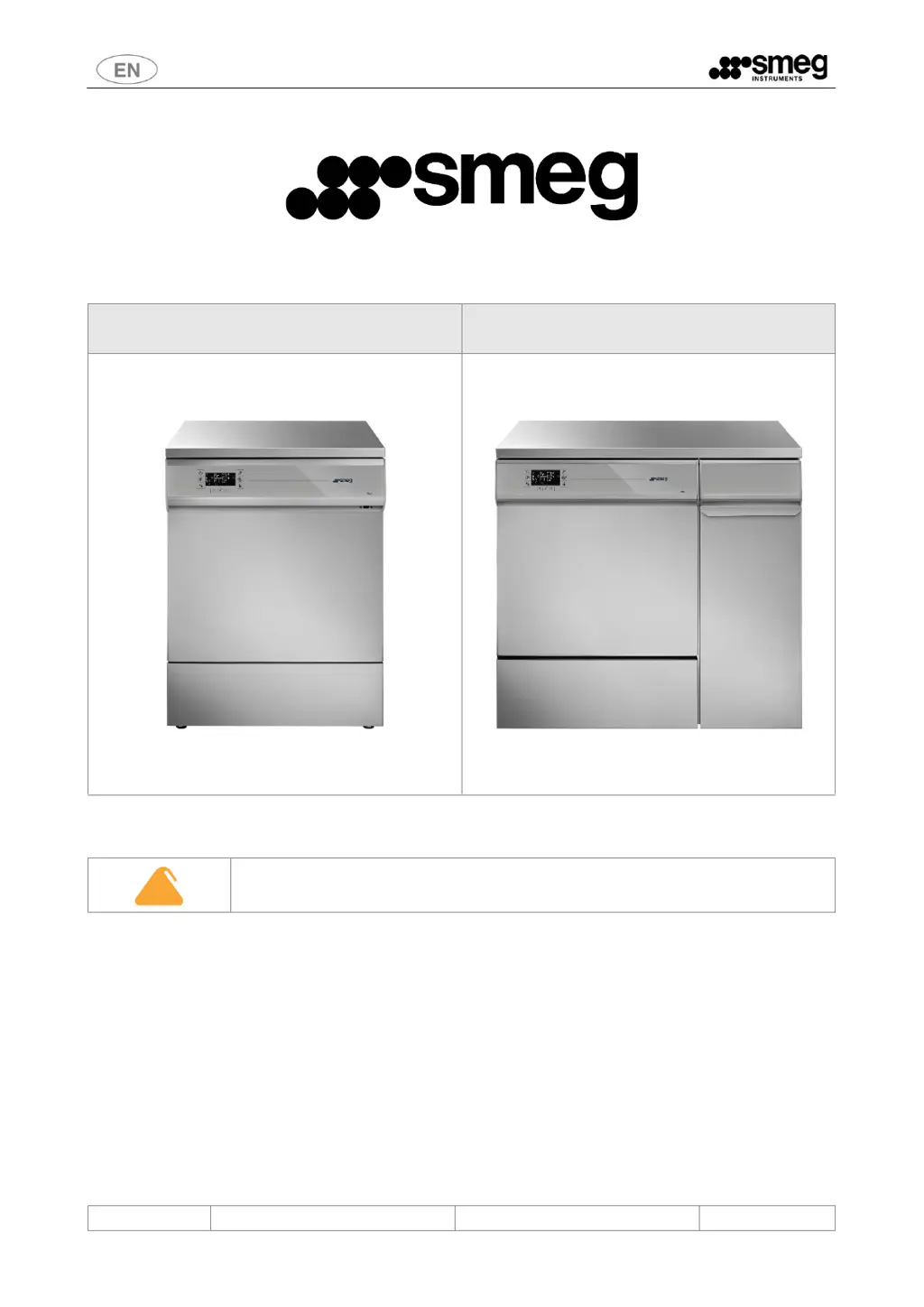
GW0260 - GW1260 - GW4260 - GW4290
193909119 rev.01
Page 1 86
GW0260 - GW1260 - GW4260
GW LABORATORY GLASSWARE WASHERS
USER MANUAL
TRANSLATION OF THE ORIGINAL INSTRUCTIONS

Table of Contents

Questions and Answers

Summary

1 INITIAL INSTRUCTIONS

1.1 READ THIS USER MANUAL WITH CARE

Emphasizes the importance of reading and understanding the manual for safe and correct device operation.

2 INTENDED PURPOSE AND CLASSIFICATION

2.1 INTENDED PURPOSE

Defines the primary function of the glassware washer for treatment of lab components.

2.2 LIFE CYCLE

Specifies the expected lifespan of the device in years or cycles under normal conditions.

2.3 DEFINITION: “RESPONSIBLE BODY IN RELATION TO THE DEVICE

Defines the 'responsible body' for safe use and maintenance as per IEC 61010-1.

2.4 INTENDED USER AND SUPERUSER

Outlines the qualifications and responsibilities of trained staff using the device.

3 PRESENTATION

4 CONFIGURATIONS AND OPTIONAL ACCESSORIES

4.1 Table of accessories

Lists available optional accessories and their features, including symbols key.

4.2 GW0260 Model Specifications

Details the features and specifications specific to the GW0260 model.

4.3 GW1260 Model Specifications

Details the features and specifications specific to the GW1260 model.

4.4 GW4260 Model Specifications

Details the features and specifications specific to the GW4260 model.

4.5 GW4290 Model Specifications

Details the features and specifications specific to the GW4290 model.

4.6 REF - Configuration Identifier

Explains the REF code structure for unique product identification.

5 SAFETY AND PRECAUTIONS FOR USE

5.1 KEY TO THE SYMBOLS USED IN THE MANUAL AND ON THE DEVICE

Provides a guide to all symbols used in the manual and on the device.

5.2 GENERAL WARNINGS

Covers crucial safety information, including load limits and malfunction handling.

5.3 WARNINGS FOR HANDLING THE DEVICE

Details safety precautions for storage, unpacking, and moving the device.

5.4 ACCESSING AND REUSING THE DEVICE AFTER AN INCOMPLETE CYCLE AND ACCESSING THE DEVICE AT END-OF-LIFE

Provides safety instructions for handling the device during incomplete cycles or at end-of-life.

6 OPENING AND CLOSING OF THE DOOR

6.1 MANUAL DOOR UNLOCKING; OPENING PROCEDURE

Explains the emergency procedure for manually unlocking the door.

6.2 OPENING THE HATCH OF THE SIDE CABINET - GW4290 ONLY

Details access to the side cabinet for the GW4290 model.

7 COMMISSIONING

7.1 USING THE WATER SOFTENER

Guides on filling the water softener tank with regenerating salt.

7.2 ADJUSTING THE SPRAY ARM WASHING PRESSURE

Explains how to adjust water pressure for upper and lower spray arms.

7.3 USING DETERGENTS AND LIQUID SUCTION SYSTEM

Covers detergent dispensing and replacing empty jerry cans.

8 BASIC OPERATION

8.1 CONTROL AREA

Describes the device's control panel, display, and buttons.

8.2 BUTTONS

Details the main and secondary functions of each control button.

8.3 DISPLAY AND ICONS

Explains the meaning of various icons and display information.

8.4 PROGRAM PARAMETER INFORMATION AND ADJUSTMENTS

Information on preselected programs and adjusting drying duration.

8.5 SELECTING AND STARTING PROGRAMS

Guides on selecting and starting wash programs.

8.7 PROGRAM RUNNING AND EASY MODE

Describes program execution display and simplified 'Easy Mode'.

8.8 PROGRAM COMPLETED AND AUTO OPENING

Information on successful program completion and automatic door opening.

8.9 PROGRAM COMPLETED WITH ANOMALIES - WARNINGS

Details how warnings are displayed and acknowledged after program completion.

8.10 ALARMS - SERIOUS ANOMALIES

Explains serious anomalies, their codes, and the danger icon.

9 SETUP AND PARAMETER SETTING PROCEDURES

9.1 Accessing the menus

Step-by-step guide to accessing the device's setup and parameter menus.

9.2 Setup and dependent headings

Explains navigation within setup menus and editing values.

9.3 SETTING THE TIME AND DATE

Instructions for setting the device's current time and date.

9.5 DRY HOUR COUNTER AND CYCLE COUNT

Describes read-only counters for drying hours and device cycles.

9.7 PROGRAM ENABLING

Guides on enabling or disabling specific washing programs.

9.8 RESET PROCEDURES

Details various reset options for machine configuration and maintenance.

9.9 PRINT AND LOG MANAGEMENT

Covers printing cycle/parameter data and managing internal logs.

9.11 ABOUT - FIRMWARE VERSION

Explains how to view the installed firmware versions.

9.12 MEMORY AND PRINTOUT

Defines terms and abbreviations used in program records and printouts.

9.13 EDITING CUSTOM PROGRAMS

Provides guidelines for constructing and editing custom washing programs.

10 RECOMMENDED DETERGENTS AND IMPORTANT NOTICES

Recommended detergents for GW products - Laboratory sector

Lists recommended alkaline detergents and acid neutralising agents.

GENERAL PRECAUTIONS FOR MANAGING DETERGENTS AND REPLACING JERRY CANS

Safety guidelines for handling detergents, first aid, and disposal.

11 PREPARING THE LOAD FOR THE WASHING AND DISINFECTION CYCLE

12 ALARMS, WARNINGS, AND BLACKOUT RESPONSE

12.1 WARNINGS AND WARNING TABLE

Explains user-acknowledged warnings and provides a table of warning codes.

12.2 ALARMS AND ALARM TABLE

Describes device alarms, their codes, and provides a comprehensive alarm table.

13 CLEANING AND MAINTENANCE

13.1 PRELIMINARY PRECAUTIONS AND DEVICE CLEANING

Safety precautions before cleaning and general instructions for device cleaning.

13.3 Cleaning the FILTERING UNIT

Instructions for cleaning the various parts of the filtering unit.

13.4 DEVICE STORAGE AND REUSE

Procedures for leaving the device out of use and preparing it for reuse.

13.6 MAINTENANCE AND ROUTINE CHECK TIME INTERVALS

Details daily, weekly, semi-annual, and annual maintenance tasks.

13.7 TROUBLESHOOTING

Provides solutions for common minor problems encountered with the device.

14 INSTALLATION

14.1 PACKAGING REMOVAL AND DEVICE POSITIONING

Instructions for unpacking, handling, and positioning the device.

14.3 INSTALLATION ON STAND

Details on installing the device on an authorized stand.

14.4 ELECTRICAL CONNECTION REQUIREMENTS

Specifies electrical connection types, circuit breakers, and power cables.

14.5 WATER CONNECTION REQUIREMENTS

Covers requirements for cold, hot, and demineralised water connections.

14.6 WATER DRAIN REQUIREMENTS

Details requirements and precautions for the device's water drain connection.

14.7 TECHNICAL CHARACTERISTICS

Provides detailed technical data for water, electrical, ambient, and weight.

14.8 PRODUCT DIMENSIONS AND CONNECTIONS

Illustrates product dimensions and connection points for different models.

14.9 CONNECTIONS AREA - ELECTRICITY AND WATER

Diagrams showing the layout for electrical and water connections.

15 AFTER-SALES SERVICE AND MANUFACTURER CONTACT DETAILS

Summary

1 INITIAL INSTRUCTIONS

1.1 READ THIS USER MANUAL WITH CARE

Emphasizes the importance of reading and understanding the manual for safe and correct device operation.

2 INTENDED PURPOSE AND CLASSIFICATION

2.1 INTENDED PURPOSE

Defines the primary function of the glassware washer for treatment of lab components.

2.2 LIFE CYCLE

Specifies the expected lifespan of the device in years or cycles under normal conditions.

2.3 DEFINITION: “RESPONSIBLE BODY IN RELATION TO THE DEVICE

Defines the 'responsible body' for safe use and maintenance as per IEC 61010-1.

2.4 INTENDED USER AND SUPERUSER

Outlines the qualifications and responsibilities of trained staff using the device.

3 PRESENTATION

4 CONFIGURATIONS AND OPTIONAL ACCESSORIES

4.1 Table of accessories

Lists available optional accessories and their features, including symbols key.

4.2 GW0260 Model Specifications

Details the features and specifications specific to the GW0260 model.

4.3 GW1260 Model Specifications

Details the features and specifications specific to the GW1260 model.

4.4 GW4260 Model Specifications

Details the features and specifications specific to the GW4260 model.

4.5 GW4290 Model Specifications

Details the features and specifications specific to the GW4290 model.

4.6 REF - Configuration Identifier

Explains the REF code structure for unique product identification.

5 SAFETY AND PRECAUTIONS FOR USE

5.1 KEY TO THE SYMBOLS USED IN THE MANUAL AND ON THE DEVICE

Provides a guide to all symbols used in the manual and on the device.

5.2 GENERAL WARNINGS

Covers crucial safety information, including load limits and malfunction handling.

5.3 WARNINGS FOR HANDLING THE DEVICE

Details safety precautions for storage, unpacking, and moving the device.

5.4 ACCESSING AND REUSING THE DEVICE AFTER AN INCOMPLETE CYCLE AND ACCESSING THE DEVICE AT END-OF-LIFE

Provides safety instructions for handling the device during incomplete cycles or at end-of-life.

6 OPENING AND CLOSING OF THE DOOR

6.1 MANUAL DOOR UNLOCKING; OPENING PROCEDURE

Explains the emergency procedure for manually unlocking the door.

6.2 OPENING THE HATCH OF THE SIDE CABINET - GW4290 ONLY

Details access to the side cabinet for the GW4290 model.

7 COMMISSIONING

7.1 USING THE WATER SOFTENER

Guides on filling the water softener tank with regenerating salt.

7.2 ADJUSTING THE SPRAY ARM WASHING PRESSURE

Explains how to adjust water pressure for upper and lower spray arms.

7.3 USING DETERGENTS AND LIQUID SUCTION SYSTEM

Covers detergent dispensing and replacing empty jerry cans.

8 BASIC OPERATION

8.1 CONTROL AREA

Describes the device's control panel, display, and buttons.

8.2 BUTTONS

Details the main and secondary functions of each control button.

8.3 DISPLAY AND ICONS

Explains the meaning of various icons and display information.

8.4 PROGRAM PARAMETER INFORMATION AND ADJUSTMENTS

Information on preselected programs and adjusting drying duration.

8.5 SELECTING AND STARTING PROGRAMS

Guides on selecting and starting wash programs.

8.7 PROGRAM RUNNING AND EASY MODE

Describes program execution display and simplified 'Easy Mode'.

8.8 PROGRAM COMPLETED AND AUTO OPENING

Information on successful program completion and automatic door opening.

8.9 PROGRAM COMPLETED WITH ANOMALIES - WARNINGS

Details how warnings are displayed and acknowledged after program completion.

8.10 ALARMS - SERIOUS ANOMALIES

Explains serious anomalies, their codes, and the danger icon.

9 SETUP AND PARAMETER SETTING PROCEDURES

9.1 Accessing the menus

Step-by-step guide to accessing the device's setup and parameter menus.

9.2 Setup and dependent headings

Explains navigation within setup menus and editing values.

9.3 SETTING THE TIME AND DATE

Instructions for setting the device's current time and date.

9.5 DRY HOUR COUNTER AND CYCLE COUNT

Describes read-only counters for drying hours and device cycles.

9.7 PROGRAM ENABLING

Guides on enabling or disabling specific washing programs.

9.8 RESET PROCEDURES

Details various reset options for machine configuration and maintenance.

9.9 PRINT AND LOG MANAGEMENT

Covers printing cycle/parameter data and managing internal logs.

9.11 ABOUT - FIRMWARE VERSION

Explains how to view the installed firmware versions.

9.12 MEMORY AND PRINTOUT

Defines terms and abbreviations used in program records and printouts.

9.13 EDITING CUSTOM PROGRAMS

Provides guidelines for constructing and editing custom washing programs.

10 RECOMMENDED DETERGENTS AND IMPORTANT NOTICES

Recommended detergents for GW products - Laboratory sector

Lists recommended alkaline detergents and acid neutralising agents.

GENERAL PRECAUTIONS FOR MANAGING DETERGENTS AND REPLACING JERRY CANS

Safety guidelines for handling detergents, first aid, and disposal.

11 PREPARING THE LOAD FOR THE WASHING AND DISINFECTION CYCLE

12 ALARMS, WARNINGS, AND BLACKOUT RESPONSE

12.1 WARNINGS AND WARNING TABLE

Explains user-acknowledged warnings and provides a table of warning codes.

12.2 ALARMS AND ALARM TABLE

Describes device alarms, their codes, and provides a comprehensive alarm table.

13 CLEANING AND MAINTENANCE

13.1 PRELIMINARY PRECAUTIONS AND DEVICE CLEANING

Safety precautions before cleaning and general instructions for device cleaning.

13.3 Cleaning the FILTERING UNIT

Instructions for cleaning the various parts of the filtering unit.

13.4 DEVICE STORAGE AND REUSE

Procedures for leaving the device out of use and preparing it for reuse.

13.6 MAINTENANCE AND ROUTINE CHECK TIME INTERVALS

Details daily, weekly, semi-annual, and annual maintenance tasks.

13.7 TROUBLESHOOTING

Provides solutions for common minor problems encountered with the device.

14 INSTALLATION

14.1 PACKAGING REMOVAL AND DEVICE POSITIONING

Instructions for unpacking, handling, and positioning the device.

14.3 INSTALLATION ON STAND

Details on installing the device on an authorized stand.

14.4 ELECTRICAL CONNECTION REQUIREMENTS

Specifies electrical connection types, circuit breakers, and power cables.

14.5 WATER CONNECTION REQUIREMENTS

Covers requirements for cold, hot, and demineralised water connections.

14.6 WATER DRAIN REQUIREMENTS

Details requirements and precautions for the device's water drain connection.

14.7 TECHNICAL CHARACTERISTICS

Provides detailed technical data for water, electrical, ambient, and weight.

14.8 PRODUCT DIMENSIONS AND CONNECTIONS

Illustrates product dimensions and connection points for different models.

14.9 CONNECTIONS AREA - ELECTRICITY AND WATER

Diagrams showing the layout for electrical and water connections.

15 AFTER-SALES SERVICE AND MANUFACTURER CONTACT DETAILS

Smeg GW0260 Specifications

General IconGeneral
BrandSmeg
ModelGW0260
CategoryLaboratory Equipment
LanguageEnglish

Related product manuals