Changing the Correction Tape
~~~-,
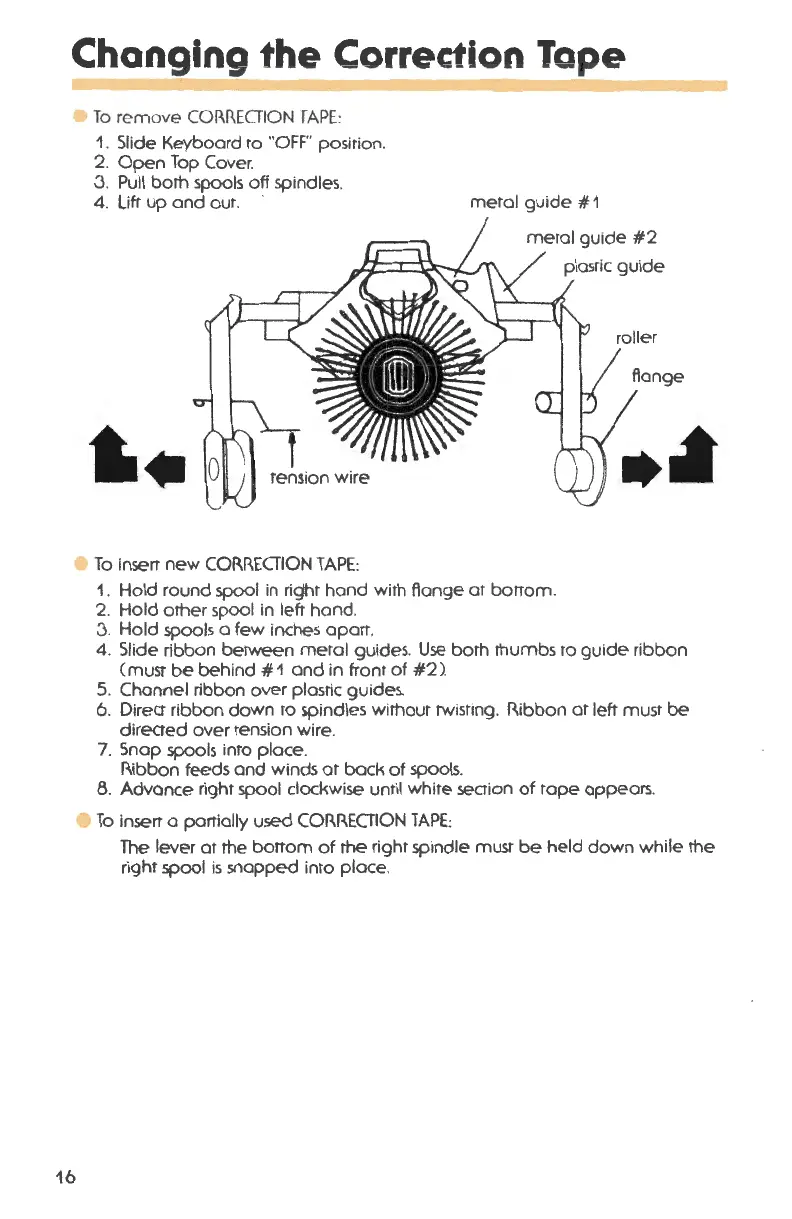
e To remove CORRECTION TAPE:
16
1. Slide Keyboard to "'OFF" position .
2. Open Top Cover.
3. Pull both spools off spindles.
4. Lift up and out. metal guide
# 1
To insert new CORRECTION TAPE:
1. Hold round spool in right hand with flange at borrom .
2. Hold other spool in left hand .
3. Hold spools a few inches apart .
4. Slide ribbon between metal guides. Use both thumbs to guide ribbon
(must be behind #1 and in front of #2) .
5. Channel ribbon over plastic guides.
6. Direct ribbon down to spindles without twisting. 11.ibbon at left must be
directed over tension wire.
7. Snap spools into place .
Ribbon feeds and winds at back of spools.
8. Advance right spool clockwise until white section of tape appears .
e To insert a partially used CORRECTION TAPE:
The lever at the bottom of the right spindle must be held down while the
right spool is snapped into place .




 To Next Page