• To gain access to ribbon cassette, prinrwheel. correction tape and impression
control:
1. Slide KEYl3OARD switch down to turn keyboard oft.
2.
Lift cover (23)
Power remains on with POWER switch in "on" position .
Ribbon Cassette: P.emoving
and Inserting .
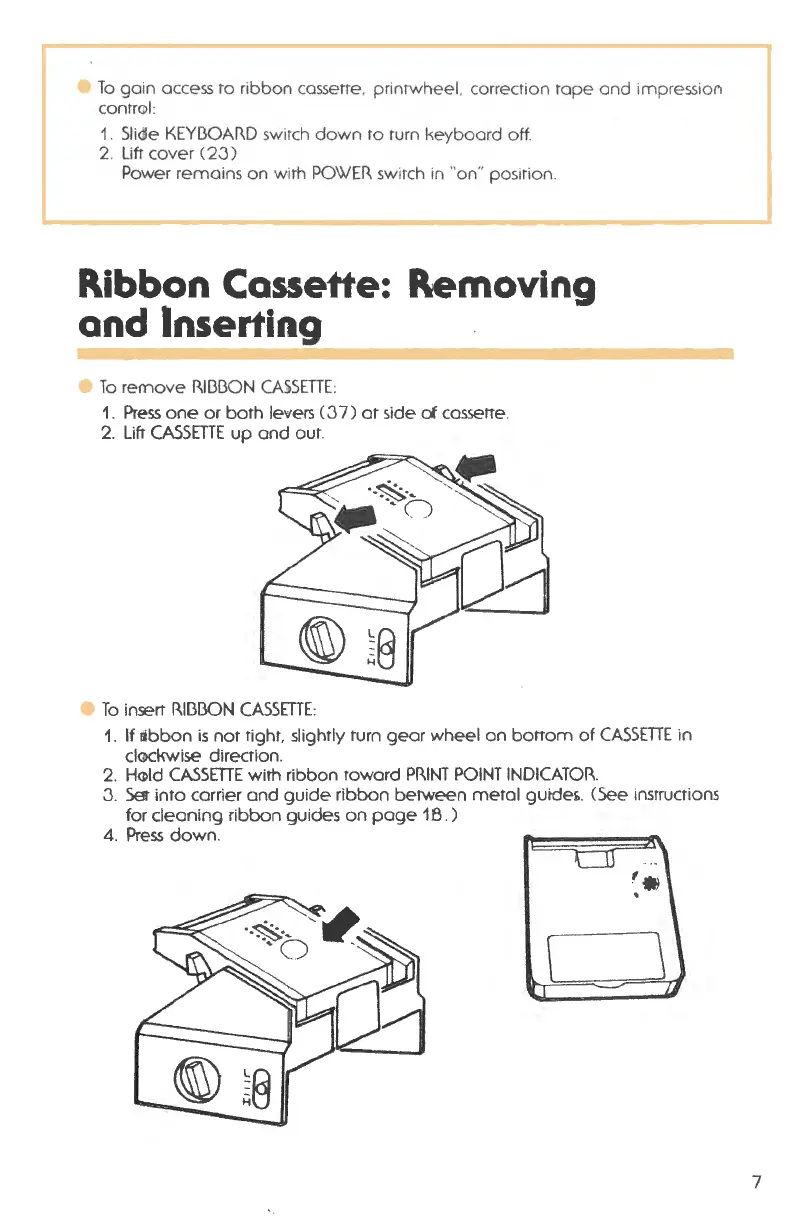
e To remove Rll313ON CA.iSETTE:
1. Press one or both levers (37) at side
of cassette.
2.
Lift CASSETTE up and out.
e To insert Rll313ON CASSETTE:
1. If libbon is not tight, slightly turn gear wheel on bottom of CASSETTE in
cl@ckwise direction .
2. H@ld CASSETTE with ribbon toward PRINT POINT INDICATOR.
3.
Set into carrier and guide ribbon between metal guide£.. (See instructions
for cleaning ribbon guides on page 18 . )
4. Press down .
'•
.
\
\
7



 To Next Page