8
Printwheel: P.emoving
and Inserting
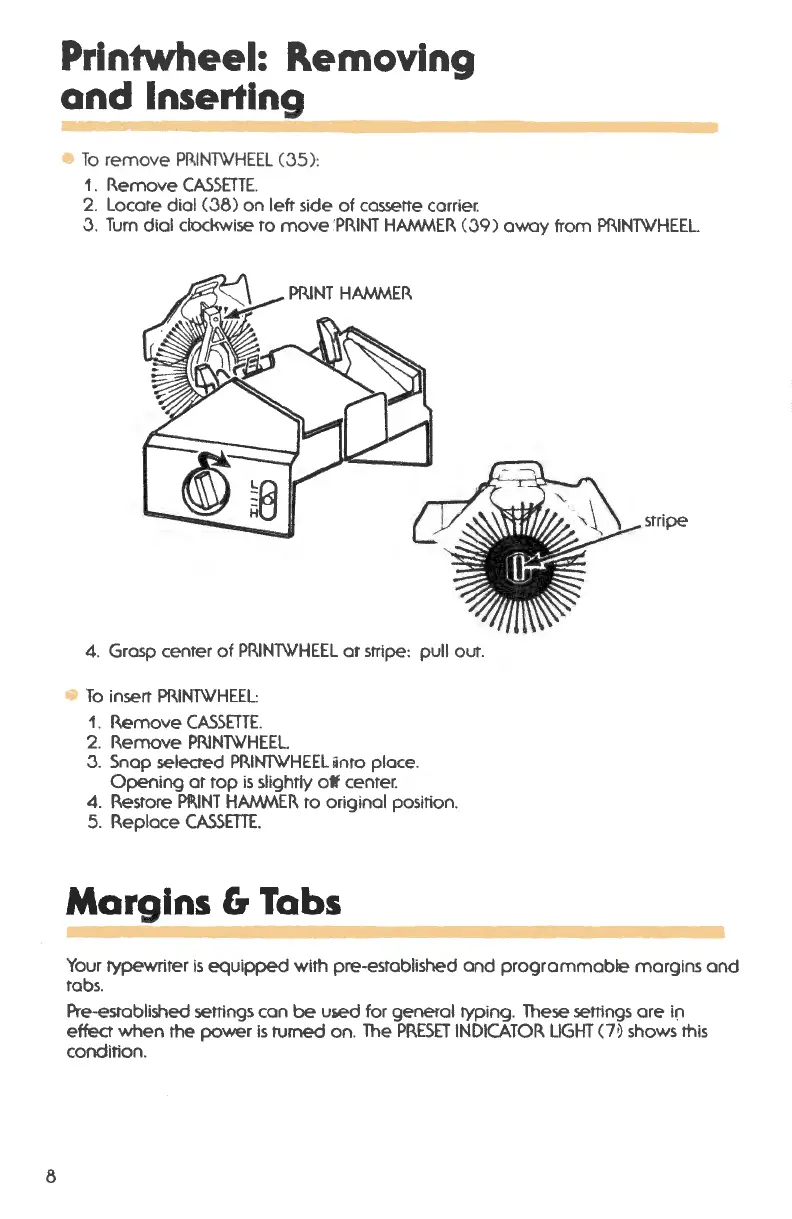
• To remove PRINTWHEEL (35):
1. Remove CASSETTE.
2. Locate dial (38) on left side of cassette carrier.
3. Turn dial clockwise to move'PRINT HAMMER (39) away from PRIN'TWHEEL.
stripe
4. Grasp center of PRINTWHEEL or stripe: pull out .
• To insert PRINTWHEEL:
1. Remove CASSETTE.
2. Remove PI\INTWHEEL.
3. Snap selected PRINTWHEELiinto place .
Opening at top is slightly otf center.
4. Restore PP.INT HAMNIER to original position .
5. Replace CASSETTE.
Margins 6 Tabs
Your typewriter is equipped with pre-established and programmabte margins and
tabs.
Pre-established settings can
be used for general typing. These settings are ift
effect when the power is turned on . The PRESET INDICATOR LIGHT (7 ~ shows this
condition .



 To Next Page