III
. INSTALLATION PROCEDURES
P. 3
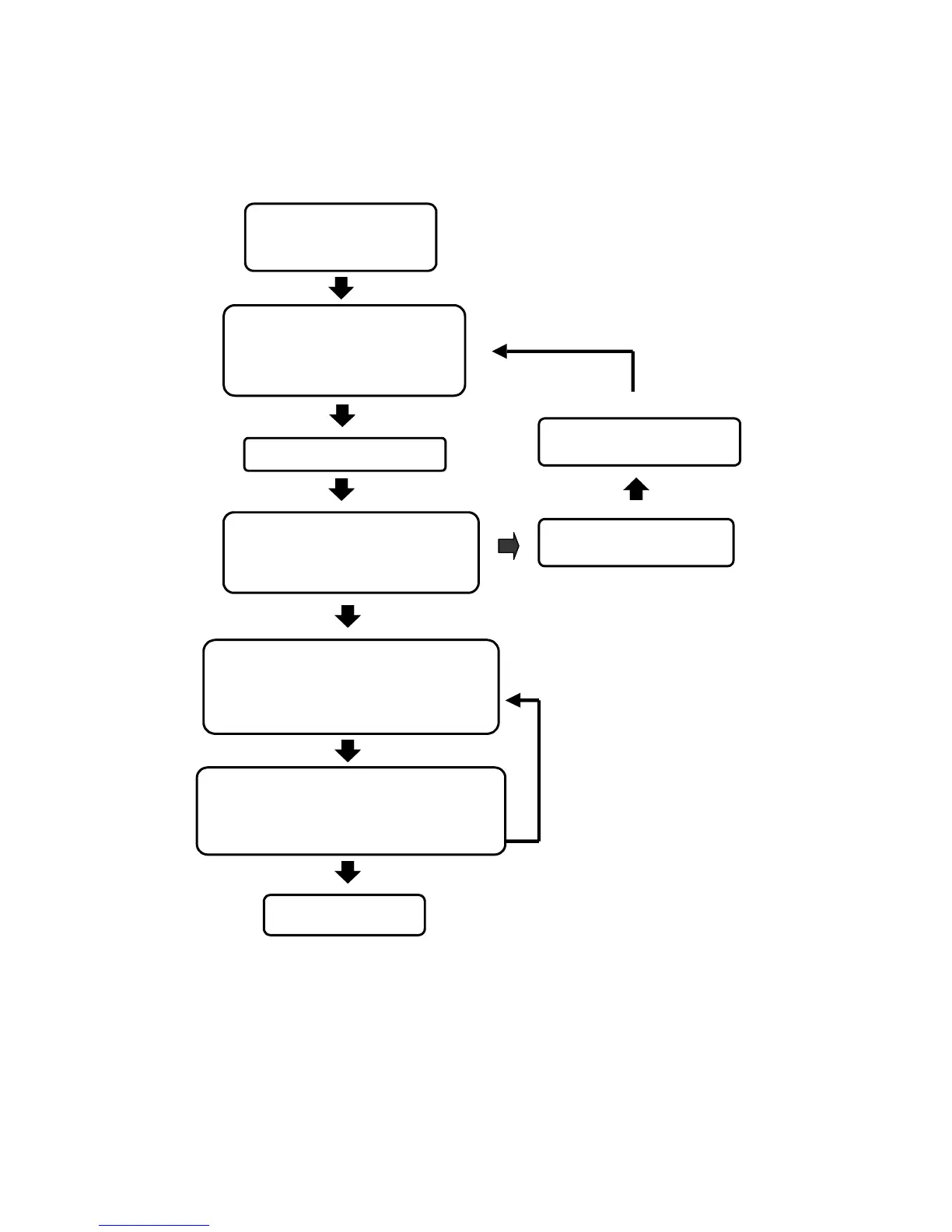
T
NO
Ensure the power adapter’s
voltage and pole are correct.
YES
Locate a right position to
install the reader unit. Please
refer to appendix A.(page 17)
Depending on the user’s requirement,
install either the 6-pin or the 8-pin
connector. Please refer to item 5,
installation guide at page. 12-14.
Supply the power to the reader.
Check if the power (RED) indicator
brightens up. Then, observe for a beep
sound and the screen will show
“ ST-660 2 “
If not, cut the power supply
immediately.
If yes, enter the system password ( # 5678#),
then, observe a beep sound and that the
yellow indicator flashes. If so, then it is in
the setting mode.
If there isn’t any activation within
20 seconds, this system will
automatically escape out from the
setting mode.
Completion of setting
Enter 1 (register the proximity card) or 6
(batch registration). Then, register all the
user’s proximity cards and key tags. After
that, press R to escape from the setting mode.


 To Next Page