24 / 47
11)*Set discharge depth (only for DEFAULT battery type)
Press “Up” or “Down” to change the 1
st
digit, press “OK” to switch to next digit. After changing the discharge depth
per your battery specification, press “Ok”, then “Set empty discharge voltage” will pop up.
12)*Set empty discharge voltage (only for DEFAULT battery type)
Press “Up” or “Down” to change the 1
st
digit, press “OK” to switch to next digit. After changing the empty discharge
voltage per your battery specification, press “Ok”, then “Set full charge voltage” will pop up.
13)*Set full charge voltage (only for DEFAULT battery type)
Press “Up” or “Down” to change the 1
st
digit, press “OK” to switch to next digit. After changing the full charge voltage
per your battery specification, press “Ok”.
Congratulations, HYD3000/4000/5000/6000-ES’s first-time setup is complete. Please press “OK” to enter the main
interface.
6.3. Commissioning
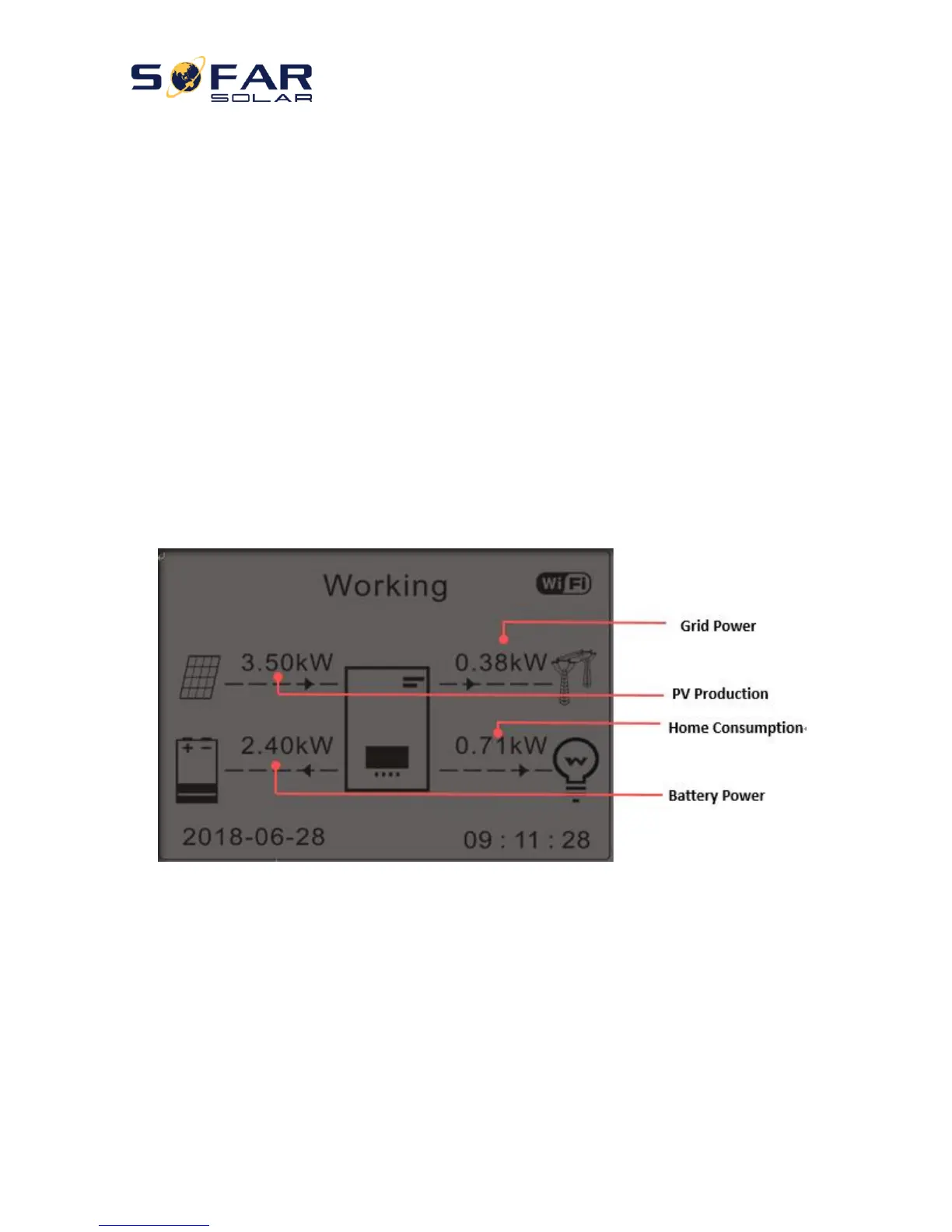
The main interface:
Fig 17. Main interface
If you didn’t change the work mode of HYD-ES inverter, which means HYD-ES inverter is working in “Auto Mode”:
While “PV Production” > “Home Consumption”
If the battery is not full. HYD-ES inverter will charge the battery.
While “PV Production” < “Home Consumption”
If the battery is not flat. HYD-ES inverter will discharge the battery.



 To Next Page