Default UI: Smooth ramping
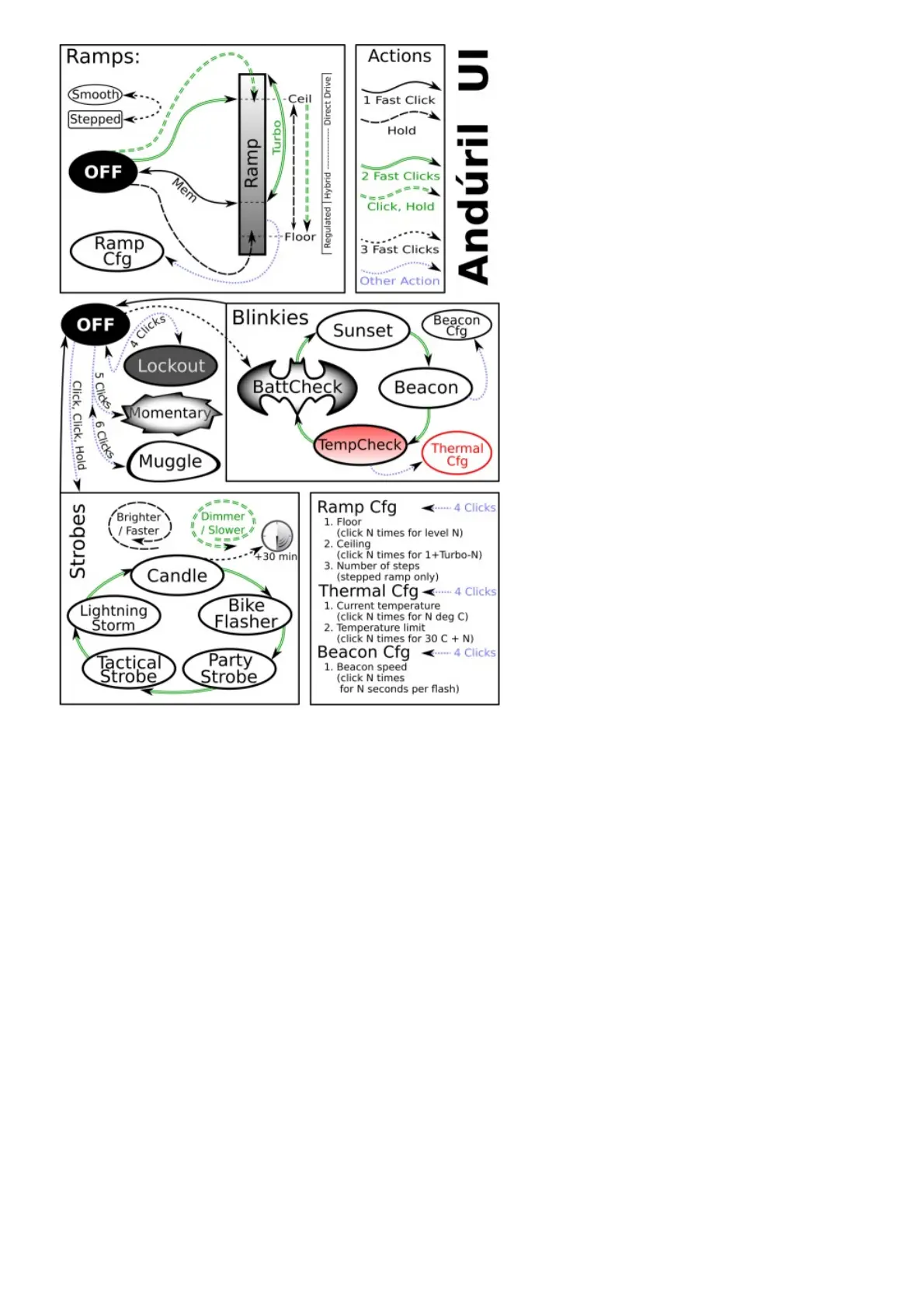
This UI provides smooth dimming of the light output between FLOOR (lowest level) and CEILING
(highest level), with an easily accessible 100% TURBO mode.
Switch to STEPPED RAMP: If the lamp is ON: Three clicks (Hint: If you use 3 clicks from OFF you
engage battery check)
Turn the lamp ON: single-click the button, the SP36 turns ON using the previously used light output
level (MEM)
Ramp up; brighter: hold the button Reverse ramp: while ramping in one direction, release button
briefly and hold again
Ramp down; darker: Click, hold, when ON (means: double-click, but hold the second click a bit
longer) If you do this when the lamp is OFF, it ramps down from the CEILING (dashed double lines)
Instant top CEILING: from OFF: double-click (double lines)
TURBO: from ON: double-click toggles between turbo and the memorized level from OFF (You must
first switch ON): Click, then double-click
FLOOR / MOON mode: from OFF: Hold turns on at the FLOOR level, it makes a subtle “blink” to
provide a timing hint if you want to stay there. If you keep holding, it ramps up
Battery check: from OFF: triple-click (4 blinks, a short pause, then 1 blink would indicate 4.1 V)



 To Next Page