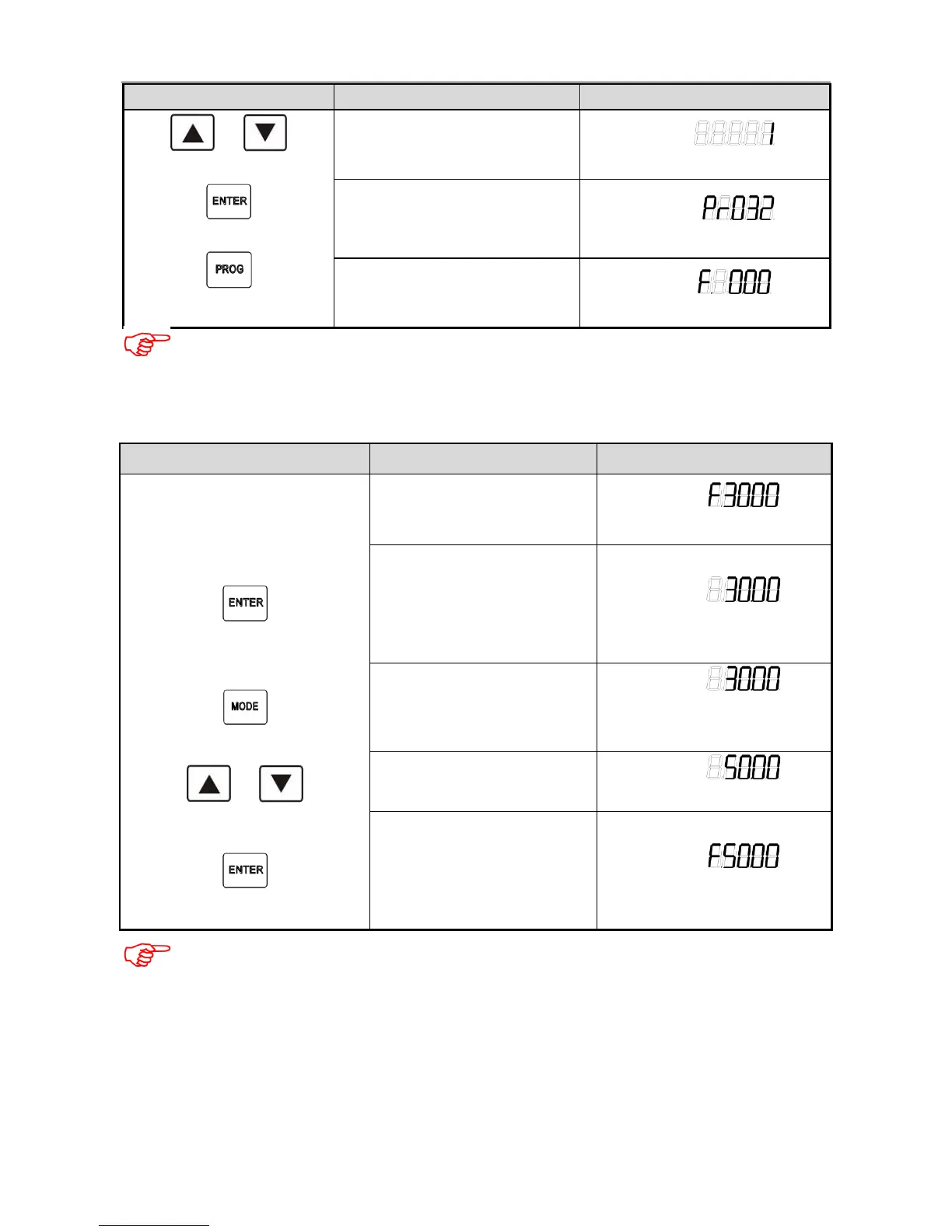
Operation Description Display
or
↓
↓
Change parameter value
Example:
Indicate: 1
Confirm and save the parameter
value
Display next parameter number
Example:
Indicate: Pr.32
Quit from the parameter display
mode
Display current running data
Example:
Indicate:0.00Hz
Note:
When controller is operating, the control parameters can only be read.
The control parameters can be modified after the controller stops operation.
Change target frequency during operation
Operation Description Display
Initial status
↓
↓
↓
or
↓
Display current running data
Output frequency of the controller
Example:
Indicate:30.00Hz
Enter the parameter
modification interface
Display the current target
frequency
Example:
Indicate: 30.00Hz
Switch the digit to modify
(unit, decade, hundred)
Example:
Indicate: the blinking digit can be
modified
Modify the target frequency
Example:
Indicate: change to 50Hz
Confirm the change and save
the target frequency
Display current operation
frequency of the controller
Example:
Indicate: 50Hz
Note
:
The modification can be only applied when Pr.33 value is 0
3.3 Function Parameter Description


 To Next Page