23
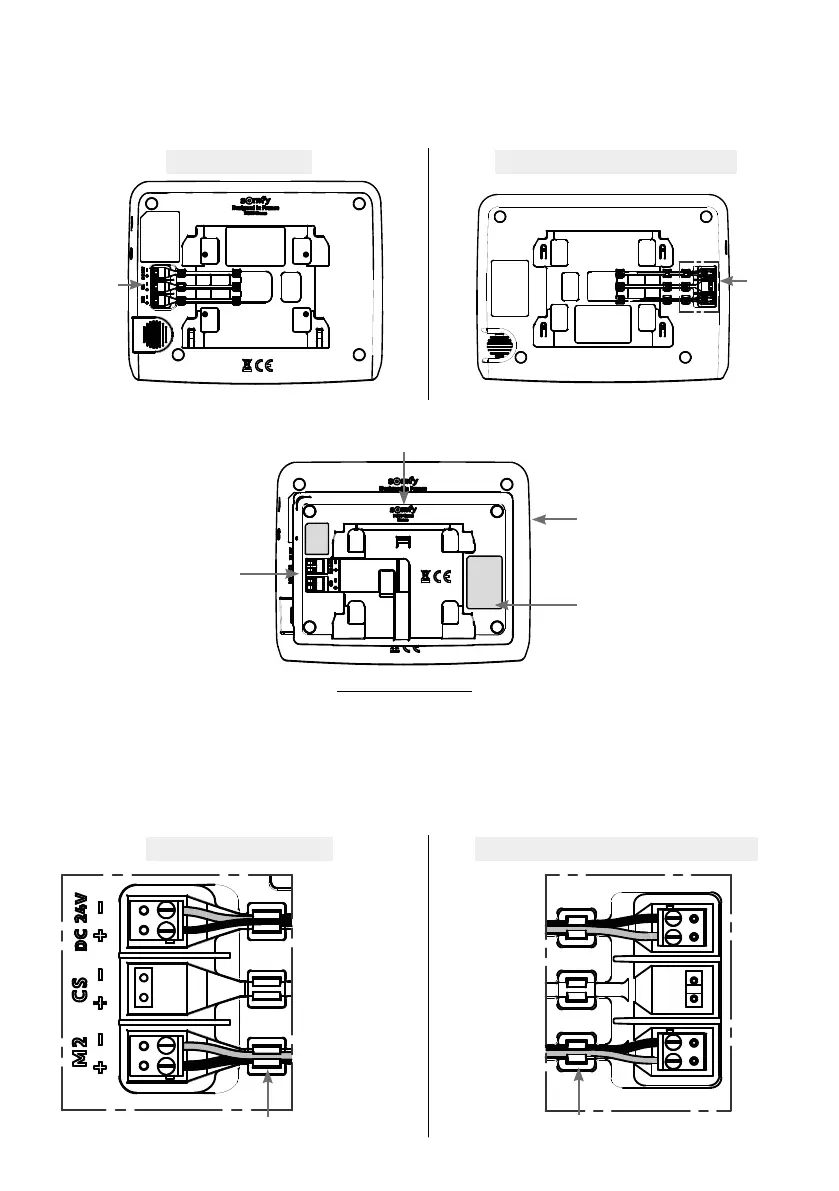
CONNECTING THE CONNECTIVITY MODULE TO THE MONITOR:
• Mount the monitor on a bracket, with the screen downwards in the direction shown below, and making sure that it is
protected.
V®350 monitor V®500 / V®500 PRO io monitor
Top
Bottom
Terminal
blocks
• Without connecting it, position the connectivity module on the back of the monitor, adhering to the orientation below:
Top
Monitor screen downwards
Module back facing you
Bottom
Module terminal
blocks on the left
Orientation to be adhered to
Module logo on top
• Connect the connectivity module connection cables to the back of the monitor:
- The blue power supply connector fitted with red and black wires on the 24V DC terminal block.
- The call station blue connector fitted with yellow and green wires on the 2nd monitor terminal block.
- Do not connect anything to the Call Station terminal block.
• Insert all the cables into the cable grommets.
V®350 terminal blocks V®500 / V®500 PRO io terminal blocks
Power supply
Red and black wires
Do not connect
anything to
the Call Station
terminal block
Call station
Yellow and green wires
Cable grommet
Cable grommet
Power supply
Red and black wires
Do not connect
anything to
the Call Station
terminal block
Call station
Yellow and green
wires
24V DC
Call station
2 nd monitor
Top
Bottom
Terminal
blocks



 To Next Page