Lodestar Hardware
Manual
Document Ref: UM-8084-
Issue: A– Rev
© Sonardyne International Limited 201
6.5 Recovery Procedures
There are procedures that can be followed to recover the Lodestar to a known
state in the event of a problem. These procedures are explained below.
Lodestar
6.5.1 Lodestar Reset
The Lodestar can be commanded to perform a hardware reset if shutting down the
unit via the configuration software, command line or external switch (surface unit
only) is not possible.
To perform hardware reset the user must be connected to the Lodestar serially via
the console port using a terminal package such as HyperTerminal. Make sure the
connection to the Lodestar is 9600 baud and RS232 protocol. If these conditions
are met, the Lodestar can be restarted by typing UNLK, and then return in the
terminal window (note the use of uppercase letters). You may need to enter UNLK
and press return several times.
Factory
Settings
6.5.2 Restore Lodestar Factory Settings
Lodestar can be commanded to restore its factory default settings.
If factory settings are restored the all previous user defined
settings in Lodestar will be lost. It is recommended a careful
note is taken of any required settings before restoring factory
settings. See AHRS Operation Manual UM-8084-
The Lodestar PC Utility can be used to restore Lodestar to its default state. This
procedure will succeed even if the current baud rate of Lodestar isn’t known.
Connect the Lodestar directly to the PC using Lodestars Console port. If using a
test cable then check that the blue connectors are joined to put Lodestar into an
RS232 mode. Apply power to the Lodestar and wait 2 minutes for it to start up.
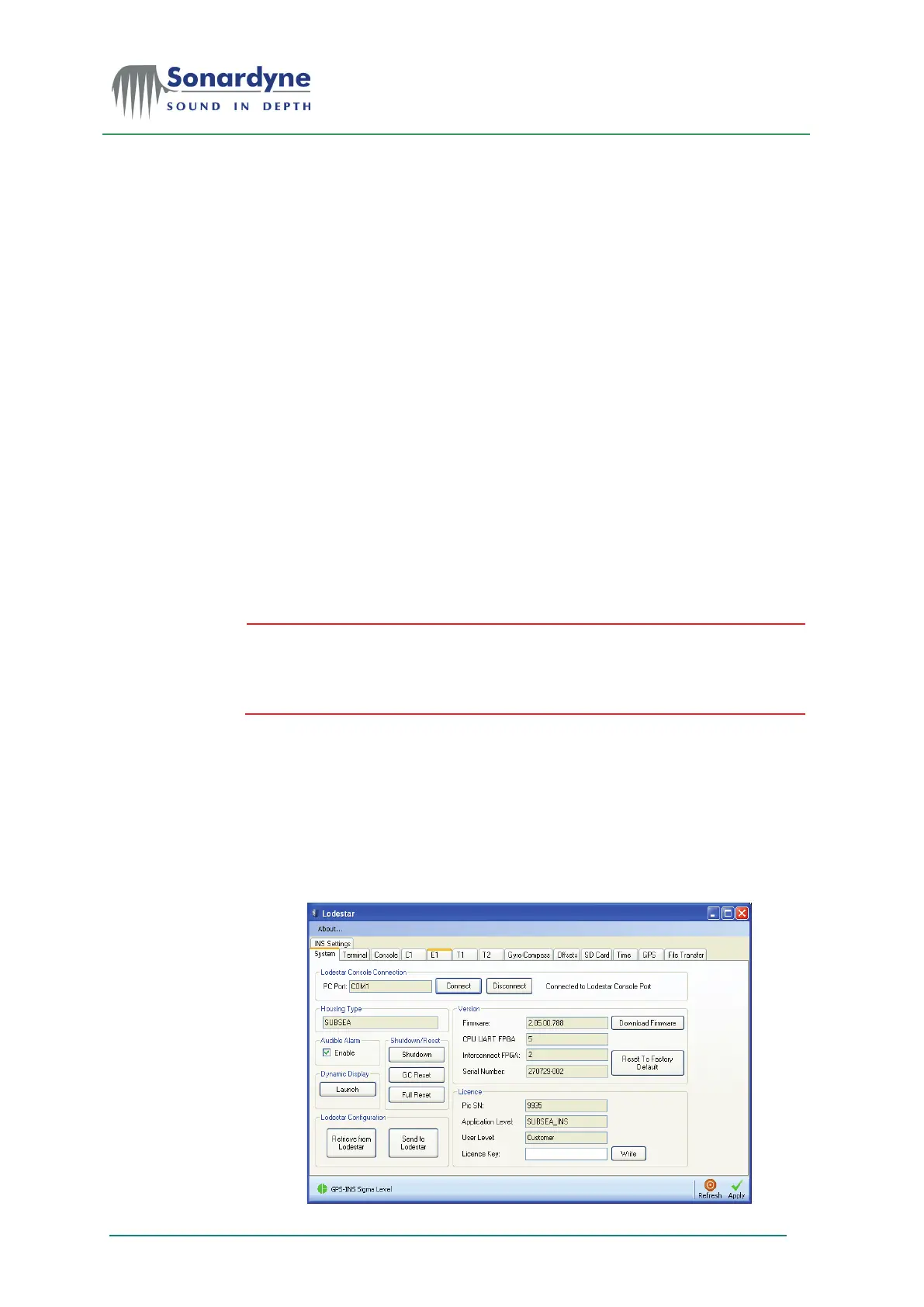
Open the Lodestar PC Utility and attempt to Connect to Lodestar.
Figure 12 – PC Utility Connection


 To Next Page