5
Chapter 3 – Card Installation Steps and Setup Completion Information
7. Remove the PCIe card from its packaging, handling the card by its
edges and without touching any components or gold connector
pins.
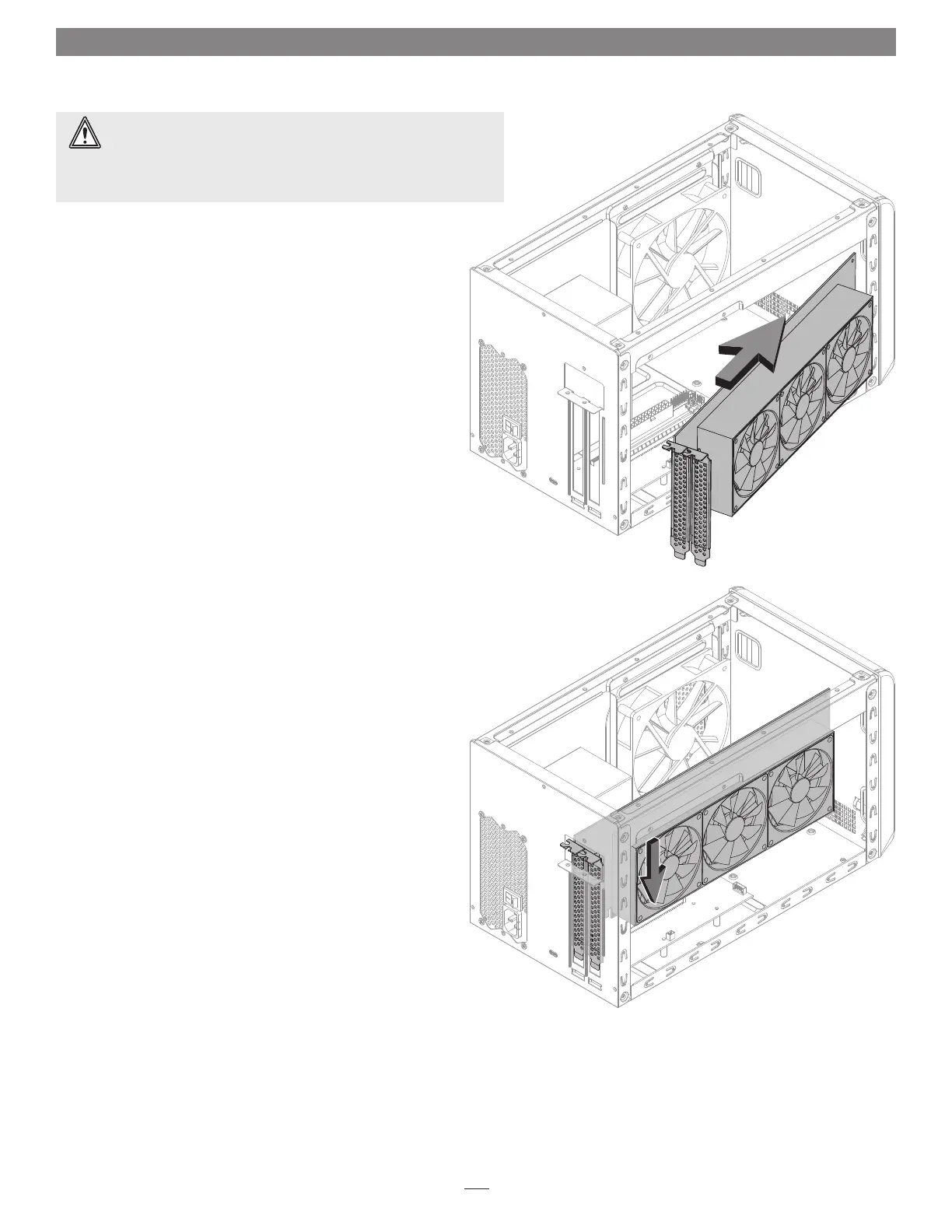
8. Insert the PCIe card into the inner assembly through the top or
side, depending on the size of your card (Figure 4). Please note
that in some instances, it may be necessary to remove the main
fan in order to insert the card into the inner assembly.
9. Line up the card’s connector with the PCIe slot, and then gently but
firmly press the card straight into the slot; do not rock the card or force
the card into the slot. If you encounter excessive resistance, check the
card’s connector and the slot for damage, and then try inserting the
card again (Figure 5).
10. If necessary, connect the auxiliary power connectors to the card.
Figure 4
Figure 5
WARNING: When handling computer products, take care to prevent
components from being damaged by static electricity; avoid working
in carpeted areas. Handle PCIe cards only by their edges and avoid touching
connector traces and component pins. Also, avoid touching the box’s circuit
boards and any of its components.




 To Next Page