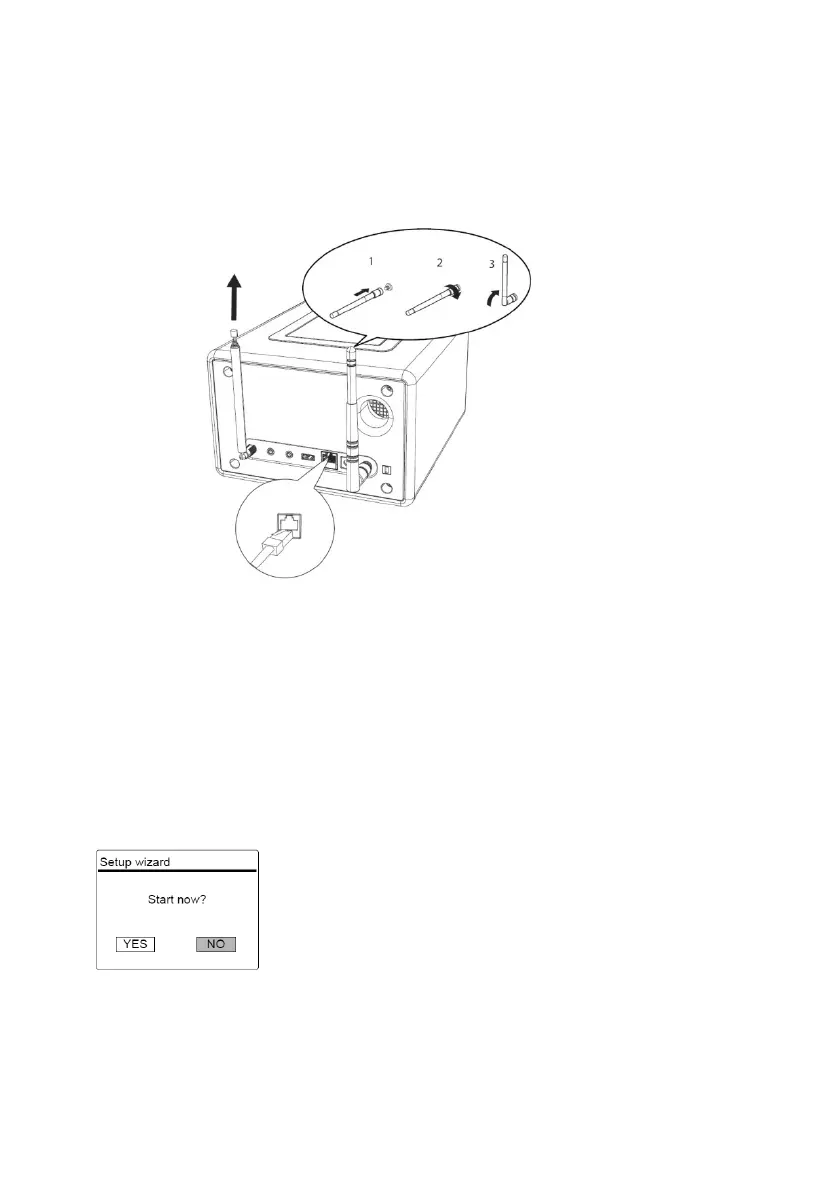
3.
Screw the desired Wi-Fi antenna located on the back of ELITE to the WiFi
antenna connector. Lift Wi-Fi antenna upwards.
4.
If you want to connect ELITE to your network using an Ethernet cable,
connect an Ethernet cable from LAN port on the back of ELITE to your
router.
3.5 Performing initial setup
When ELITE is powered on for the first time, the “Language’ (to be used in the
display) selection appears on the display. Then, the “Setup wizard” appears on
the display. Follow the instructions below to configure some basic settings.
1.
When the “Setup Wizard” is displayed, press
+
or
▬
on the remote
control (or
rotate the navigation knob) to select “YES” and then press
to start the
setup.
2.
You are then prompted to select:
•
Time format (12 or 24-hour),
•
Source of auto update for clock time and date (Update from Radio, Internet
or no update).
Depending on the selection you have made, follow the instructions on the
display to further set up date and time, time zone, daylight saving or wireless
68 © sonoro audio GmbH 2019



 To Next Page