8
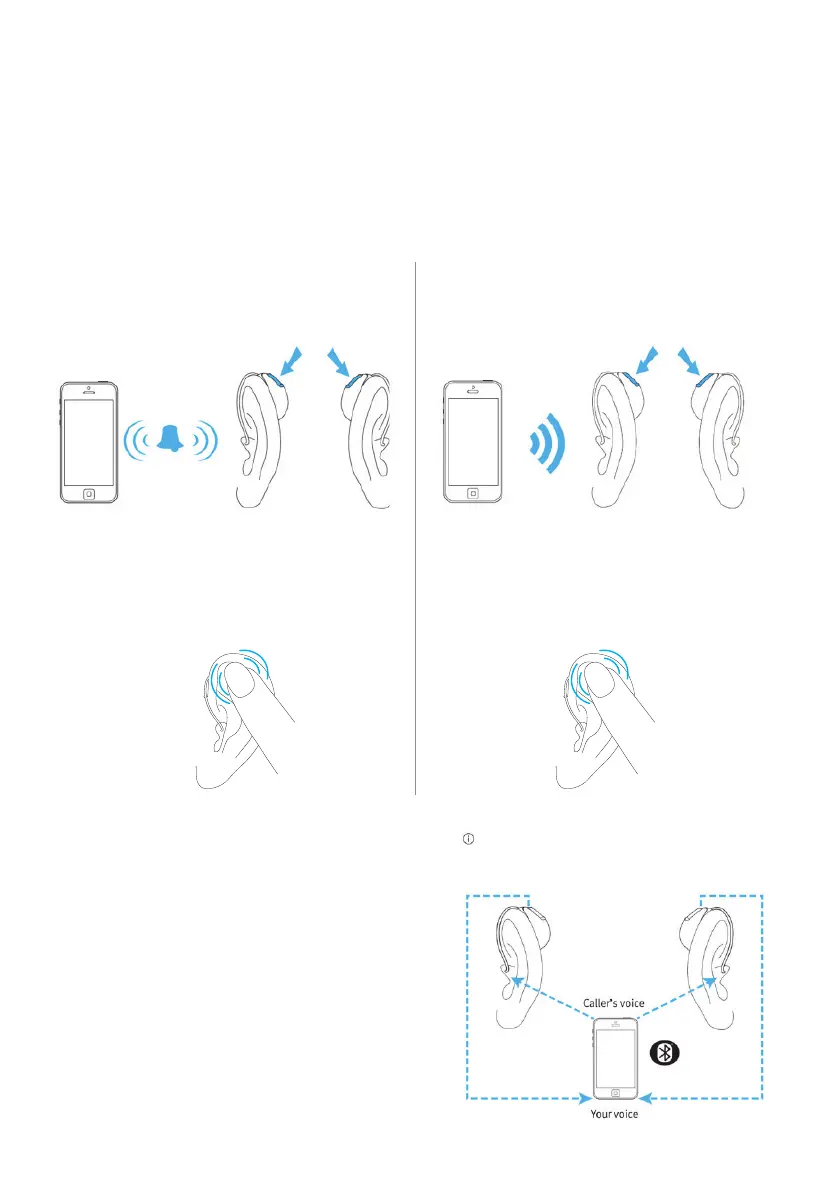
When the phone rings, accept the call with a short push (< 2 seconds) on either the
upper or lower part of the button on either hearing aid. A long push (> 2 seconds)
on either the upper or lower part of the button on either hearing aid rejects the call/
sends the call to voicemail/ends the call.
Answer a phone call Reject a phone call/send to voicemail/
end a call
Or
Double tap with
Tap control
(Moxi B-R and Moxi B-RT)
Or
End call with Tap control by
double tapping
(Moxi B-R and Moxi B-RT)
How to answer Bluetooth
®
phone calls
short press < 2 seconds long press > 2 seconds
Votre voix
Voix de l’appelant
You do not need to hold your mobile phone close
to your mouth, your voice is transmitted through the
hearing aids to your mobile phone.
P
hone calls on a mobile phone
Discover, Discover Next and Blu hearing
instruments allow direct communications
with Bluetooth
®
compatible phones (hands-
free classic profile). When paired and
connected to a phone, your client will hear
the voice of their caller in both ears directly
from the hearing instruments. The hearing
instruments also pick up your client’s voice
using its own microphones.




 To Next Page