151
Menu List
Appendix
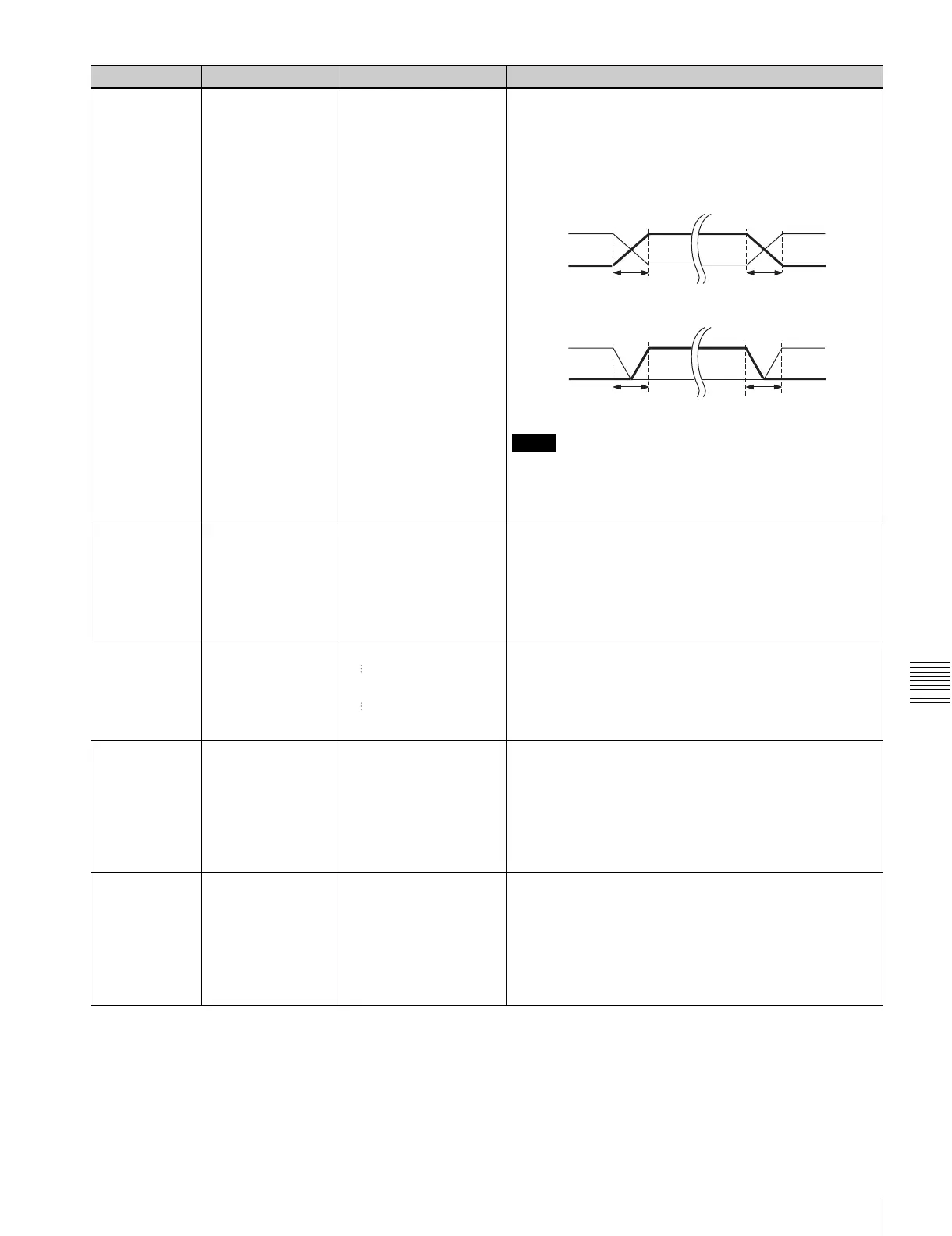
317 AUDIO EDIT MODE cut edit
[cross fade]
fade in/out
Specifies the type of editing for digital audio signals.
cut edit: Cut editing (discontinuity in audio signal may result
at the join, causing noise.)
cross fade: Cross-fade (see figure below.)
fade in/out: Fade-out and fade-in (see figure below.)
Notes
• The “t” in the figures above is the time set by item 811.
• When editing non-audio data, be sure to select “cut edit”.
• Noise may be produced during the editing of certain non-
audio data.
318 EDIT RETRY off
[on]
Set this item when the VTR is used as a recorder during
VTR-to-VTR editing. Specifies the action taken when the
recorder fails to synchronize with the player VTR.
off: Editing is not executed and the VTR enters STOP
mode.
on: The VTR automatically repeats the editing (not more
than twice).
320 PLAY COMMAND
DELAY START
TIME
–30 frame
[0 frame]
+30 frame
This adjusts the time in frames required between the issue
of a playback command and this unit actually beginning the
execution of the command. This adjustment is useful for
synchronization between VTRs with widely differing start-
up timing.
321 VIDEO PREVIEW
MODE
[VVV]
VBV
During a preview operation, this selects the video signals
that can be monitored on the monitor output and line output
connectors.
VVV(VIDEO-VIDEO-VIDEO): In the editing interval the
monitored signal is the player video signal or video
input (EE) signal.
VBV(VIDEO-BLACK-VIDEO): In the editing interval the
monitored signal is a black signal.
322 AUDIO PREVIEW
MODE
[SSS]
SMS
During a preview operation, this selects the audio signals
that can be monitored on the monitor output and line output
connectors.
SSS: SOUND-SOUND-SOUND: In the editing interval the
monitored signal is the player audio signal or audio
input (EE) signal.
SMS: SOUND-MUTE-SOUND: In the editing interval the
audio signal is muted.
Item number Item Setting Function
CROSS FADE
PB
INPUT
FADE IN/OUT
PB
INPUT
IN
IN
OUT
OUT
tt
tt


 To Next Page