30
3-1 Connecting External Equipment
Chapter 3 Setting Up the VTR
3-1-2 Making NTSC/PAL Digital Connections
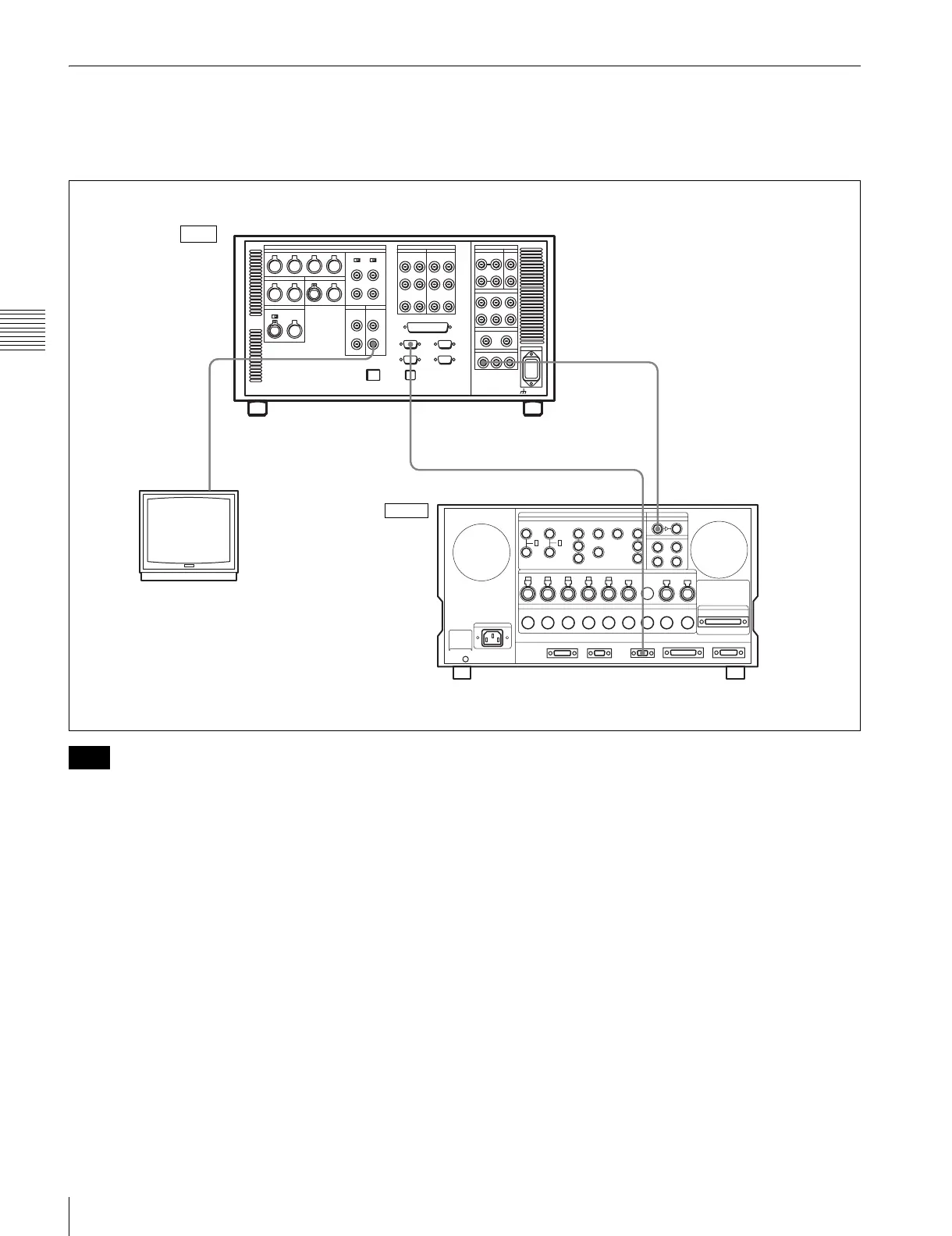
This example shows how to connect two VTRs, an SRW-
5000/5500 as the player and a DVW-500 D-1 Component
Digital VTR as the recorder.
For color frame editing using the SRW-5000/5500 as the
player and an NTSC/PAL digital device as the recorder, set
the VTR SETUP menu item 005 “SERVO/AV
REFERENCE select” to “external” and set the menu item
006 “EXTERNAL REFERENCE select” to “extern SD”.
REMOTE 1-IN(9P)
SD OUT
COMPOSITE (MONITOR)
SD SDI OUT
DIGITAL I/O SERIAL V/A INPUT
REMOTE 1-OUT
SRW-5000/5500 (Player)
a)
BNC cable
9-pin remote control cable
BNC cable
Video monitor
(NTSC/PAL monitor)
DVW-500 (Recorder)
a) The figure shows the SRW-5500.
Input
Output
Note


 To Next Page