86
4-4 CUE Menu
Chapter 4 Menu Settings
To close the window
Press the [F8] (TAPE INFO) button again.
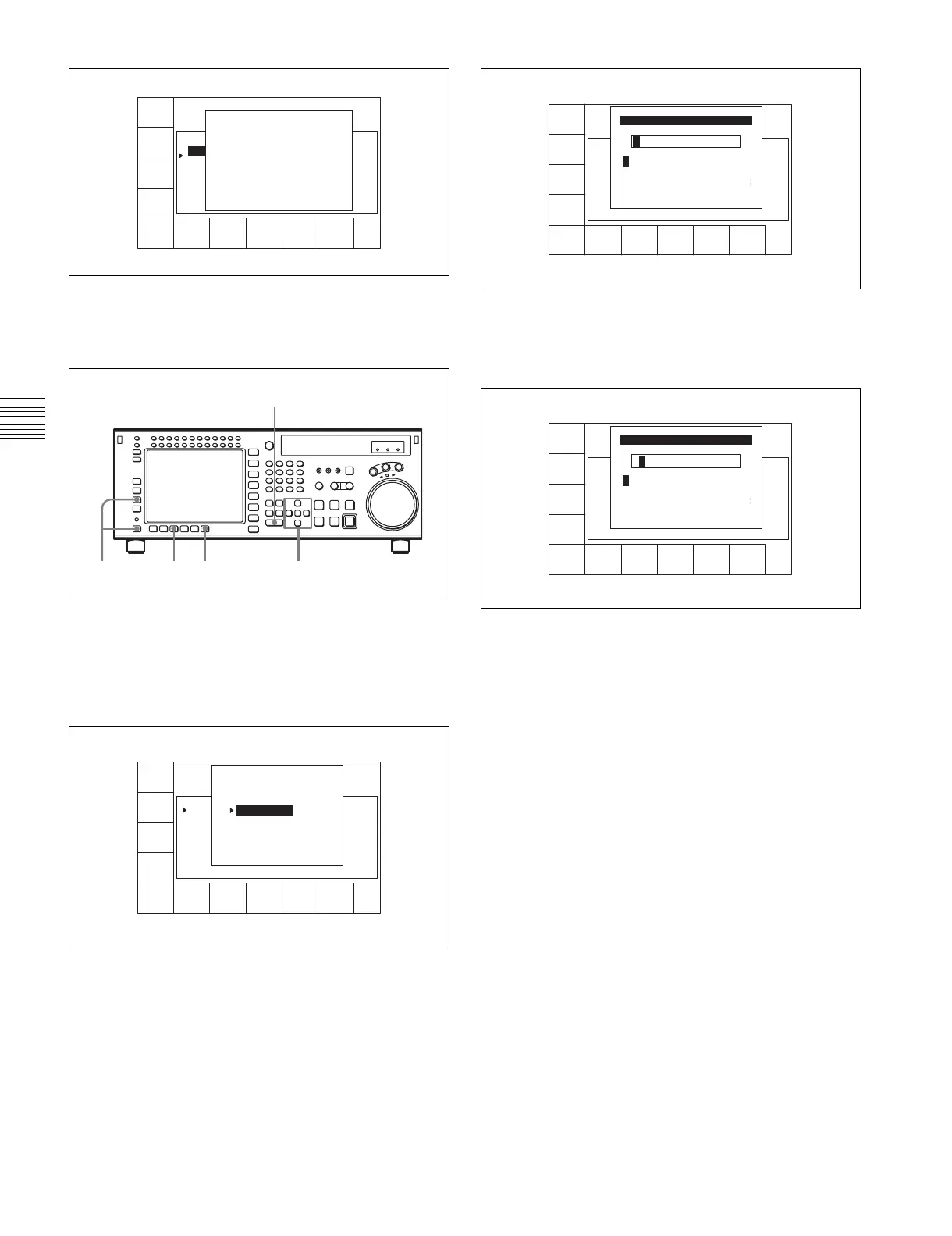
To change ID or ADMIN data
1
Press the ALT/[F3] (ATTRIB EDIT) buttons.
2
Press the R or r button to select “ID” (tape ID) or
“ADMIN” (administrator), then press the ENTRY
button.
3
Press the T or t button to select a character.
4
Press the[F7] (SET LETTER) button or the cursor
center button.
The selected character is entered.
5
Repeat steps 3 and 4 to enter more characters.
To enter a space
Press the [F5] (SPACE) button.
If you enter a wrong character
Press the [F6] (BACK SPACE) button to go back.
Then re-enter the character.
To start the procedure over again
Press the [F9] (CANCEL) button to start again.
To change a character
Press the cursor R button to move the cursor to the ID
or ADMIN box. Then press the cursor T or t button
to move the insertion position.
If entered text is longer than the ID or ADMIN box
t or T appears to the left or right of the box.
6
Press the [F10] (SAVE/EXIT) button.
The screen that was on before the ID or ADMIN data
was changed is displayed again.
CUE
SCAN
ENTRY
POINT
COMMNT
EDIT
CHANGE
DATA
DEL
POINT
PRO-
TECT
TAPE
INFO
CUENUM
POINT
WRITE/
EXIT
MARK
REC DATE[2003/02/25] EOS[01:01:24:15]
TITLE[ ] Rest100%
No. Time Mrk Tk Cut Scn
0 00:01:02:03 NG 00:01:01:03
1 --:--:--:-- KP --:--:--:--
2 00:03:04:03 OK @ 00:03:03:03
3 00:04:04:03 OK 00:04:03:03
4 00:05:05:03 NG 00:05:04:03
5 00:06:06:03 OK 00:06:05:03
6 --:--:--:--
TAPE INFORMATION
ID: 001234567 TITLE
ADMIN: Kanrisha
MODEL: HDW-700
SERIAL NUMBER:000123
WRITE PROTECT: ON
TAPE THREAD COUNT: 123
CUE POINT NUMBER: 5
CONTROL MODE: panel
SIZE: 1024 USED: 234
2,3,446
2
1
FORMAT
T-Fil
UNDO
ALL
ATTAI
EDIT
COPY
toCUE
T-Fil
MODE
WRITE
PRTEC
REC DATE[2003/02/25]
TITLE[NAplay Sample
No. Time Mrk Tk Cut Scn
0 00:01:02:03 NG 01 0015 A01
1 00:02:03:03 KP 02 0015 A01
2 00:03:04:03 OK @ 03 0015 A01
3 00:04:05:03 OK 01 017~ A01
4 00:05:06:03 NG 01 B20
5 00:06:07:03 OK 02 B20
6 --:--:--:--
EOS[01:01:--:--]
] Rest 50%
ATTRIB EDIT SELECT
TITLE
ID
ADMIN
Press [ENTRY] to edit
Press [CLR] to CANCEL
SPACE SET
LETTER
SAVE/
EXIT
BACK
SPACE
A B CDEFGHIJKLMNOPQRSTUVWXYZ
abcdefghjiklmnopqrstuvwxyz
0123456789[]()<>@+-*=!?:;
Id Edit
$#%&,."\^_'/~ {} HD1D2CAM
'
SPACE SET
LETTER
CANCEL SAVE/
EXIT
BACK
SPACE
B
A B CDEFGHIJKLMNOPQRSTUVWXYZ
abcdefghjiklmnopqrstuvwxyz
0123456789[]()<>@+-*=!?:;
Id Edit
$#%&,."\^_'/~ {} HD1D2CAM
'


 To Next Page