19
BDP-S3700/BDP-BX370/BDP-S1700
4-579-663-13(1)
master page=right
E:\SONY
DVD\SD160018\4579663131_US\040PLY.fm
Playback
Playback
Playing a Disc
For “Playable discs”, see page 37.
1 Switch the input selector on your
TV so that the signal from the
player appears on your TV screen.
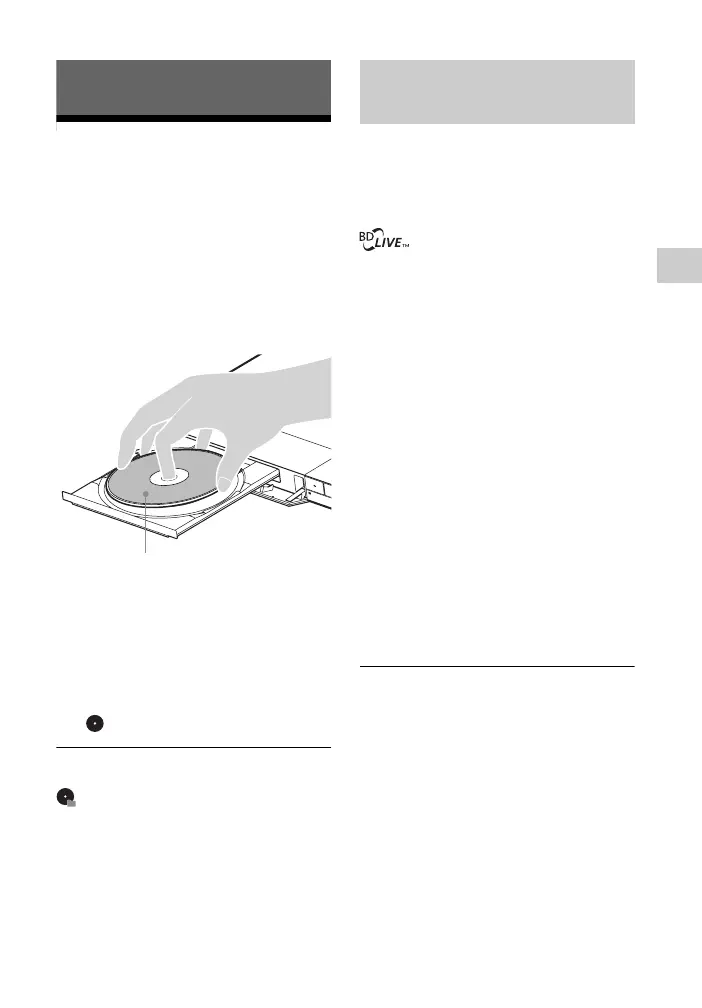
2 Press Z OPEN/CLOSE, and place
a disc on the disc tray.
3 Press Z OPEN/CLOSE to close the
disc tray.
Playback starts.
If playback does not start
automatically, select [Video],
[Music], or [Photo] category in
(Disc), and press ENTER.
z
(Mixed disc) contains data contents. Press
OPTIONS on the remote and select [Data
Contents] to display any available contents.
Some BD-ROMs with the “BD-LIVE”
logo have bonus contents and other data
that can be downloaded for your
enjoyment.
1 Connect a USB memory to the
USB jack on the player (page 11).
Use a 1 GB or larger USB memory
as your local storage.
2 Prepare for BD-LIVE (BD-LIVE
only).
• Connect the player to a network
(page 17).
• Set [BD Internet Connection] in
[BD/DVD Viewing Settings] to
[Allow] (page 27).
3 Insert a BD-ROM with
BONUSVIEW/BD-LIVE.
The operation method differs
depending on the disc. Refer to the
instruction manual supplied with the
disc.
z
To delete data in the USB memory, select
[Delete BD Data] in [BD/DVD Viewing
Settings], and press ENTER. All data stored in
the buda folder will be erased.
Playing side facing down
Enjoying BONUSVIEW/
BD-LIVE


 To Next Page