20
BDP-S3700/BDP-BX370/BDP-S1700
4-579-663-13(1)
master page=left
E:\SONY
DVD\SD160018\4579663131_US\040PLY.fm
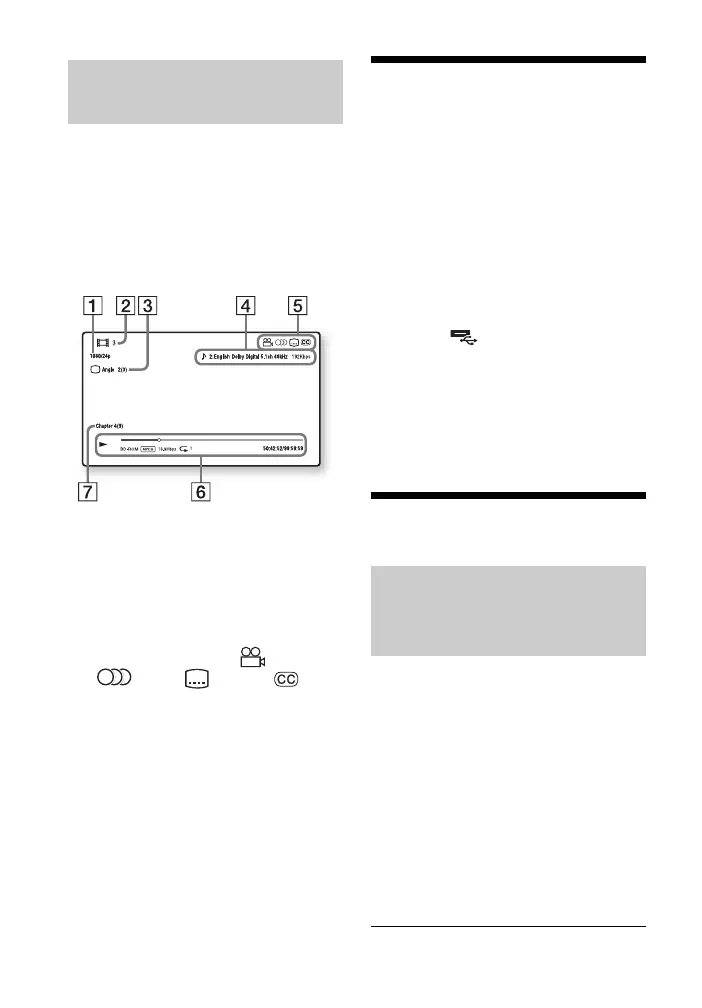
You can view the playback information,
etc., by pressing DISPLAY.
The displayed information differs
depending on the disc type and player
status.
Example: when playing a BD-ROM
A Output resolution/Video frequency
B Title number or name
C The currently selected angle
D The currently selected audio and
closed caption settings
E Available functions ( angle,
audio, subtitle,
closed caption)
F Playback information
Displays the Play mode, Playing
status bar, Disc type, Video codec,
Bitrate, Repeat type, Elapsed time,
and Total playing time.
G Chapter number
Playing from a USB
Device
For “Playable types of files”, see
page 38.
1 Connect the USB device to the
USB jack on the player (page 11).
Refer to the instruction manual
supplied with the USB device before
connecting.
2 Select [USB device] using
</M/m/,, and press ENTER.
3 Select [Video], [Music], or
[Photo] category using
M/m, and press ENTER.
Playing via a Network
A DLNA-compatible product can play
video/music/photo files stored on
another DLNA-compatible product via a
network.
1 Prepare to use DLNA.
• Connect the player to a network
(page 17).
• Prepare the other necessary
DLNA-compatible products.
Refer to the instruction manual
supplied with the product.
Displaying the play
information
Playing files on a Home
Network (DLNA) (BDP-S3700/
BX370 only)


 To Next Page