3-19 (E)
BKM-21D
3-3-16. PAL-D Output Level Adjustment
(BD Board)
n
The following Adjustment menu is below the BKM-21D
menu of the MAINTENANCE menu.
PB LEVEL
PR LEVEL
1. Input the composite PAL 100% color bar signal into
the VIDEO 4 input terminal.
(Full-field 0% set up)
2. Set 03 CH.
3. Connect the oscilloscope to TP501 of the BD board.
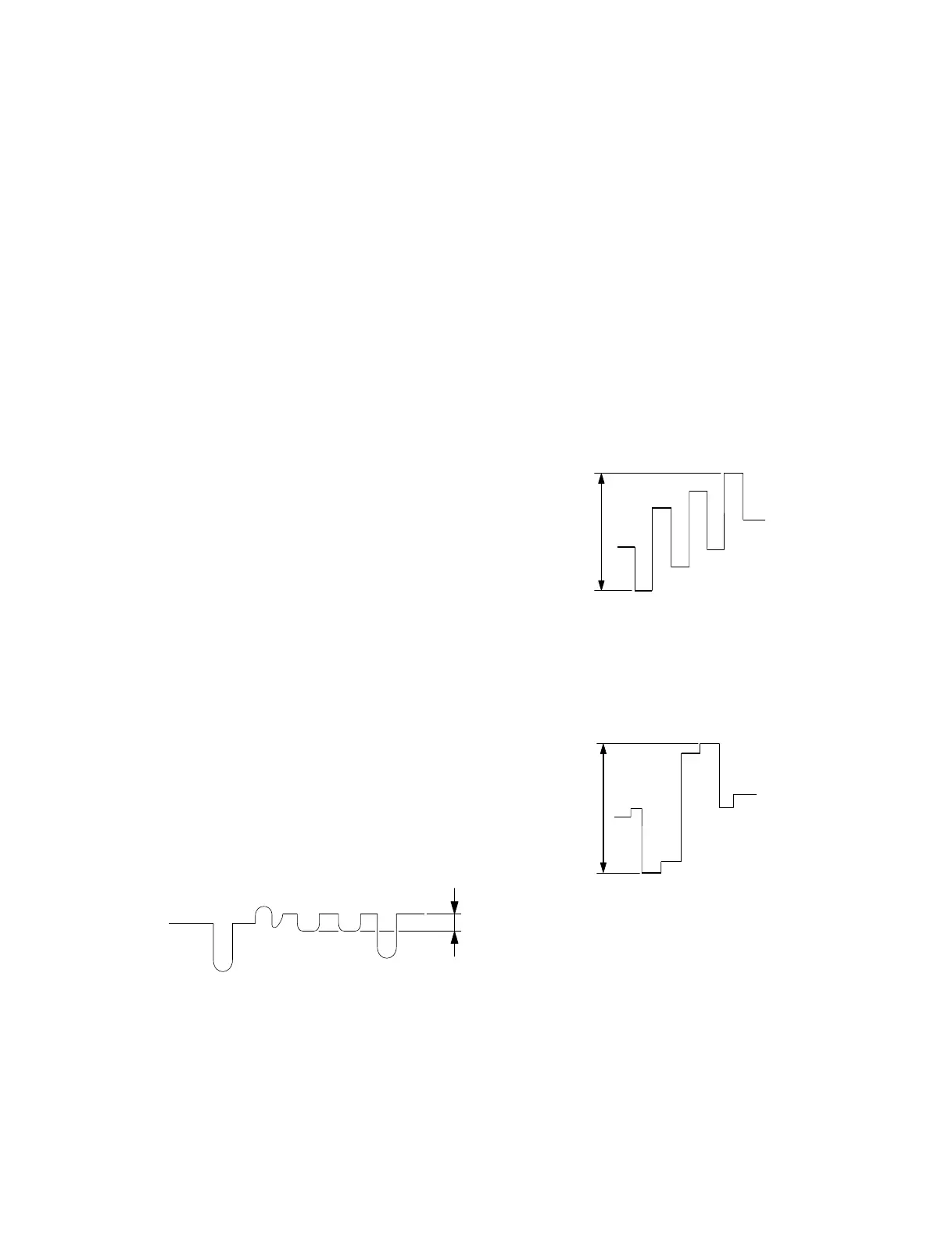
4. Adjust the PB LEVEL data so that the PB OUT signal
level B of TP501 satisfies the specification.
Fig. 3-14.
5. Connect the oscilloscope to TP601 of the BD board.
6. Adjust the PR LEVEL data so that the PR OUT signal
level C of TP601 satisfies the specification.
Fig. 3-15.
PB OUT
(TP501)
Specification A = Below 10 mV
A
B
Specification B = 660 ± 10 mV
C
Specification C = 660 ± 10 mV
3-3-14. PAL-D KILLER Level Adjustment
(BD Board)
n
The following adjustment menu is below the BKM-21D
menu of the MAINTENANCE menu.
KILLER LEVEL
1. Input the composite PAL 100% color bar signal into
the VIDEO 4 input terminal.
(Full-field 0% set up)
2. Set 03 CH.
3. Set the KILLER LEVEL data to 30.
4. Attenuate the input signal by 10 dB.
5. Connect the oscilloscope to Pin !; of IC802 (KILL-
ER-IN) of the BD board.
(DC 1 V/div)
6. Gradually increase the KILLER LEVEL data until the
DC voltage of Pin !; of IC802 changes from 5 V to 0
V.
3-3-15. PAL-D PHASE Adjustment (BD Board)
n
The following adjustment menu is below the BKM-21D
menu of the MAINTENANCE menu.
PHASE OFFSET
PHASE
1. Input the anti-PAL signal into the VIDEO 4 input
terminal.
2. Set 03 CH.
3. Connect the oscilloscope to TP501 of the BD board.
4. Check that the PHASE data is 128.
5. Adjust the PHASE OFFSET data so that the amplitude
of the PB OUT signal of TP501 becomes minimum.
Fig. 3-13.


 To Next Page